Scale subsequent operations by 3x horizontally and 2x vertically
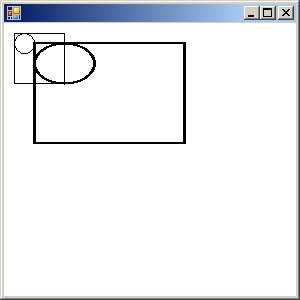
  using System;
  using System.Drawing;
  using System.Drawing.Drawing2D;
  using System.Collections;
  using System.ComponentModel;
  using System.Windows.Forms;
  using System.Data;
  using System.Drawing.Imaging;

  public class Form1 : System.Windows.Forms.Form
  {
    public Form1()
    {
      InitializeComponent();
    }
    private void InitializeComponent()
    {
      this.AutoScaleBaseSize = new System.Drawing.Size(5, 13);
      this.ClientSize = new System.Drawing.Size(292, 273);
      this.Text = "";
      this.Resize += new System.EventHandler(this.Form1_Resize);
      this.Paint += new System.Windows.Forms.PaintEventHandler(this.Form1_Paint);

    }
    static void Main()
    {
      Application.Run(new Form1());
    }

    private void Form1_Paint(object sender, System.Windows.Forms.PaintEventArgs e)
    {
      Graphics g = e.Graphics;
      g.FillRectangle(Brushes.White, this.ClientRectangle);

      g.DrawRectangle(Pens.Black, 10, 10, 50, 50);
      g.DrawEllipse(Pens.Black, 10, 10, 20, 20);

      // Now apply the scaling transformation
      // This will scale subsequent operations by 3x horizontally
      // and 2x vertically
      g.ScaleTransform(3.0f, 2.0f);

      // Now draw the same rectangle and circle,
      // but with the scaling transformation
      g.DrawRectangle(Pens.Black, 10, 10, 50, 50);
      g.DrawEllipse(Pens.Black, 10, 10, 20, 20);
    }

    private void Form1_Resize(object sender, System.EventArgs e)
    {
      Invalidate();
    }
  }
Related examples in the same category