Pass parameters to SqlCommand : SqlCommand « Database ADO.net « C# / C Sharp

C# / C Sharp
1. 2D Graphics
2. Class Interface
3. Collections Data Structure
4. Components
5. Data Types
6. Database ADO.net
7. Design Patterns
8. Development Class
9. Event
10. File Stream
11. Generics
12. GUI Windows Form
13. Language Basics
14. LINQ
15. Network
16. Office
17. Reflection
18. Regular Expressions
19. Security
20. Services Event
21. Thread
22. Web Services
23. Windows
24. XML
25. XML LINQ
Java
Java Tutorial
Java Source Code / Java Documentation
Java Open Source
Jar File Download
Java Articles
Java Products
Java by API
C# / CSharp Tutorial
ASP.Net
JavaScript DHTML
JavaScript Tutorial
JavaScript Reference
HTML / CSS
HTML CSS Reference
C / ANSI-C
C Tutorial
C++
C++ Tutorial
PHP
Python
SQL Server / T-SQL
Oracle PL / SQL
Oracle PL/SQL Tutorial
PostgreSQL
SQL / MySQL
MySQL Tutorial
VB.Net
VB.Net Tutorial
Flash / Flex / ActionScript
VBA / Excel / Access / Word
Microsoft Office PowerPoint 2007 Tutorial
Microsoft Office Excel 2007 Tutorial
Microsoft Office Word 2007 Tutorial
C# / C Sharp » Database ADO.net » SqlCommandScreenshots 
Pass parameters to SqlCommand

using System;
using System.Data;
using System.Data.SqlClient;

   class CommandExampleParameters
   {
      static void Main() 
      {
         SqlConnection thisConnection = new SqlConnection("server=(local)\\SQLEXPRESS;database=MyDatabase;Integrated Security=SSPI");

         SqlCommand nonqueryCommand = thisConnection.CreateCommand();

         try {
            thisConnection.Open();

            nonqueryCommand.CommandText = "CREATE TABLE MyTable (MyName VARCHAR (30), MyNumber integer)";
            Console.WriteLine(nonqueryCommand.CommandText);
            Console.WriteLine("Number of Rows Affected is: {0}", nonqueryCommand.ExecuteNonQuery());

            nonqueryCommand.CommandText = "INSERT INTO MyTable VALUES (@MyName, @MyNumber)";

            nonqueryCommand.Parameters.Add("@MyName", SqlDbType.VarChar, 30);
            nonqueryCommand.Parameters.Add("@MyNumber", SqlDbType.Int);
        
            nonqueryCommand.Prepare();
        
            string[] names = "A""B""C""D" ;
            int i;
            for (i=1; i<=4; i++) {
               nonqueryCommand.Parameters["@MyName"].Value = names[i-1];
               nonqueryCommand.Parameters["@MyNumber"].Value = i;
               Console.WriteLine(nonqueryCommand.CommandText);
               Console.WriteLine("Number of Rows Affected is: {0}", nonqueryCommand.ExecuteNonQuery());
            }
         catch (SqlException ex) {
            Console.WriteLine(ex.ToString());
         finally {  
            thisConnection.Close();
            Console.WriteLine("Connection Closed.");
         }
      }
   }


Related examples in the same category
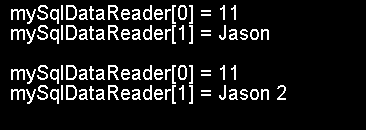
1. Use the GetOrdinal() method of a DataReader object to get the numeric positions of a column
2. How to use the ExecuteScalar() method to run a SELECT statement that returns a single value
3. Use the ExecuteNonQuery() method to run INSERT, UPDATE, and DELETE statements
4. Use SqlCommand to call SQL and insert data to database table
5. Delete data from database using SqlCommand
6. Get row count from SqlCommand
7. Get row count by 'ExecuteScalar'
8. Execute multiple SQL statements(insert) using a SqlCommand objectExecute multiple SQL statements(insert) using a SqlCommand object
9. execute multiple SELECT statements(select) using a SqlCommand object and read the results using a SqlDataReader object
10. Async Command Object
11. Populate a DataSet object using a SELECT statement
12. Use ExecuteXmlReader() to run a SELECT statement that returns XML
13. control SqlCommand to return a single row
w__w_w.__j_a_va__2s___.__c___o___m | Contact Us
Copyright 2003 - 08 Demo Source and Support. All rights reserved.
All other trademarks are property of their respective owners.