Get Registry value
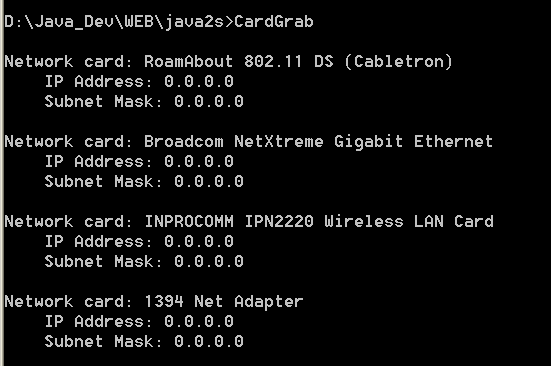
/*
C# Network Programming
by Richard Blum

Publisher: Sybex
ISBN: 0782141765
*/

using System;
using Microsoft.Win32;

public class CardGrab
{
    public static void Main()
    {
    RegistryKey start = Registry.LocalMachine;
    RegistryKey cardServiceName, networkKey;
    string networkcardKey = "SOFTWARE\\Microsoft\\Windows NT\\CurrentVersion\\NetworkCards";
    string serviceKey = "SYSTEM\\CurrentControlSet\\Services\\";
    string networkcardKeyName, deviceName, deviceServiceName, serviceName;

    RegistryKey serviceNames = start.OpenSubKey(networkcardKey);
    if (serviceNames == null)
    {
        Console.WriteLine("Bad registry key");
        return;
    }

    string[] networkCards = serviceNames.GetSubKeyNames();
    serviceNames.Close();

    foreach(string keyName in networkCards)
    {
        networkcardKeyName = networkcardKey + "\\" + keyName;
        cardServiceName = start.OpenSubKey(networkcardKeyName);
        if (cardServiceName == null)
        {
        Console.WriteLine("Bad registry key: {0}", networkcardKeyName);
        return;
        }
        deviceServiceName = (string)cardServiceName.GetValue("ServiceName");
        deviceName = (string)cardServiceName.GetValue("Description");
        Console.WriteLine("\nNetwork card: {0}", deviceName);

        serviceName = serviceKey + deviceServiceName +
             "\\Parameters\\Tcpip";
        networkKey = start.OpenSubKey(serviceName);
        if (networkKey == null)
        {
        Console.WriteLine("    No IP configuration set");
        } else
        {
        string[] ipaddresses = (string[])networkKey.GetValue("IPAddress");
        string[] defaultGateways = (string[])networkKey.GetValue("DefaultGateway");
        string[] subnetmasks = (string[])networkKey.GetValue("SubnetMask");

        foreach(string ipaddress in ipaddresses)
        {
            Console.WriteLine("    IP Address: {0}", ipaddress);
        }
        foreach(string subnetmask in subnetmasks)
        {
            Console.WriteLine("    Subnet Mask: {0}", subnetmask);
        }
        foreach(string defaultGateway in defaultGateways)
        {
            Console.WriteLine("    Gateway: {0}", defaultGateway);
        }
        networkKey.Close();
        }
    }

    start.Close();
    }
}
Related examples in the same category