Color Dialog and Font Dialog : Font Dialog « GUI Windows Form « C# / C Sharp
Color Dialog and Font Dialog
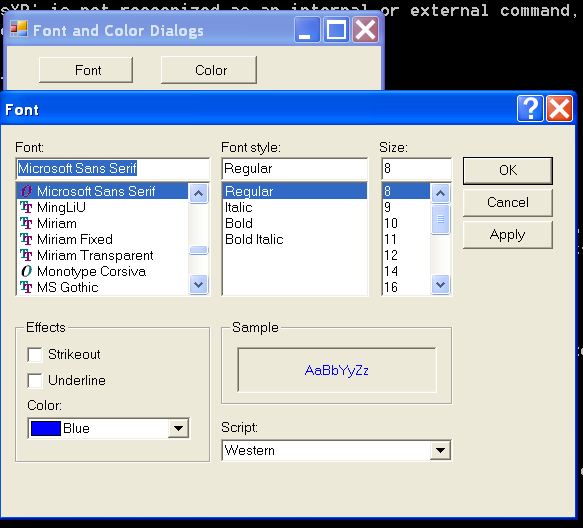
/*
Professional Windows GUI Programming Using C#
by Jay Glynn, Csaba Torok, Richard Conway, Wahid Choudhury,
   Zach Greenvoss, Shripad Kulkarni, Neil Whitlow

Publisher: Peer Information
ISBN: 1861007663
*/

using System;
using System.Drawing;
using System.Collections;
using System.ComponentModel;
using System.Windows.Forms;
using System.Data;

namespace ColorFontDialog
{
    /// <summary>
    /// Summary description for ColorFontDialog.
    /// </summary>
    public class ColorFontDialog : System.Windows.Forms.Form
    {
        private System.Windows.Forms.Button button1;
        private System.Windows.Forms.Button button2;
        private System.Windows.Forms.Label label1;
        /// <summary>
        /// Required designer variable.
        /// </summary>
        private System.ComponentModel.Container components = null;

        public ColorFontDialog()
        {
            //
            // Required for Windows Form Designer support
            //
            InitializeComponent();
            this.Text = "Font and Color Dialogs";
            this.button1.Text = "&Font";
            this.button2.Text = "&Color";
            this.label1.Text = "Change my FONT and COLOR!";

            //
            // TODO: Add any constructor code after InitializeComponent call
            //
        }

        /// <summary>
        /// Clean up any resources being used.
        /// </summary>
        protected override void Dispose( bool disposing )
        {
            if( disposing )
            {
                if (components != null)
                {
                    components.Dispose();
                }
            }
            base.Dispose( disposing );
        }

        #region Windows Form Designer generated code
        /// <summary>
        /// Required method for Designer support - do not modify
        /// the contents of this method with the code editor.
        /// </summary>
        private void InitializeComponent()
        {
            this.button1 = new System.Windows.Forms.Button();
            this.button2 = new System.Windows.Forms.Button();
            this.label1 = new System.Windows.Forms.Label();
            this.SuspendLayout();
            //
            // button1
            //
            this.button1.Location = new System.Drawing.Point(24, 8);
            this.button1.Name = "button1";
            this.button1.TabIndex = 0;
            this.button1.Text = "button1";
            this.button1.Click += new System.EventHandler(this.button1_Click_1);
            //
            // button2
            //
            this.button2.Location = new System.Drawing.Point(120, 8);
            this.button2.Name = "button2";
            this.button2.TabIndex = 1;
            this.button2.Text = "button2";
            this.button2.Click += new System.EventHandler(this.button2_Click);
            //
            // label1
            //
            this.label1.Location = new System.Drawing.Point(8, 48);
            this.label1.Name = "label1";
            this.label1.Size = new System.Drawing.Size(280, 48);
            this.label1.TabIndex = 2;
            this.label1.Text = "label1";
            //
            // ColorFontDialog
            //
            this.AutoScaleBaseSize = new System.Drawing.Size(5, 13);
            this.ClientSize = new System.Drawing.Size(292, 101);
            this.Controls.AddRange(new System.Windows.Forms.Control[] {
                                                                          this.label1,
                                                                          this.button2,
                                                                          this.button1});
            this.Name = "ColorFontDialog";
            this.Text = "ColorFontDialog";
            this.ResumeLayout(false);

        }
        #endregion

        /// <summary>
        /// The main entry point for the application.
        /// </summary>
        [STAThread]
        static void Main()
        {
            Application.Run(new ColorFontDialog());
        }
        private void button2_Click(object sender, System.EventArgs e)
        {
            ColorDialog cd = new ColorDialog();
            cd.AllowFullOpen = true;   // allow custom colors
            //cd.FullOpen = true;   // shows custom colors automatically
            cd.Color = Color.DarkBlue;  // sets the custom color
            //cd.Color = Color.Blue;   // set the basic color

            if(cd.ShowDialog() == System.Windows.Forms.DialogResult.OK)
                this.label1.ForeColor = cd.Color;
        }
        private void button1_Click_1(object sender, System.EventArgs e)
        {
            FontDialog fd = new FontDialog();
            fd.ShowColor = true;
            fd.Color = Color.Blue;
            fd.ShowApply = true;   // ColorDialog does not provide this option!!!
            fd.Apply += new EventHandler(ApplyFont);
            if(fd.ShowDialog() != System.Windows.Forms.DialogResult.Cancel)
                ChangeFont(fd);
        }

        private void ApplyFont(object o, EventArgs ea)
        {
            ChangeFont((FontDialog)o);
        }

        private void ChangeFont(FontDialog fd)
        {
            this.label1.Font = fd.Font;
            this.label1.ForeColor = fd.Color;
        }
    }
}
Related examples in the same category
| 1. | Get the font in a FontDialog |