Control Docking
/*
C# Programming Tips & Techniques
by Charles Wright, Kris Jamsa

Publisher: Osborne/McGraw-Hill (December 28, 2001)
ISBN: 0072193794
*/

using System;
using System.Drawing;
using System.Collections;
using System.ComponentModel;
using System.Windows.Forms;
using System.Data;

namespace Docking
{
  /// <summary>
  /// Summary description for FormDocking.
  /// </summary>
  public class FormDocking : System.Windows.Forms.Form
  {
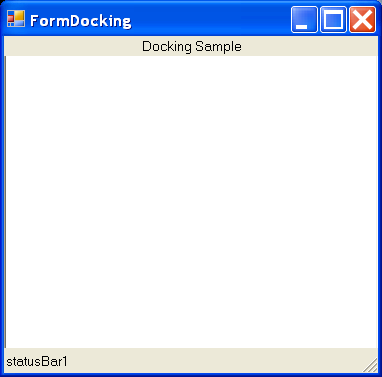
    private System.Windows.Forms.StatusBar statusBar1;
    private System.Windows.Forms.Label label1;
    private System.Windows.Forms.TextBox textBox1;
    /// <summary>
    /// Required designer variable.
    /// </summary>
    private System.ComponentModel.Container components = null;

    public FormDocking()
    {
      //
      // Required for Windows Form Designer support
      //
      InitializeComponent();

      //
      // TODO: Add any constructor code after InitializeComponent call
      //
    }

    /// <summary>
    /// Clean up any resources being used.
    /// </summary>
    protected override void Dispose( bool disposing )
    {
      if( disposing )
      {
        if (components != null)
        {
          components.Dispose();
        }
      }
      base.Dispose( disposing );
    }

    #region Windows Form Designer generated code
    /// <summary>
    /// Required method for Designer support - do not modify
    /// the contents of this method with the code editor.
    /// </summary>
    private void InitializeComponent()
    {
      this.statusBar1 = new System.Windows.Forms.StatusBar();
      this.textBox1 = new System.Windows.Forms.TextBox();
      this.label1 = new System.Windows.Forms.Label();
      this.SuspendLayout();
      //
      // statusBar1
      //
      this.statusBar1.Location = new System.Drawing.Point(0, 253);
      this.statusBar1.Name = "statusBar1";
      this.statusBar1.Size = new System.Drawing.Size(292, 20);
      this.statusBar1.TabIndex = 9;
      this.statusBar1.Text = "statusBar1";
      //
      // textBox1
      //
      this.textBox1.Dock = System.Windows.Forms.DockStyle.Fill;
      this.textBox1.Multiline = true;
      this.textBox1.Name = "textBox1";
      this.textBox1.Size = new System.Drawing.Size(292, 273);
      this.textBox1.TabIndex = 2;
      this.textBox1.Text = "Top Bottom Left Right";
      //
      // label1
      //
      this.label1.Dock = System.Windows.Forms.DockStyle.Top;
      this.label1.Name = "label1";
      this.label1.Size = new System.Drawing.Size(292, 16);
      this.label1.TabIndex = 10;
      this.label1.Text = "Docking Sample";
      this.label1.TextAlign = System.Drawing.ContentAlignment.MiddleCenter;
      //
      // FormDocking
      //
      this.AutoScaleBaseSize = new System.Drawing.Size(5, 13);
      this.ClientSize = new System.Drawing.Size(292, 273);
      this.Controls.AddRange(new System.Windows.Forms.Control[] {
                                      this.label1,
                                      this.statusBar1,
                                      this.textBox1});
      this.Name = "FormDocking";
      this.Text = "FormDocking";
      this.ResumeLayout(false);

    }
    #endregion

    /// <summary>
    /// The main entry point for the application.
    /// </summary>
    [STAThread]
    static void Main()
    {
      Application.Run(new FormDocking());
    }
  }
}
Related examples in the same category