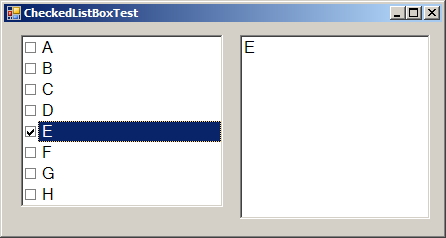
Get selected checkbox list items
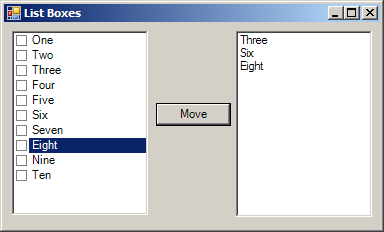
using System;
using System.Drawing;
using System.Collections;
using System.ComponentModel;
using System.Windows.Forms;
using System.Data;

public class Form1 : System.Windows.Forms.Form {
   private System.Windows.Forms.CheckedListBox chkListPossibleValues;
   private System.Windows.Forms.ListBox lstSelected;
   private System.Windows.Forms.Button btnMove;
   private System.ComponentModel.Container components=null;

   public Form1() {
      InitializeComponent();
      this.chkListPossibleValues.Items.Add("Ten");
   }

   private void InitializeComponent() {
      this.lstSelected = new System.Windows.Forms.ListBox();
      this.btnMove = new System.Windows.Forms.Button();
      this.chkListPossibleValues = new System.Windows.Forms.CheckedListBox();
      this.SuspendLayout();

      this.lstSelected.Location = new System.Drawing.Point(232, 8);
      this.lstSelected.Name = "lstSelected";
      this.lstSelected.Size = new System.Drawing.Size(136, 186);
      this.lstSelected.TabIndex = 1;

      this.btnMove.Location = new System.Drawing.Point(152, 80);
      this.btnMove.Name = "btnMove";
      this.btnMove.TabIndex = 3;
      this.btnMove.Text = "Move";
      this.btnMove.Click += new System.EventHandler(this.btnMove_Click);

      this.chkListPossibleValues.CheckOnClick = true;
      this.chkListPossibleValues.Items.AddRange(new object[] {"One", "Two", "Three",
                  "Four", "Five","Six","Seven", "Eight", "Nine"});
      this.chkListPossibleValues.Location = new System.Drawing.Point(8, 8);
      this.chkListPossibleValues.Name = "chkListPossibleValues";
      this.chkListPossibleValues.Size = new System.Drawing.Size(136, 184);
      this.chkListPossibleValues.TabIndex = 0;

      this.AutoScaleBaseSize = new System.Drawing.Size(5, 13);
      this.ClientSize = new System.Drawing.Size(376, 205);
      this.Controls.AddRange(new System.Windows.Forms.Control[] {this.btnMove,
                                  this.lstSelected,  this.chkListPossibleValues});
      this.Name = "Form1";
      this.Text = "List Boxes";
      this.ResumeLayout(false);

      }

      static void Main() {
         Application.Run(new Form1());
      }

      private void btnMove_Click(object sender, System.EventArgs e) {
         if (this.chkListPossibleValues.CheckedItems.Count > 0) {
            this.lstSelected.Items.Clear();
            foreach (string item in this.chkListPossibleValues.CheckedItems) {
                this.lstSelected.Items.Add(item.ToString());
            }
            for (int i = 0; i < this.chkListPossibleValues.Items.Count; i++){
                 this.chkListPossibleValues.SetItemChecked(i, false);
            }
         }
      }
}
Related examples in the same category