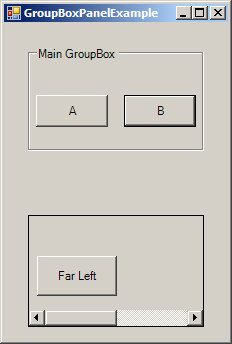
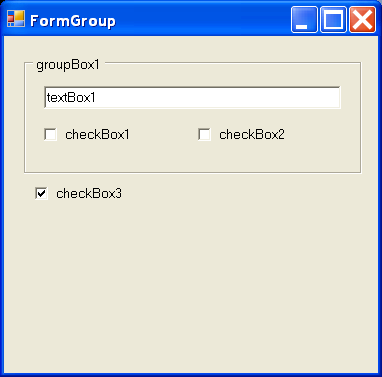
Group Box mouse enter event
using System;
using System.Drawing;
using System.Collections;
using System.ComponentModel;
using System.Windows.Forms;
using System.Data;

public class Form1 : System.Windows.Forms.Form {
    private System.Windows.Forms.GroupBox groupBox1;
    private System.Windows.Forms.CheckBox checkBox1;
    private System.Windows.Forms.CheckBox checkBox2;
    private System.Windows.Forms.CheckBox checkBox3;
    private System.Windows.Forms.RadioButton radioButton1;
    private System.Windows.Forms.RadioButton radioButton2;
    private System.Windows.Forms.RadioButton radioButton3;
    private System.Windows.Forms.Button button1;

    private System.ComponentModel.Container components = null;

    public Form1() {
      InitializeComponent();
    }

    private void InitializeComponent() {
            this.groupBox1 = new System.Windows.Forms.GroupBox();
            this.checkBox1 = new System.Windows.Forms.CheckBox();
            this.checkBox2 = new System.Windows.Forms.CheckBox();
            this.checkBox3 = new System.Windows.Forms.CheckBox();
            this.radioButton1 = new System.Windows.Forms.RadioButton();
            this.radioButton2 = new System.Windows.Forms.RadioButton();
            this.radioButton3 = new System.Windows.Forms.RadioButton();
            this.button1 = new System.Windows.Forms.Button();
            this.groupBox1.SuspendLayout();
            this.SuspendLayout();
            //
            // groupBox1
            //
            this.groupBox1.Controls.AddRange(new System.Windows.Forms.Control[] {
                                                                                    this.radioButton1,
                                                                                    this.radioButton2,
                                                                                    this.radioButton3});
            this.groupBox1.Location = new System.Drawing.Point(8, 120);
            this.groupBox1.Name = "groupBox1";
            this.groupBox1.Size = new System.Drawing.Size(120, 144);
            this.groupBox1.TabIndex = 0;
            this.groupBox1.TabStop = false;
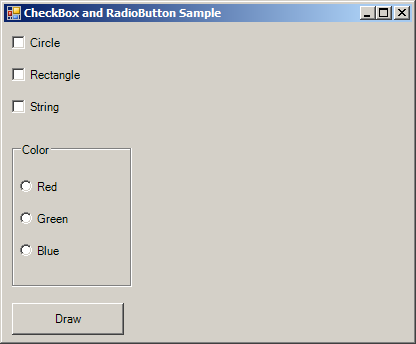
            this.groupBox1.Text = "Color";
            this.groupBox1.Enter += new System.EventHandler(this.groupBox1_Enter);
            //
            // checkBox1
            //
            this.checkBox1.Location = new System.Drawing.Point(8, 8);
            this.checkBox1.Name = "checkBox1";
            this.checkBox1.TabIndex = 1;
            this.checkBox1.Text = "Circle";
            //
            // checkBox2
            //
            this.checkBox2.Location = new System.Drawing.Point(8, 40);
            this.checkBox2.Name = "checkBox2";
            this.checkBox2.TabIndex = 2;
            this.checkBox2.Text = "Rectangle";
            //
            // checkBox3
            //
            this.checkBox3.Location = new System.Drawing.Point(8, 72);
            this.checkBox3.Name = "checkBox3";
            this.checkBox3.TabIndex = 3;
            this.checkBox3.Text = "String";
            //
            // radioButton1
            //
            this.radioButton1.Location = new System.Drawing.Point(8, 32);
            this.radioButton1.Name = "radioButton1";
            this.radioButton1.TabIndex = 4;
            this.radioButton1.Text = "Red";
            this.radioButton1.CheckedChanged += new System.EventHandler(this.radioButton1_CheckedChanged);
            //
            // radioButton2
            //
            this.radioButton2.Location = new System.Drawing.Point(8, 64);
            this.radioButton2.Name = "radioButton2";
            this.radioButton2.TabIndex = 5;
            this.radioButton2.Text = "Green";
            //
            // radioButton3
            //
            this.radioButton3.Location = new System.Drawing.Point(8, 96);
            this.radioButton3.Name = "radioButton3";
            this.radioButton3.TabIndex = 6;
            this.radioButton3.Text = "Blue";
            //
            // button1
            //
            this.button1.Location = new System.Drawing.Point(8, 280);
            this.button1.Name = "button1";
            this.button1.Size = new System.Drawing.Size(112, 32);
            this.button1.TabIndex = 4;
            this.button1.Text = "Draw";
            this.button1.Click += new System.EventHandler(this.button1_Click);
            //
            // Form1
            //
            this.AutoScaleBaseSize = new System.Drawing.Size(5, 13);
            this.ClientSize = new System.Drawing.Size(408, 317);
            this.Controls.AddRange(new System.Windows.Forms.Control[] {
                                                                          this.button1,
                                                                          this.checkBox3,
                                                                          this.checkBox2,
                                                                          this.checkBox1,
                                                                          this.groupBox1});
            this.Name = "Form1";
            this.Text = "CheckBox and RadioButton Sample";
            this.groupBox1.ResumeLayout(false);
            this.ResumeLayout(false);

        }

        [STAThread]
        static void Main()
        {
            Application.Run(new Form1());
        }

        private void groupBox1_Enter(object sender, System.EventArgs e)
        {
           Console.WriteLine("group box enter event");
        }

        private void radioButton1_CheckedChanged(object sender, System.EventArgs e)
        {
           Console.WriteLine("Radio Button checked changed event");
        }

        private void button1_Click(object sender, System.EventArgs e)
        {
            Graphics g = Graphics.FromHwnd(this.Handle);
            String str = "";
            Rectangle rc = new Rectangle(150, 50, 250, 250);

            if(radioButton1.Checked)
            {
                str = "red";
            }
            if(radioButton2.Checked)
            {
                str+="Green";
            }
            if(radioButton3.Checked)
            {
                str+="Blue";
            }

            if (checkBox1.Checked)
            {
                str+="Ellipse";
            }
            if (checkBox2.Checked)
            {
                str += "Rectangle";
            }
            if (checkBox3.Checked)
            {
                g.FillRectangle(new SolidBrush(Color.White), rc);
                g.DrawString(str, new Font("Verdana", 12), new SolidBrush(Color.Black), rc);
            }


        }
    }
Related examples in the same category