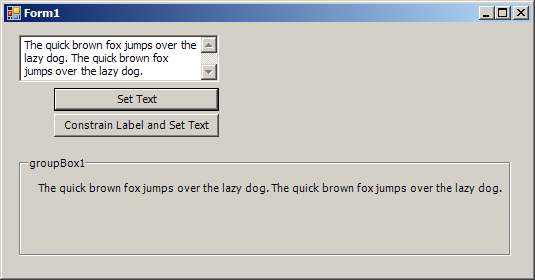
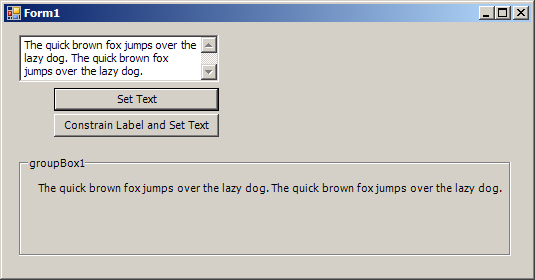
Label grows as the inner text
using System;
using System.Collections.Generic;
using System.ComponentModel;
using System.Data;
using System.Drawing;
using System.Text;
using System.Windows.Forms;

public class Form1 : Form
{
    private System.Windows.Forms.GroupBox groupBox1;
    private System.Windows.Forms.Label label1;
    private System.Windows.Forms.TextBox textBox1;
    private System.Windows.Forms.Button cmdSetText;
    private System.Windows.Forms.Button cmdSetTextConstraint;

  public Form1() {
        InitializeComponent();
  }

    private void InitializeComponent(){
        this.groupBox1 = new System.Windows.Forms.GroupBox();
        this.label1 = new System.Windows.Forms.Label();
        this.textBox1 = new System.Windows.Forms.TextBox();
        this.cmdSetText = new System.Windows.Forms.Button();
        this.cmdSetTextConstraint = new System.Windows.Forms.Button();
        this.groupBox1.SuspendLayout();
        this.SuspendLayout();
        //
        // groupBox1
        //
        this.groupBox1.AutoSize = true;
        this.groupBox1.Controls.Add(this.label1);
        this.groupBox1.Location = new System.Drawing.Point(15, 133);
        this.groupBox1.Margin = new System.Windows.Forms.Padding(20);
        this.groupBox1.Name = "groupBox1";
        this.groupBox1.Size = new System.Drawing.Size(200, 100);
        this.groupBox1.TabIndex = 0;
        this.groupBox1.TabStop = false;
        this.groupBox1.Text = "groupBox1";
        //
        // label1
        //
        this.label1.AutoSize = true;
        this.label1.Location = new System.Drawing.Point(17, 25);
        this.label1.Margin = new System.Windows.Forms.Padding(5);
        this.label1.Name = "label1";
        this.label1.Size = new System.Drawing.Size(35, 13);
        this.label1.TabIndex = 0;
        this.label1.Text = "label1";
        //
        // textBox1
        //
        this.textBox1.Location = new System.Drawing.Point(15, 12);
        this.textBox1.Multiline = true;
        this.textBox1.Name = "textBox1";
        this.textBox1.ScrollBars = System.Windows.Forms.ScrollBars.Vertical;
        this.textBox1.Size = new System.Drawing.Size(200, 47);
        this.textBox1.TabIndex = 1;
        this.textBox1.Text = "The quick brown fox jumps over the lazy dog. The quick brown fox jumps over the l" +
            "azy dog.";
        //
        // cmdSetText
        //
        this.cmdSetText.Location = new System.Drawing.Point(50, 65);
        this.cmdSetText.Name = "cmdSetText";
        this.cmdSetText.Size = new System.Drawing.Size(165, 23);
        this.cmdSetText.TabIndex = 2;
        this.cmdSetText.Text = "Set Text";
        this.cmdSetText.UseVisualStyleBackColor = true;
        this.cmdSetText.Click += new System.EventHandler(this.cmdSetText_Click);
        //
        // cmdSetTextConstraint
        //
        this.cmdSetTextConstraint.Location = new System.Drawing.Point(50, 91);
        this.cmdSetTextConstraint.Name = "cmdSetTextConstraint";
        this.cmdSetTextConstraint.Size = new System.Drawing.Size(165, 23);
        this.cmdSetTextConstraint.TabIndex = 3;
        this.cmdSetTextConstraint.Text = "Constrain Label and Set Text";
        this.cmdSetTextConstraint.UseVisualStyleBackColor = true;
        this.cmdSetTextConstraint.Click += new System.EventHandler(this.cmdSetTextConstraint_Click);
        //
        // Form1
        //
        this.AutoScaleDimensions = new System.Drawing.SizeF(6F, 13F);
        this.AutoScaleMode = System.Windows.Forms.AutoScaleMode.Font;
        this.AutoSize = true;
        this.AutoSizeMode = System.Windows.Forms.AutoSizeMode.GrowAndShrink;
        this.ClientSize = new System.Drawing.Size(247, 336);
        this.Controls.Add(this.cmdSetTextConstraint);
        this.Controls.Add(this.cmdSetText);
        this.Controls.Add(this.textBox1);
        this.Controls.Add(this.groupBox1);
        this.Font = new System.Drawing.Font("Tahoma", 8.25F, System.Drawing.FontStyle.Regular, System.Drawing.GraphicsUnit.Point, ((byte)(0)));
        this.Name = "Form1";
        this.Text = "Form1";
        this.groupBox1.ResumeLayout(false);
        this.groupBox1.PerformLayout();
        this.ResumeLayout(false);
        this.PerformLayout();

    }
    private void cmdSetText_Click(object sender, EventArgs e)
    {
        label1.MaximumSize = new Size(0,0);
        label1.Text = "";
        label1.Text = textBox1.Text;
    }

    private void cmdSetTextConstraint_Click(object sender, EventArgs e)
    {
        label1.MaximumSize = new Size(200,0);
        label1.Text = textBox1.Text;
    }

  [STAThread]
  static void Main()
  {
    Application.EnableVisualStyles();
    Application.Run(new Form1());
  }

}
Related examples in the same category