Timer based animation for font
  using System;
  using System.Drawing;
  using System.Drawing.Text;
  using System.Collections;
  using System.ComponentModel;
  using System.Windows.Forms;
  using System.Data;


  public class FontForm : System.Windows.Forms.Form
  {
    private Timer timer;
    private int swellValue;
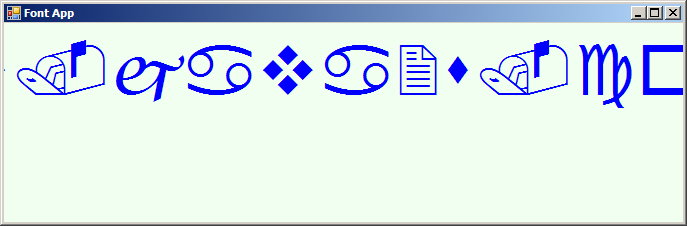
    private string fontFace = "WingDings";

    public FontForm()
    {
      InitializeComponent();
      timer = new Timer();

      Text = "Font App";
      Width = 425;
      Height = 150;
      BackColor = Color.Honeydew;
      CenterToScreen();
      timer.Enabled = true;
      timer.Interval = 100;
      timer.Tick += new EventHandler(FontForm_OnTimer);
    }
    private void InitializeComponent()
    {
      this.AutoScaleBaseSize = new System.Drawing.Size(5, 13);
      this.ClientSize = new System.Drawing.Size(292, 253);
      this.Text = "Form1";
      this.Resize += new System.EventHandler(this.FontForm_Resize);
      this.Paint += new System.Windows.Forms.PaintEventHandler(this.FontForm_Paint);

    }
    static void Main()
    {
      Application.Run(new FontForm());
    }

    private void FontForm_Paint(object sender, System.Windows.Forms.PaintEventArgs e)
    {
      Graphics g = e.Graphics;
      Font theFont = new Font(fontFace, 12 + swellValue);

      string message = "www.java2s.com";

      float windowCenter = this.DisplayRectangle.Width / 2;
      SizeF stringSize = e.Graphics.MeasureString(message, theFont);
      float startPos = windowCenter - (stringSize.Width / 2);

      g.DrawString(message, theFont,
        new SolidBrush(Color.Blue), startPos, 10);
    }

    private void FontForm_Resize(object sender, System.EventArgs e)
    {
      Rectangle myRect = new Rectangle(0, 100,
        ClientRectangle.Width, ClientRectangle.Height);
      Invalidate(myRect);
    }

    private void FontForm_OnTimer(object sender, EventArgs e)
    {
      swellValue += 5;
      if(swellValue >= 50)
        swellValue = 0;

      Invalidate(new Rectangle(0, 0, ClientRectangle.Width, 100));
    }
  }
Related examples in the same category