Access the Internet : Web Client « Network « C# / C Sharp

C# / C Sharp
1. 2D Graphics
2. Class Interface
3. Collections Data Structure
4. Components
5. Data Types
6. Database ADO.net
7. Design Patterns
8. Development Class
9. Event
10. File Stream
11. Generics
12. GUI Windows Form
13. Language Basics
14. LINQ
15. Network
16. Office
17. Reflection
18. Regular Expressions
19. Security
20. Services Event
21. Thread
22. Web Services
23. Windows
24. XML
25. XML LINQ
Java
Java Tutorial
Java Source Code / Java Documentation
Java Open Source
Jar File Download
Java Articles
Java Products
Java by API
Photoshop Tutorial
C# / CSharp Tutorial
C# / CSharp Open Source
ASP.Net
ASP.NET Tutorial
JavaScript DHTML
JavaScript Tutorial
JavaScript Reference
HTML / CSS
HTML CSS Reference
C / ANSI-C
C Tutorial
C++
C++ Tutorial
Ruby
PHP
Python
Python Tutorial
Python Open Source
SQL Server / T-SQL
SQL Server / T-SQL Tutorial
Oracle PL / SQL
Oracle PL/SQL Tutorial
PostgreSQL
SQL / MySQL
MySQL Tutorial
VB.Net
VB.Net Tutorial
Flash / Flex / ActionScript
VBA / Excel / Access / Word
XML
XML Tutorial
Microsoft Office PowerPoint 2007 Tutorial
Microsoft Office Excel 2007 Tutorial
Microsoft Office Word 2007 Tutorial
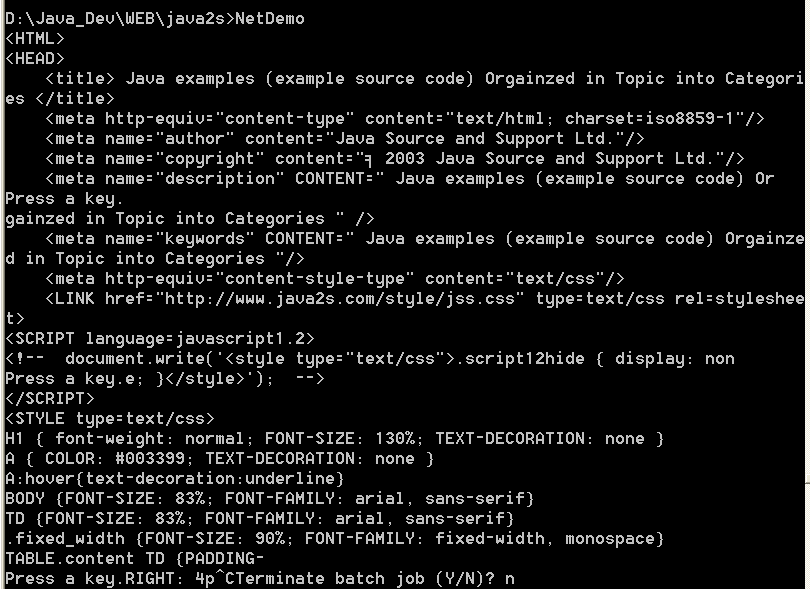
C# / C Sharp » Network » Web ClientScreenshots 
Access the Internet
Access the Internet

/*
C#: The Complete Reference 
by Herbert Schildt 

Publisher: Osborne/McGraw-Hill (March 8, 2002)
ISBN: 0072134852
*/


// Access the Internet. 
 
using System; 
using System.Net; 
using System.IO; 
 
public class NetDemo {  
  public static void Main() { 
    int ch; 
 
    // First, create a WebRequest to a URI. 
    HttpWebRequest req = (HttpWebRequest
           WebRequest.Create("http://www.java2s.com")
 
    // Next, send that request and return the response. 
    HttpWebResponse resp = (HttpWebResponse
           req.GetResponse()
 
    // From the response, obtain an input stream. 
    Stream istrm = resp.GetResponseStream()
 
 
    /* Now, read and display the html present at 
       the specified URI.  So you can see what is 
       being displayed, the data is shown 
       400 characters at a time.  After each 400 
       characters are displayed, you must press 
       ENTER to get the next 400. */ 
   
    for(int i=1; ; i++) { 
      ch =  istrm.ReadByte()
      if(ch == -1break
      Console.Write((charch)
      if((i%400)==0) { 
        Console.Write("\nPress a key.")
        Console.Read()


    // Close the Response. This also closes istrm. 
    resp.Close()
  
}


Related examples in the same category

1. Basic WebClient
2. Save web page from HttpWebResponse
3. Displays the resource specified
4. My Web Client
5. Handle network exceptionsHandle network exceptions
6. Use WebClient to download information into a fileUse WebClient to download information into a file
7. Use LastModifiedUse LastModified
8. Examine the headersExamine the headers
9. Reading Web Pages
10. NetworkCredential Cache Test
11. NetworkCredential test
12. Download Data Test
13. Download File Test
14. Web GetWeb Get
15. Web Client Upload Values Test
16. Web Client Upload Data Test 2
17. Web Client Response Headers Test
18. Web Client Open Write Test
19. Web Client Open Read Test
w__w_w___.__j___a___v___a2___s___._com__ | Contact Us
Copyright 2003 - 08 Demo Source and Support. All rights reserved.
All other trademarks are property of their respective owners.

