Navigate Frame to a URL
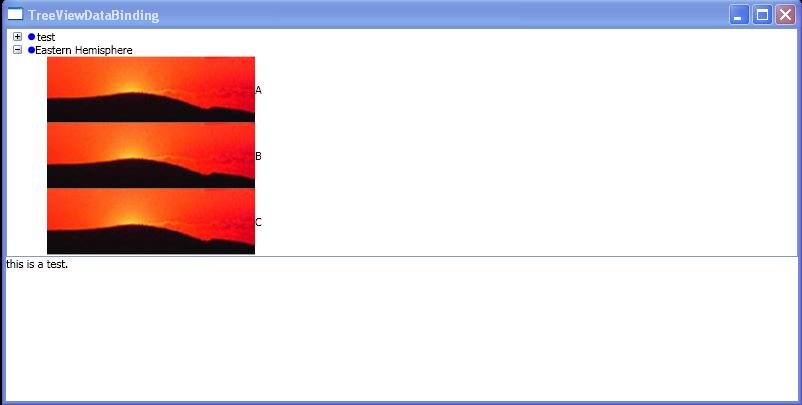
<Window x:Class="TreeViewDataBinding.Window1"
    xmlns="http://schemas.microsoft.com/winfx/2006/xaml/presentation"
    xmlns:x="http://schemas.microsoft.com/winfx/2006/xaml"
    Title="TreeViewDataBinding"
    xmlns:EngNews="clr-namespace:TreeViewDataBinding">

  <Window.Resources>
    <ObjectDataProvider x:Key="EasternHemisphereDataSource" ObjectType="{x:Type EngNews:WebSiteGroupA}"/>
    <ObjectDataProvider x:Key="WesternHemisphereDataSource" ObjectType="{x:Type EngNews:WebSiteGroupB}"/>
    <DataTemplate x:Key="NewspaperTVItem">
      <DockPanel>
        <Image Source="c:\image.jpg"/>
        <TextBlock VerticalAlignment="center" Text ="{Binding Path=Name}"/>
      </DockPanel>
    </DataTemplate>
    <DataTemplate x:Key="WesternHemisphereHeaderTemplate">
      <DockPanel>
        <Ellipse Width="7" Height="7"  Fill="Blue" DockPanel.Dock="Left"/>
        <TextBlock Margin="2,0,0,0" VerticalAlignment="Center" DockPanel.Dock="Right">
          test
        </TextBlock>
      </DockPanel>
    </DataTemplate>
    <DataTemplate x:Key="EasternHemisphereHeaderTemplate">
      <DockPanel>
        <Ellipse Width="7" Height="7"  Fill="Blue" DockPanel.Dock="Left"/>
        <TextBlock DockPanel.Dock="Right">Eastern Hemisphere</TextBlock>
      </DockPanel>
    </DataTemplate>
  </Window.Resources>
  <StackPanel>
      <TreeView Name="WebSiteEntrys" SelectedItemChanged="SelectedNewspaperChanged">
        <TreeViewItem HeaderTemplate="{StaticResource WesternHemisphereHeaderTemplate}"
                      ItemsSource="{Binding Source={StaticResource WesternHemisphereDataSource}}"
                      ItemTemplate="{StaticResource NewspaperTVItem}"/>
        <TreeViewItem HeaderTemplate="{StaticResource EasternHemisphereHeaderTemplate}"
                      ItemsSource="{Binding Source={StaticResource EasternHemisphereDataSource}}"
                      ItemTemplate="{StaticResource NewspaperTVItem}"/>
      </TreeView>
      <Frame Name = "NewspaperFrame" Content="this is a test."/>
  </StackPanel>
</Window>
//File:Window.xaml.cs
using System;
using System.Windows;
using System.Windows.Controls;
using System.Windows.Data;
using System.Windows.Documents;
using System.Windows.Media;
using System.Windows.Shapes;
using System.Collections.ObjectModel;

namespace TreeViewDataBinding
{
    public partial class Window1 : Window{
        public Window1(){
            InitializeComponent();
        }
        private void SelectedNewspaperChanged(object sender,RoutedPropertyChangedEventArgs<Object> e){
            WebSiteEntry engnews = WebSiteEntrys.SelectedItem as WebSiteEntry;
            if( engnews != null ) NewspaperFrame.Navigate(new System.Uri(engnews.Website));
        }
    }
    public class WebSiteEntry{
        private string _name;
        private string _website;

        public string Website
        {
            get { return _website; }
            set { _website = value; }
        }

        public string Name
        {
            get { return _name; }
            set { _name = value; }
        }

        public WebSiteEntry(string name, string website)
        {
            Name = name;
            Website = website;
        }
    }
    public class WebSiteGroupA : ObservableCollection<WebSiteEntry>
    {
        public WebSiteGroupA()
        {
            Add(new WebSiteEntry("A","http://www.A.com"));
            Add(new WebSiteEntry("B","http://www.B.com"));
            Add(new WebSiteEntry("C","http://www.C.com"));
        }
    }

    public class WebSiteGroupB : ObservableCollection<WebSiteEntry>
    {
        public WebSiteGroupB()
        {
            Add(new WebSiteEntry("D","http://www.D.com/"));
            Add(new WebSiteEntry("E","http://www.E.net/"));
            Add(new WebSiteEntry("F","http://www.F.com"));
        }
    }
}
Related examples in the same category