Illustrates the XslTransform class
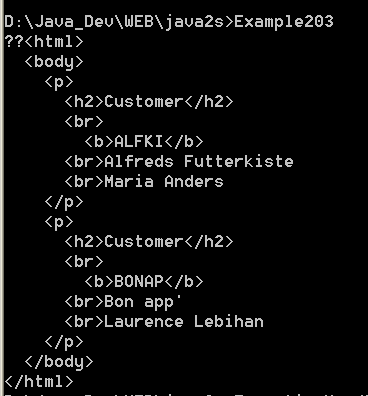
/*
Mastering Visual C# .NET
by Jason Price, Mike Gunderloy

Publisher: Sybex;
ISBN: 0782129110
*/


/*
  Example20_3.cs illustrates the XslTransform class
*/

using System;
using System.Xml;
using System.Xml.Xsl;
using System.IO;

public class Example20_3
{

    public static void Main()
    {

        // use an XmlTextReader to open an XML document
        XmlTextReader xtr = new XmlTextReader("Cust3.xml");
        xtr.WhitespaceHandling = WhitespaceHandling.None;

        // load the file into an XmlDocuent
        XmlDocument xd = new XmlDocument();
        xd.Load(xtr);

        // load an XSLT file
        XslTransform xslt = new XslTransform();
        xslt.Load("Cust.xsl");

        // perform the transformation in memory
        MemoryStream stm = new MemoryStream();
        xslt.Transform(xd, null, stm);

        // and dump the results
        stm.Position = 1;
        StreamReader sr = new StreamReader(stm);
        Console.Write(sr.ReadToEnd());

        // close the reader
        xtr.Close();
    }

}

//File:Cust3.xml
/*
<?xml version="1.0" encoding="UTF-8"?>
<?xml-stylesheet type="text/xsl" href="Cust.xsl"?>
<NewDataSet>
    <Customers>
        <CustomerID>ALFKI</CustomerID>
        <CompanyName>Alfreds Futterkiste</CompanyName>
        <ContactName>Maria Anders</ContactName>
        <ContactTitle>Sales Representative</ContactTitle>
        <Address>Obere Str. 57</Address>
        <City>Berlin</City>
        <PostalCode>12209</PostalCode>
        <Country>Germany</Country>
        <Phone>030-0074321</Phone>
        <Fax>030-0076545</Fax>
    </Customers>
    <Customers>
        <CustomerID>BONAP</CustomerID>
        <CompanyName>A Company</CompanyName>
        <ContactName>Laurence Lebihan</ContactName>
        <ContactTitle>Owner</ContactTitle>
        <Address>12, rue des Bouchers</Address>
        <City>Marseille</City>
        <PostalCode>13008</PostalCode>
        <Country>France</Country>
        <Phone>91.24.45.40</Phone>
        <Fax>91.24.45.41</Fax>
    </Customers>
</NewDataSet>

*/

//File:Cust.xsl
/*
<?xml version="1.0" encoding="UTF-8"?>
<html xsl:version="1.0" xmlns:xsl="http://www.w3.org/1999/XSL/Transform">
<body>
    <xsl:for-each select="/NewDataSet/Customers">
        <p><h2>Customer</h2>
         <br><b><xsl:value-of select="CustomerID"/></b></br>
         <br><xsl:value-of select="CompanyName"/></br>
         <br><xsl:value-of select="ContactName"/></br></p>
    </xsl:for-each>
</body>
</html>


*/
Related examples in the same category