Query the installed version of the JMF
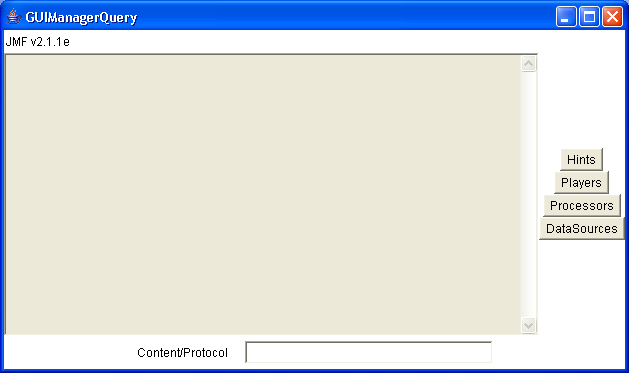
/*******************************************************************************
 * GUIManagerQuery - A Graphical User Interface built atop the ManagerQuery
 * class allowing the user to query the installed version of the JMF as to its
 * support in termsof different players, processors, and protocols.
 *
 * @author Spike Barlow
 ******************************************************************************/

import java.awt.*;
import java.awt.event.*;
import javax.media.*;
import java.util.*;

public class GUIManagerQuery extends Frame implements ActionListener {

  /** The version of the JMF. */
  protected Label versionLabel;

  /** Button to print JMF's hints. */
  protected Button hintsButton;

  /** Button to print list of players. */
  protected Button playersButton;

  /** Button to print list of processors. */
  protected Button processorsButton;

  /** Button to print list of data sources. */
  protected Button sourcesButton;

  /** TextField in which user can enter protocols or content types. */
  protected TextField contentsField;

  /** Area in which the results are displayed. */
  protected TextArea results;

  /***************************************************************************
   * Construct the GUIManagerQuery object, constructing the various components
   * and laying them out on the screen.
   **************************************************************************/
  public GUIManagerQuery() {
    super("GUIManagerQuery");
    setLayout(new BorderLayout());

    addWindowListener(new WindowAdapter() {
      public void windowClosing(WindowEvent e) {
        System.exit(0);
      }
    });

    versionLabel = new Label("JMF v" + Manager.getVersion());
    add(versionLabel, "North");

    Panel lower = new Panel();
    lower.add(new Label("Content/Protocol"));
    contentsField = new TextField(32);
    lower.add(contentsField);
    add(lower, "South");

    results = new TextArea(20, 80);
    results.setEditable(false);
    add(results, "Center");

    Panel controls = new Panel();
    controls.setLayout(new GridBagLayout());
    GridBagConstraints gbc = new GridBagConstraints();

    hintsButton = new Button("Hints");
    gbc.gridx = 0;
    gbc.gridy = 0;
    controls.add(hintsButton, gbc);
    hintsButton.addActionListener(this);

    playersButton = new Button("Players");
    gbc.gridy = 1;
    controls.add(playersButton, gbc);
    playersButton.addActionListener(this);

    processorsButton = new Button("Processors");
    gbc.gridy = 2;
    controls.add(processorsButton, gbc);
    processorsButton.addActionListener(this);

    sourcesButton = new Button("DataSources");
    gbc.gridy = 3;
    controls.add(sourcesButton, gbc);
    sourcesButton.addActionListener(this);

    add(controls, "East");
  }

  /***************************************************************************
   * Respond to button presses from the user indicating the desire for
   * information such as a list of players.
   **************************************************************************/
  public void actionPerformed(ActionEvent e) {

    int type;
    String[] cons;

    ////////////////////////////////////////////////////////////////
    // Handle hints - simplest case [no need to check content types]
    ////////////////////////////////////////////////////////////////
    if (e.getSource() == hintsButton) {
      results.setText(ManagerQuery.getHints());
    }
    /////////////////////////////////////////////////////////////////////
    // Players, processors, or datasources. Need to check the contents
    // field and if it has text in there then use that as a qualifier
    // in the search for classes. However if empty then generate a
    // complete list of all classes of the required type. User may
    // enter multiple content types either comma or space separated,
    // hence use of StringTokenizer.
    ////////////////////////////////////////////////////////////////////
    else {
      if (e.getSource() == playersButton)
        type = ManagerQuery.HANDLERS;
      else if (e.getSource() == processorsButton)
        type = ManagerQuery.PROCESSORS;
      else
        type = ManagerQuery.DATASOURCES;

      String contents = contentsField.getText();
      if (contents == null || contents.length() == 0)
        cons = null;
      else {
        StringTokenizer tokenizer = new StringTokenizer(contents,
            " ,\t;");
        cons = new String[tokenizer.countTokens()];
        for (int i = 0; i < cons.length; i++)
          cons[i] = tokenizer.nextToken();
      }
      if (cons != null && cons.length > 0)
        results.setText(ManagerQuery
            .getHandlersOrProcessors(cons, type));
      else if (type == ManagerQuery.HANDLERS)
        results.setText(ManagerQuery.getHandlers());
      else if (type == ManagerQuery.PROCESSORS)
        results.setText(ManagerQuery.getProcessors());
      else
        results.setText(ManagerQuery.getDataSources());
    }
  }

  /***************************************************************************
   * Main method - construct a GUIManagerQuery frame and show it on the
   * screen.
   **************************************************************************/
  public static void main(String[] args) {

    GUIManagerQuery gui = new GUIManagerQuery();
    gui.pack();
    gui.setSize(640, 600);
    gui.show();
  }
}
Related examples in the same category