Background Geometry : Background « 3D « Java
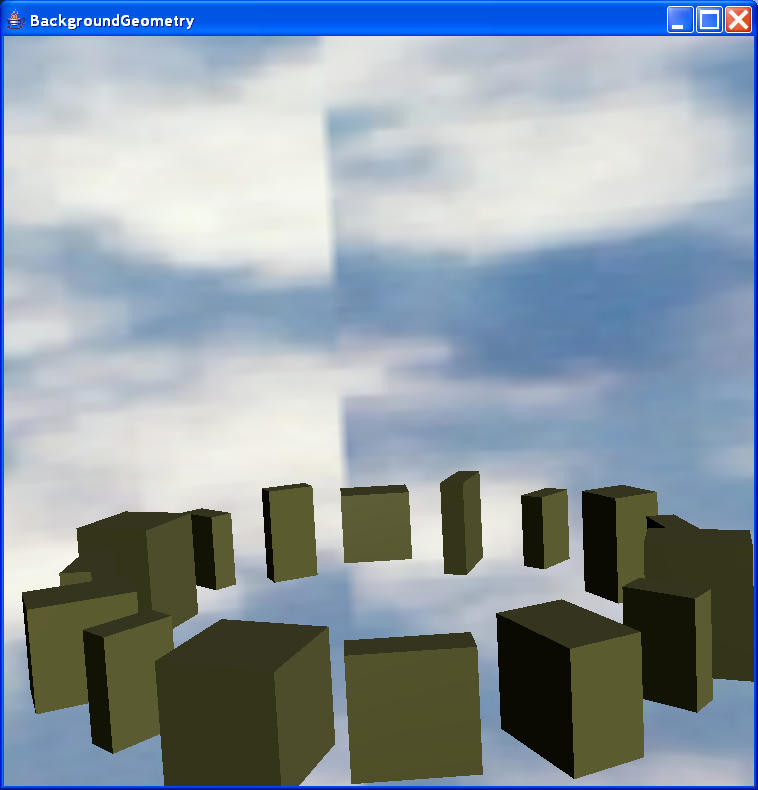
Background Geometry
/*
 * @(#)BackgroundGeometry.java 1.11 02/10/21 13:37:48
 *
 * Copyright (c) 1996-2002 Sun Microsystems, Inc. All Rights Reserved.
 *
 * Redistribution and use in source and binary forms, with or without
 * modification, are permitted provided that the following conditions are met:
 *  - Redistributions of source code must retain the above copyright notice,
 * this list of conditions and the following disclaimer.
 *  - Redistribution in binary form must reproduce the above copyright notice,
 * this list of conditions and the following disclaimer in the documentation
 * and/or other materials provided with the distribution.
 *
 * Neither the name of Sun Microsystems, Inc. or the names of contributors may
 * be used to endorse or promote products derived from this software without
 * specific prior written permission.
 *
 * This software is provided "AS IS," without a warranty of any kind. ALL
 * EXPRESS OR IMPLIED CONDITIONS, REPRESENTATIONS AND WARRANTIES, INCLUDING ANY
 * IMPLIED WARRANTY OF MERCHANTABILITY, FITNESS FOR A PARTICULAR PURPOSE OR
 * NON-INFRINGEMENT, ARE HEREBY EXCLUDED. SUN AND ITS LICENSORS SHALL NOT BE
 * LIABLE FOR ANY DAMAGES SUFFERED BY LICENSEE AS A RESULT OF USING, MODIFYING
 * OR DISTRIBUTING THE SOFTWARE OR ITS DERIVATIVES. IN NO EVENT WILL SUN OR ITS
 * LICENSORS BE LIABLE FOR ANY LOST REVENUE, PROFIT OR DATA, OR FOR DIRECT,
 * INDIRECT, SPECIAL, CONSEQUENTIAL, INCIDENTAL OR PUNITIVE DAMAGES, HOWEVER
 * CAUSED AND REGARDLESS OF THE THEORY OF LIABILITY, ARISING OUT OF THE USE OF
 * OR INABILITY TO USE SOFTWARE, EVEN IF SUN HAS BEEN ADVISED OF THE POSSIBILITY
 * OF SUCH DAMAGES.
 *
 * You acknowledge that Software is not designed,licensed or intended for use in
 * the design, construction, operation or maintenance of any nuclear facility.
 */

import java.applet.Applet;
import java.awt.BorderLayout;
import java.awt.GraphicsConfiguration;

import javax.media.j3d.Appearance;
import javax.media.j3d.Background;
import javax.media.j3d.BoundingSphere;
import javax.media.j3d.BranchGroup;
import javax.media.j3d.Canvas3D;
import javax.media.j3d.DirectionalLight;
import javax.media.j3d.Material;
import javax.media.j3d.Transform3D;
import javax.media.j3d.TransformGroup;
import javax.vecmath.Color3f;
import javax.vecmath.Point3d;
import javax.vecmath.Vector3f;

import com.sun.j3d.utils.applet.MainFrame;
import com.sun.j3d.utils.behaviors.mouse.MouseRotate;
import com.sun.j3d.utils.behaviors.mouse.MouseTranslate;
import com.sun.j3d.utils.behaviors.mouse.MouseZoom;
import com.sun.j3d.utils.geometry.Box;
import com.sun.j3d.utils.geometry.Sphere;
import com.sun.j3d.utils.image.TextureLoader;
import com.sun.j3d.utils.universe.SimpleUniverse;

public class BackgroundGeometry extends Applet {

  BoundingSphere bounds = new BoundingSphere(new Point3d(0.0, 0.0, 0.0),
      100.0);

  private java.net.URL bgImage = null;

  private SimpleUniverse u = null;

  public BranchGroup createSceneGraph() {

    // Create the root of the branch graph
    BranchGroup objRoot = new BranchGroup();

    // Create a Transformgroup to scale all objects so they
    // appear in the scene.
    TransformGroup objScale = new TransformGroup();
    Transform3D t3d = new Transform3D();
    t3d.setScale(0.4);
    objScale.setTransform(t3d);
    objRoot.addChild(objScale);

    // Create the transform group node and initialize it to the
    // identity. Enable the TRANSFORM_WRITE capability so that
    // our behavior code can modify it at runtime.
    TransformGroup objTrans = new TransformGroup();
    objScale.addChild(objTrans);

    Background bg = new Background();
    bg.setApplicationBounds(bounds);
    BranchGroup backGeoBranch = new BranchGroup();
    Sphere sphereObj = new Sphere(1.0f, Sphere.GENERATE_NORMALS
        | Sphere.GENERATE_NORMALS_INWARD
        | Sphere.GENERATE_TEXTURE_COORDS, 45);
    Appearance backgroundApp = sphereObj.getAppearance();
    backGeoBranch.addChild(sphereObj);
    bg.setGeometry(backGeoBranch);
    objTrans.addChild(bg);

    TextureLoader tex = new TextureLoader(bgImage, new String("RGB"), this);
    if (tex != null)
      backgroundApp.setTexture(tex.getTexture());

    Vector3f tranlation = new Vector3f(2.0f, 0.0f, 0.0f);
    Transform3D modelTransform = new Transform3D();
    Transform3D tmpTransform = new Transform3D();
    double angleInc = Math.PI / 8.0;
    double angle = 0.0;
    int numBoxes = 16;

    float scaleX[] = { 0.1f, 0.2f, 0.2f, 0.3f, 0.2f, 0.1f, 0.2f, 0.3f,
        0.1f, 0.3f, 0.2f, 0.3f, 0.1f, 0.3f, 0.2f, 0.3f };

    float scaleY[] = { 0.3f, 0.4f, 0.3f, 0.4f, 0.3f, 0.4f, 0.3f, 0.4f,
        0.3f, 0.3f, 0.3f, 0.3f, 0.3f, 0.3f, 0.3f, 0.4f };

    float scaleZ[] = { 0.3f, 0.2f, 0.1f, 0.1f, 0.3f, 0.2f, 0.1f, 0.3f,
        0.3f, 0.2f, 0.1f, 0.3f, 0.3f, 0.2f, 0.1f, 0.2f };

    Appearance a1 = new Appearance();
    Color3f eColor = new Color3f(0.0f, 0.0f, 0.0f);
    Color3f sColor = new Color3f(0.5f, 0.5f, 1.0f);
    Color3f oColor = new Color3f(0.5f, 0.5f, 0.3f);

    Material m = new Material(oColor, eColor, oColor, sColor, 100.0f);
    m.setLightingEnable(true);
    a1.setMaterial(m);

    for (int i = 0; i < numBoxes; i++, angle += angleInc) {
      modelTransform.rotY(angle);
      tmpTransform.set(tranlation);
      modelTransform.mul(tmpTransform);

      TransformGroup tgroup = new TransformGroup(modelTransform);
      objTrans.addChild(tgroup);

      tgroup.addChild(new Box(scaleX[i], scaleY[i], scaleZ[i],
          Box.GENERATE_NORMALS, a1));
    }

    // Shine it with two lights.
    Color3f lColor1 = new Color3f(0.7f, 0.7f, 0.7f);
    Color3f lColor2 = new Color3f(0.2f, 0.2f, 0.1f);
    Vector3f lDir1 = new Vector3f(-1.0f, -1.0f, -1.0f);
    Vector3f lDir2 = new Vector3f(0.0f, 0.0f, -1.0f);
    DirectionalLight lgt1 = new DirectionalLight(lColor1, lDir1);
    DirectionalLight lgt2 = new DirectionalLight(lColor2, lDir2);
    lgt1.setInfluencingBounds(bounds);
    lgt2.setInfluencingBounds(bounds);
    objScale.addChild(lgt1);
    objScale.addChild(lgt2);

    return objRoot;
  }

  public BackgroundGeometry() {
  }

  public BackgroundGeometry(java.net.URL bgurl) {
    bgImage = bgurl;
  }

  public void init() {

    if (bgImage == null) {
      // the path to the image for an applet
      try {
        bgImage = new java.net.URL(getCodeBase().toString()
            + "/bg.jpg");
      } catch (java.net.MalformedURLException ex) {
        System.out.println(ex.getMessage());
        System.exit(1);
      }
    }
    setLayout(new BorderLayout());
    GraphicsConfiguration config = SimpleUniverse
        .getPreferredConfiguration();

    Canvas3D c = new Canvas3D(config);
    add("Center", c);

    BranchGroup scene = createSceneGraph();
    u = new SimpleUniverse(c);

    // This will move the ViewPlatform back a bit so the
    // objects in the scene can be viewed.
    u.getViewingPlatform().setNominalViewingTransform();

    TransformGroup viewTrans = u.getViewingPlatform()
        .getViewPlatformTransform();

    // Create the rotate behavior node
    MouseRotate behavior1 = new MouseRotate(viewTrans);
    scene.addChild(behavior1);
    behavior1.setSchedulingBounds(bounds);

    // Create the zoom behavior node
    MouseZoom behavior2 = new MouseZoom(viewTrans);
    scene.addChild(behavior2);
    behavior2.setSchedulingBounds(bounds);

    // Create the translate behavior node
    MouseTranslate behavior3 = new MouseTranslate(viewTrans);
    scene.addChild(behavior3);
    behavior3.setSchedulingBounds(bounds);

    // Let Java 3D perform optimizations on this scene graph.
    scene.compile();

    u.addBranchGraph(scene);
  }

  public void destroy() {
    u.cleanup();
  }

  public static void main(String argv[]) {
    System.out
        .println("Usage: mouse buttons to rotate, zoom or translate the view platform transform");
    System.out
        .println("       Note that the background geometry only changes with rotation");
    // the path to the image file for an application
    java.net.URL bgurl = null;
    try {
      bgurl = new java.net.URL("file:bg.jpg");
    } catch (java.net.MalformedURLException ex) {
      System.out.println(ex.getMessage());
      System.exit(1);
    }
    new MainFrame(new BackgroundGeometry(bgurl), 750, 750);
  }
}