Environment Explorer
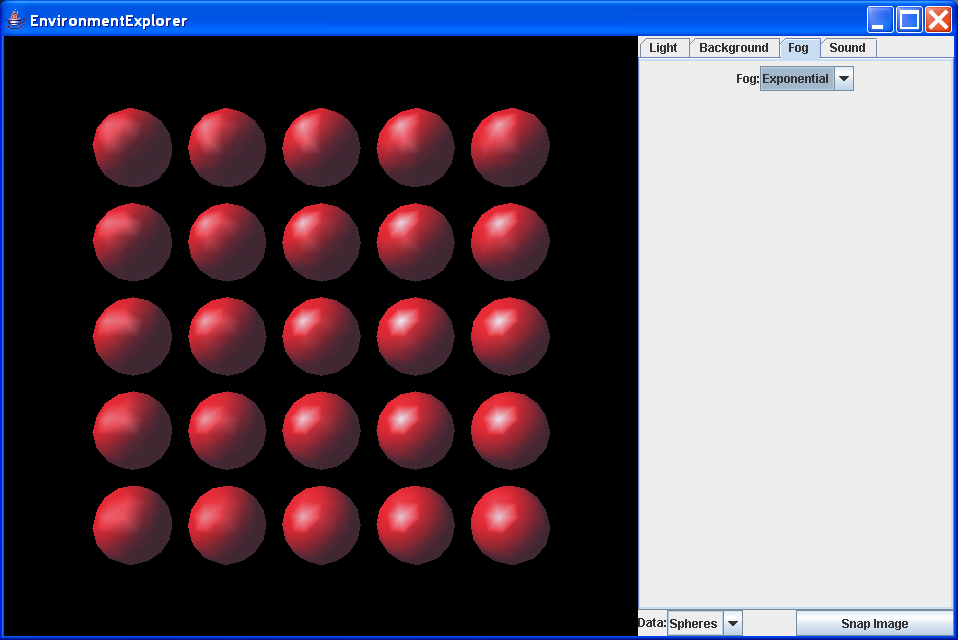
/*
 * %Z%%M% %I% %E% %U%
 *
 * ************************************************************** "Copyright (c)
 * 2001 Sun Microsystems, Inc. All Rights Reserved.
 *
 * Redistribution and use in source and binary forms, with or without
 * modification, are permitted provided that the following conditions are met:
 *
 * -Redistributions of source code must retain the above copyright notice, this
 * list of conditions and the following disclaimer.
 *
 * -Redistribution in binary form must reproduce the above copyright notice,
 * this list of conditions and the following disclaimer in the documentation
 * and/or other materials provided with the distribution.
 *
 * Neither the name of Sun Microsystems, Inc. or the names of contributors may
 * be used to endorse or promote products derived from this software without
 * specific prior written permission.
 *
 * This software is provided "AS IS," without a warranty of any kind. ALL
 * EXPRESS OR IMPLIED CONDITIONS, REPRESENTATIONS AND WARRANTIES, INCLUDING ANY
 * IMPLIED WARRANTY OF MERCHANTABILITY, FITNESS FOR A PARTICULAR PURPOSE OR
 * NON-INFRINGEMENT, ARE HEREBY EXCLUDED. SUN AND ITS LICENSORS SHALL NOT BE
 * LIABLE FOR ANY DAMAGES SUFFERED BY LICENSEE AS A RESULT OF USING, MODIFYING
 * OR DISTRIBUTING THE SOFTWARE OR ITS DERIVATIVES. IN NO EVENT WILL SUN OR ITS
 * LICENSORS BE LIABLE FOR ANY LOST REVENUE, PROFIT OR DATA, OR FOR DIRECT,
 * INDIRECT, SPECIAL, CONSEQUENTIAL, INCIDENTAL OR PUNITIVE DAMAGES, HOWEVER
 * CAUSED AND REGARDLESS OF THE THEORY OF LIABILITY, ARISING OUT OF THE USE OF
 * OR INABILITY TO USE SOFTWARE, EVEN IF SUN HAS BEEN ADVISED OF THE POSSIBILITY
 * OF SUCH DAMAGES.
 *
 * You acknowledge that Software is not designed,licensed or intended for use in
 * the design, construction, operation or maintenance of any nuclear facility."
 *
 * ***************************************************************************
 */

import java.awt.AWTEvent;
import java.awt.BorderLayout;
import java.awt.Component;
import java.awt.Container;
import java.awt.Dimension;
import java.awt.GraphicsConfiguration;
import java.awt.GridLayout;
import java.awt.Point;
import java.awt.event.ActionEvent;
import java.awt.event.ActionListener;
import java.awt.event.KeyEvent;
import java.awt.image.BufferedImage;
import java.io.BufferedOutputStream;
import java.io.FileOutputStream;
import java.text.NumberFormat;
import java.util.Enumeration;
import java.util.EventListener;
import java.util.EventObject;
import java.util.Hashtable;
import java.util.Vector;

import javax.media.j3d.AmbientLight;
import javax.media.j3d.Appearance;
import javax.media.j3d.Background;
import javax.media.j3d.BackgroundSound;
import javax.media.j3d.Behavior;
import javax.media.j3d.BoundingSphere;
import javax.media.j3d.BranchGroup;
import javax.media.j3d.Canvas3D;
import javax.media.j3d.DirectionalLight;
import javax.media.j3d.ExponentialFog;
import javax.media.j3d.Group;
import javax.media.j3d.ImageComponent;
import javax.media.j3d.ImageComponent2D;
import javax.media.j3d.Light;
import javax.media.j3d.LinearFog;
import javax.media.j3d.Link;
import javax.media.j3d.Material;
import javax.media.j3d.MediaContainer;
import javax.media.j3d.PointLight;
import javax.media.j3d.PointSound;
import javax.media.j3d.QuadArray;
import javax.media.j3d.Screen3D;
import javax.media.j3d.Shape3D;
import javax.media.j3d.SharedGroup;
import javax.media.j3d.Sound;
import javax.media.j3d.SpotLight;
import javax.media.j3d.Switch;
import javax.media.j3d.Transform3D;
import javax.media.j3d.TransformGroup;
import javax.media.j3d.View;
import javax.media.j3d.WakeupCondition;
import javax.media.j3d.WakeupCriterion;
import javax.media.j3d.WakeupOnAWTEvent;
import javax.swing.Box;
import javax.swing.BoxLayout;
import javax.swing.JApplet;
import javax.swing.JButton;
import javax.swing.JCheckBox;
import javax.swing.JComboBox;
import javax.swing.JLabel;
import javax.swing.JPanel;
import javax.swing.JSlider;
import javax.swing.JTabbedPane;
import javax.swing.event.ChangeEvent;
import javax.swing.event.ChangeListener;
import javax.vecmath.AxisAngle4f;
import javax.vecmath.Color3f;
import javax.vecmath.Point2f;
import javax.vecmath.Point3d;
import javax.vecmath.Point3f;
import javax.vecmath.Vector3f;

import com.sun.image.codec.jpeg.JPEGCodec;
import com.sun.image.codec.jpeg.JPEGEncodeParam;
import com.sun.image.codec.jpeg.JPEGImageEncoder;
import com.sun.j3d.utils.applet.MainFrame;
import com.sun.j3d.utils.behaviors.vp.OrbitBehavior;
import com.sun.j3d.utils.geometry.Sphere;
import com.sun.j3d.utils.image.TextureLoader;
import com.sun.j3d.utils.universe.SimpleUniverse;
import com.sun.j3d.utils.universe.ViewingPlatform;

public class EnvironmentExplorer extends JApplet implements
    Java3DExplorerConstants {

  // Scene graph items
  SimpleUniverse u;

  // Light items
  Group lightGroup;

  AmbientLight lightAmbient;

  DirectionalLight lightDirectional;

  PointLight lightPoint;

  SpotLight lightSpot;

  Point3f attenuation = new Point3f(1.0f, 0.0f, 0.0f);

  float spotSpreadAngle = 60; // degrees

  float spotConcentration = 5.0f;

  // Fog items
  Switch fogSwitch;

  IntChooser fogChooser;

  // Background items
  Switch bgSwitch;

  IntChooser bgChooser;

  // Sound items
  Switch soundSwitch;

  IntChooser soundChooser;

  BackgroundSound soundBackground;

  PointSound soundPoint;

  // Display object
  Switch spheresSwitch;

  Switch gridSwitch;

  // image grabber
  boolean isApplication;

  Canvas3D canvas;

  OffScreenCanvas3D offScreenCanvas;

  View view;

  // GUI elements
  JTabbedPane tabbedPane;

  // Config items
  String codeBaseString;

  String outFileBase = "env";

  int outFileSeq = 0;

  static final float OFF_SCREEN_SCALE = 1.0f;

  int colorMode = USE_COLOR;

  // Temporaries that are reused
  Transform3D tmpTrans = new Transform3D();

  Vector3f tmpVector = new Vector3f();

  AxisAngle4f tmpAxisAngle = new AxisAngle4f();

  // configurable colors. These get set based on the rendering
  // mode. By default they use color. B&W is set up for print
  // file output: white background with B&W coloring.
  Color3f objColor;

  // geometric constants
  Point3f origin = new Point3f();

  /*
   * Set up the lights. This is a group which contains the ambient light and a
   * switch for the other lights. directional : white light pointing along Z
   * axis point : white light near upper left corner of spheres spot : white
   * light near upper left corner of spheres, pointing towards center.
   */
  void setupLights() {

    lightGroup = new Group();

    // Set up the ambient light
    lightAmbient = new AmbientLight(darkGrey);
    lightAmbient.setInfluencingBounds(infiniteBounds);
    lightAmbient.setCapability(Light.ALLOW_STATE_WRITE);
    lightAmbient.setEnable(true);
    lightGroup.addChild(lightAmbient);

    // Set up the directional light
    Vector3f lightDirection = new Vector3f(0.65f, -0.65f, -0.40f);
    lightDirectional = new DirectionalLight(white, lightDirection);
    lightDirectional.setInfluencingBounds(infiniteBounds);
    lightDirectional.setEnable(true);
    lightDirectional.setCapability(Light.ALLOW_STATE_WRITE);
    lightGroup.addChild(lightDirectional);

    // Set up the point light
    Point3f lightPosition = new Point3f(-1.0f, 1.0f, 0.6f);
    lightPoint = new PointLight(white, lightPosition, attenuation);
    lightPoint.setInfluencingBounds(infiniteBounds);
    lightPoint.setEnable(false);
    lightPoint.setCapability(Light.ALLOW_STATE_WRITE);
    lightPoint.setCapability(PointLight.ALLOW_ATTENUATION_WRITE);
    lightGroup.addChild(lightPoint);

    // Set up the spot light
    // Point the light back at the origin
    lightSpot = new SpotLight(white, lightPosition, attenuation,
        lightDirection, (float) Math.toRadians(spotSpreadAngle),
        spotConcentration);
    lightSpot.setInfluencingBounds(infiniteBounds);
    lightSpot.setEnable(false);
    lightSpot.setCapability(Light.ALLOW_STATE_WRITE);
    lightSpot.setCapability(PointLight.ALLOW_ATTENUATION_WRITE);
    lightSpot.setCapability(SpotLight.ALLOW_CONCENTRATION_WRITE);
    lightSpot.setCapability(SpotLight.ALLOW_SPREAD_ANGLE_WRITE);
    lightGroup.addChild(lightSpot);
  }

  /*
   * Setup the backgrounds. The bg tool creates a Switch and a GUI component
   * for the backgrounds
   */
  void setupBackgrounds() {
    // initialize the background tool
    BackgroundTool bgTool = new BackgroundTool(codeBaseString);
    bgSwitch = bgTool.getSwitch();
    bgChooser = bgTool.getChooser();
  }

  /*
   * Setup the fog Switch and Chooser. Child values are: CHILD_NONE: Don't use
   * a fog 0: The linear Fog node 1: The exponential Fog node
   */
  void setupFogs() {
    fogSwitch = new Switch(Switch.CHILD_NONE);
    fogSwitch.setCapability(Switch.ALLOW_SWITCH_WRITE);

    // set up the linear fog
    LinearFog fogLinear = new LinearFog(skyBlue, 6.0f, 12.0f);
    fogLinear.setInfluencingBounds(infiniteBounds);
    fogSwitch.addChild(fogLinear);

    // set up the exponential fog
    ExponentialFog fogExp = new ExponentialFog(skyBlue, 0.3f);
    fogExp.setInfluencingBounds(infiniteBounds);
    fogSwitch.addChild(fogExp);

    // Create the chooser GUI
    String[] fogNames = { "None", "Linear", "Exponential", };
    int[] fogValues = { Switch.CHILD_NONE, 0, 1 };

    fogChooser = new IntChooser("Fog:", fogNames, fogValues, 0);
    fogChooser.addIntListener(new IntListener() {
      public void intChanged(IntEvent event) {
        int value = event.getValue();
        fogSwitch.setWhichChild(value);
      }
    });
    fogChooser.setValue(Switch.CHILD_NONE);
  }

  /*
   * Set up the sound switch. The child values are: CHILD_NONE: 1No sound 0:
   * BackgroundSound 1: PointSound 2: ConeSound
   */
  void setupSounds() {
    soundSwitch = new Switch(Switch.CHILD_NONE);
    soundSwitch.setCapability(Switch.ALLOW_SWITCH_WRITE);

    // Set up the sound media container
    java.net.URL soundURL = null;
    String soundFile = "techno_machine.au";
    try {
      soundURL = new java.net.URL(codeBaseString + soundFile);
    } catch (java.net.MalformedURLException ex) {
      System.out.println(ex.getMessage());
      System.exit(1);
    }
    if (soundURL == null) { // application, try file URL
      try {
        soundURL = new java.net.URL("file:./" + soundFile);
      } catch (java.net.MalformedURLException ex) {
        System.out.println(ex.getMessage());
        System.exit(1);
      }
    }
    //System.out.println("soundURL = " + soundURL);
    MediaContainer soundMC = new MediaContainer(soundURL);

    // set up the Background Sound
    soundBackground = new BackgroundSound();
    soundBackground.setCapability(Sound.ALLOW_ENABLE_WRITE);
    soundBackground.setSoundData(soundMC);
    soundBackground.setSchedulingBounds(infiniteBounds);
    soundBackground.setEnable(false);
    soundBackground.setLoop(Sound.INFINITE_LOOPS);
    soundSwitch.addChild(soundBackground);

    // set up the point sound
    soundPoint = new PointSound();
    soundPoint.setCapability(Sound.ALLOW_ENABLE_WRITE);
    soundPoint.setSoundData(soundMC);
    soundPoint.setSchedulingBounds(infiniteBounds);
    soundPoint.setEnable(false);
    soundPoint.setLoop(Sound.INFINITE_LOOPS);
    soundPoint.setPosition(-5.0f, 5.0f, 0.0f);
    Point2f[] distGain = new Point2f[2];
    // set the attenuation to linearly decrease volume from max at
    // source to 0 at a distance of 15m
    distGain[0] = new Point2f(0.0f, 1.0f);
    distGain[1] = new Point2f(15.0f, 0.0f);
    soundPoint.setDistanceGain(distGain);
    soundSwitch.addChild(soundPoint);

    // Create the chooser GUI
    String[] soundNames = { "None", "Background", "Point", };

    soundChooser = new IntChooser("Sound:", soundNames);
    soundChooser.addIntListener(new IntListener() {
      public void intChanged(IntEvent event) {
        int value = event.getValue();
        // Should just be able to use setWhichChild on
        // soundSwitch, have to explictly enable/disable due to
        // bug.
        switch (value) {
        case 0:
          soundSwitch.setWhichChild(Switch.CHILD_NONE);
          soundBackground.setEnable(false);
          soundPoint.setEnable(false);
          break;
        case 1:
          soundSwitch.setWhichChild(0);
          soundBackground.setEnable(true);
          soundPoint.setEnable(false);
          break;
        case 2:
          soundSwitch.setWhichChild(1);
          soundBackground.setEnable(false);
          soundPoint.setEnable(true);
          break;
        }
      }
    });
    soundChooser.setValue(Switch.CHILD_NONE);

  }

  // sets up a grid of spheres
  void setupSpheres() {

    // create a Switch for the spheres, allow switch changes
    spheresSwitch = new Switch(Switch.CHILD_ALL);
    spheresSwitch.setCapability(Switch.ALLOW_SWITCH_WRITE);

    // Set up an appearance to make the Sphere with objColor ambient,
    // black emmissive, objColor diffuse and white specular coloring
    Material material = new Material(objColor, black, objColor, white, 32);
    Appearance appearance = new Appearance();
    appearance.setMaterial(material);

    // create a sphere and put it into a shared group
    Sphere sphere = new Sphere(0.5f, appearance);
    SharedGroup sphereSG = new SharedGroup();
    sphereSG.addChild(sphere);

    // create a grid of spheres in the z=0 plane
    // each has a TransformGroup to position the sphere which contains
    // a link to the shared group for the sphere
    for (int y = -2; y <= 2; y++) {
      for (int x = -2; x <= 2; x++) {
        TransformGroup tg = new TransformGroup();
        tmpVector.set(x * 1.2f, y * 1.2f, -0.1f);
        tmpTrans.set(tmpVector);
        tg.setTransform(tmpTrans);
        tg.addChild(new Link(sphereSG));
        spheresSwitch.addChild(tg);
      }
    }
  }

  // sets up a grid of squares
  void setupGrid() {

    // create a Switch for the spheres, allow switch changes
    gridSwitch = new Switch(Switch.CHILD_NONE);
    gridSwitch.setCapability(Switch.ALLOW_SWITCH_WRITE);

    // Set up an appearance to make the square3s with red ambient,
    // black emmissive, red diffuse and black specular coloring
    Material material = new Material(red, black, red, black, 64);
    Appearance appearance = new Appearance();
    appearance.setMaterial(material);

    // create a grid of quads
    int gridSize = 20; // grid is gridSize quads along each side
    int numQuads = gridSize * gridSize;
    int numVerts = numQuads * 4; // 4 verts per quad
    // there will be 3 floats per coord and 4 coords per quad
    float[] coords = new float[3 * numVerts];
    // All the quads will use the same normal at each vertex, so
    // allocate an array to hold references to the same normal
    Vector3f[] normals = new Vector3f[numVerts];
    Vector3f vertNormal = new Vector3f(0.0f, 0.0f, 1.0f);
    float edgeLength = 5.0f; // length of each edge of the grid
    float gridGap = 0.03f; // the gap between each quad
    // length of each quad is (total length - sum of the gaps) / gridSize
    float quadLength = (edgeLength - gridGap * (gridSize - 1)) / gridSize;

    // create a grid of quads in the z=0 plane
    // each has a TransformGroup to position the sphere which contains
    // a link to the shared group for the sphere
    float curX, curY;
    for (int y = 0; y < gridSize; y++) {
      curY = y * (quadLength + gridGap); // offset to lower left corner
      curY -= edgeLength / 2; // center on 0,0
      for (int x = 0; x < gridSize; x++) {
        // this is the offset into the vertex array for the first
        // vertex of the quad
        int vertexOffset = (y * gridSize + x) * 4;
        // this is the offset into the coord array for the first
        // vertex of the quad, where there are 3 floats per vertex
        int coordOffset = vertexOffset * 3;
        curX = x * (quadLength + gridGap); // offset to ll corner
        curX -= edgeLength / 2; // center on 0,0
        // lower left corner
        coords[coordOffset + 0] = curX;
        coords[coordOffset + 1] = curY;
        coords[coordOffset + 2] = 0.0f; // z
        // lower right corner
        coords[coordOffset + 3] = curX + quadLength;
        coords[coordOffset + 4] = curY;
        coords[coordOffset + 5] = 0.0f; // z
        // upper right corner
        coords[coordOffset + 6] = curX + quadLength;
        coords[coordOffset + 7] = curY + quadLength;
        coords[coordOffset + 8] = 0.0f; // z
        // upper left corner
        coords[coordOffset + 9] = curX;
        coords[coordOffset + 10] = curY + quadLength;
        coords[coordOffset + 11] = 0.0f; // z
        for (int i = 0; i < 4; i++) {
          normals[vertexOffset + i] = vertNormal;
        }
      }
    }
    // now that we have the data, create the QuadArray
    QuadArray quads = new QuadArray(numVerts, QuadArray.COORDINATES
        | QuadArray.NORMALS);
    quads.setCoordinates(0, coords);
    quads.setNormals(0, normals);

    // create the shape
    Shape3D shape = new Shape3D(quads, appearance);

    // add it to the switch
    gridSwitch.addChild(shape);
  }

  BranchGroup createSceneGraph() {
    // Create the root of the branch graph
    BranchGroup objRoot = new BranchGroup();

    // Add the primitives to the scene
    setupSpheres();
    objRoot.addChild(spheresSwitch);
    setupGrid();
    objRoot.addChild(gridSwitch);
    objRoot.addChild(lightGroup);
    objRoot.addChild(bgSwitch);
    objRoot.addChild(fogSwitch);
    objRoot.addChild(soundSwitch);

    KeyPrintBehavior key = new KeyPrintBehavior();
    key.setSchedulingBounds(infiniteBounds);
    objRoot.addChild(key);
    return objRoot;
  }

  public EnvironmentExplorer(boolean isApplication, boolean blackAndWhite) {
    if (blackAndWhite) {
      colorMode = USE_BLACK_AND_WHITE;
    }
    this.isApplication = isApplication;
  }

  public EnvironmentExplorer(boolean isApplication) {
    this(isApplication, false);
  }

  public EnvironmentExplorer() {
    this(false, false);
  }

  public void init() {
    // initialize the code base
    try {
      java.net.URL codeBase = getCodeBase();
      codeBaseString = codeBase.toString();
    } catch (Exception e) {
      // probably running as an application, try the application
      // code base
      codeBaseString = "file:./";
    }

    if (colorMode == USE_COLOR) {
      objColor = red;
    } else {
      objColor = white;
    }

    Container contentPane = getContentPane();

    contentPane.setLayout(new BorderLayout());

    GraphicsConfiguration config = SimpleUniverse
        .getPreferredConfiguration();

    canvas = new Canvas3D(config);

    u = new SimpleUniverse(canvas);

    if (isApplication) {
      offScreenCanvas = new OffScreenCanvas3D(config, true);
      // set the size of the off-screen canvas based on a scale
      // of the on-screen size
      Screen3D sOn = canvas.getScreen3D();
      Screen3D sOff = offScreenCanvas.getScreen3D();
      Dimension dim = sOn.getSize();
      dim.width *= OFF_SCREEN_SCALE;
      dim.height *= OFF_SCREEN_SCALE;
      sOff.setSize(dim);
      sOff.setPhysicalScreenWidth(sOn.getPhysicalScreenWidth()
          * OFF_SCREEN_SCALE);
      sOff.setPhysicalScreenHeight(sOn.getPhysicalScreenHeight()
          * OFF_SCREEN_SCALE);

      // attach the offscreen canvas to the view
      u.getViewer().getView().addCanvas3D(offScreenCanvas);

    }
    contentPane.add("Center", canvas);

    // setup the env nodes and their GUI elements
    setupLights();
    setupBackgrounds();
    setupFogs();
    setupSounds();

    // Create a simple scene and attach it to the virtual universe
    BranchGroup scene = createSceneGraph();

    // set up sound
    u.getViewer().createAudioDevice();

    // get the view
    view = u.getViewer().getView();

    // Get the viewing platform
    ViewingPlatform viewingPlatform = u.getViewingPlatform();

    // Move the viewing platform back to enclose the -4 -> 4 range
    double viewRadius = 4.0; // want to be able to see circle
    // of viewRadius size around origin
    // get the field of view
    double fov = u.getViewer().getView().getFieldOfView();

    // calc view distance to make circle view in fov
    float viewDistance = (float) (viewRadius / Math.tan(fov / 2.0));
    tmpVector.set(0.0f, 0.0f, viewDistance);// setup offset
    tmpTrans.set(tmpVector); // set trans to translate
    // move the view platform
    viewingPlatform.getViewPlatformTransform().setTransform(tmpTrans);

    // add an orbit behavior to move the viewing platform
    OrbitBehavior orbit = new OrbitBehavior(canvas, OrbitBehavior.STOP_ZOOM);
    orbit.setSchedulingBounds(infiniteBounds);
    viewingPlatform.setViewPlatformBehavior(orbit);

    u.addBranchGraph(scene);

    contentPane.add("East", guiPanel());
  }

  // create a panel with a tabbed pane holding each of the edit panels
  JPanel guiPanel() {
    JPanel panel = new JPanel();
    panel.setLayout(new BorderLayout());
    tabbedPane = new JTabbedPane();
    tabbedPane.addTab("Light", lightPanel());
    tabbedPane.addTab("Background", backgroundPanel());
    tabbedPane.addTab("Fog", fogPanel());
    tabbedPane.addTab("Sound", soundPanel());
    panel.add("Center", tabbedPane);

    panel.add("South", configPanel());
    return panel;
  }

  Box lightPanel() {
    Box panel = new Box(BoxLayout.Y_AXIS);

    // add the ambient light checkbox to the panel
    JCheckBox ambientCheckBox = new JCheckBox("Ambient Light");
    ambientCheckBox.addActionListener(new ActionListener() {
      public void actionPerformed(ActionEvent e) {
        JCheckBox checkbox = (JCheckBox) e.getSource();
        lightAmbient.setEnable(checkbox.isSelected());
      }
    });
    ambientCheckBox.setSelected(true);
    panel.add(new LeftAlignComponent(ambientCheckBox));

    String[] lightTypeValues = { "None", "Directional", "Positional",
        "Spot" };
    IntChooser lightTypeChooser = new IntChooser("Light Type:",
        lightTypeValues);
    lightTypeChooser.addIntListener(new IntListener() {
      public void intChanged(IntEvent event) {
        int value = event.getValue();
        switch (value) {
        case 0:
          lightDirectional.setEnable(false);
          lightPoint.setEnable(false);
          lightSpot.setEnable(false);
          break;
        case 1:
          lightDirectional.setEnable(true);
          lightPoint.setEnable(false);
          lightSpot.setEnable(false);
          break;
        case 2:
          lightDirectional.setEnable(false);
          lightPoint.setEnable(true);
          lightSpot.setEnable(false);
          break;
        case 3:
          lightDirectional.setEnable(false);
          lightPoint.setEnable(false);
          lightSpot.setEnable(true);
          break;
        }
      }
    });
    lightTypeChooser.setValueByName("Directional");
    panel.add(lightTypeChooser);

    // Set up the sliders for the attenuation

    // top row
    panel.add(new LeftAlignComponent(new JLabel("Light attenuation:")));

    FloatLabelJSlider constantSlider = new FloatLabelJSlider("Constant ",
        0.1f, 0.0f, 3.0f, attenuation.x);
    constantSlider.setMajorTickSpacing(1.0f);
    constantSlider.setPaintTicks(true);
    constantSlider.addFloatListener(new FloatListener() {
      public void floatChanged(FloatEvent e) {
        attenuation.x = e.getValue();
        lightPoint.setAttenuation(attenuation);
        lightSpot.setAttenuation(attenuation);
      }
    });
    panel.add(constantSlider);

    FloatLabelJSlider linearSlider = new FloatLabelJSlider("Linear   ",
        0.1f, 0.0f, 3.0f, attenuation.y);
    linearSlider.setMajorTickSpacing(1.0f);
    linearSlider.setPaintTicks(true);
    linearSlider.addFloatListener(new FloatListener() {
      public void floatChanged(FloatEvent e) {
        attenuation.y = e.getValue();
        lightPoint.setAttenuation(attenuation);
        lightSpot.setAttenuation(attenuation);
      }
    });
    panel.add(linearSlider);

    FloatLabelJSlider quadradicSlider = new FloatLabelJSlider("Quadradic",
        0.1f, 0.0f, 3.0f, attenuation.z);
    quadradicSlider.setMajorTickSpacing(1.0f);
    quadradicSlider.setPaintTicks(true);
    quadradicSlider.addFloatListener(new FloatListener() {
      public void floatChanged(FloatEvent e) {
        attenuation.z = e.getValue();
        lightPoint.setAttenuation(attenuation);
        lightSpot.setAttenuation(attenuation);
      }
    });
    panel.add(quadradicSlider);

    // Set up the sliders for the attenuation
    // top row
    panel.add(new LeftAlignComponent(new JLabel("Spot light:")));

    // spread angle is 0-180 degrees, no slider scaling
    FloatLabelJSlider spotSpreadSlider = new FloatLabelJSlider(
        "Spread Angle ", 1.0f, 0.0f, 180.0f, spotSpreadAngle);
    spotSpreadSlider.addFloatListener(new FloatListener() {
      public void floatChanged(FloatEvent e) {
        spotSpreadAngle = e.getValue();
        lightSpot.setSpreadAngle((float) Math
            .toRadians(spotSpreadAngle));
      }
    });
    panel.add(spotSpreadSlider);

    // concentration angle is 0-128 degrees
    FloatLabelJSlider spotConcentrationSlider = new FloatLabelJSlider(
        "Concentration", 1.0f, 0.0f, 128.0f, spotConcentration);
    spotConcentrationSlider.addFloatListener(new FloatListener() {
      public void floatChanged(FloatEvent e) {
        spotConcentration = e.getValue();
        lightSpot.setConcentration(spotConcentration);
      }
    });
    panel.add(spotConcentrationSlider);

    return panel;
  }

  JPanel backgroundPanel() {
    JPanel panel = new JPanel();
    panel.add(bgChooser);
    return panel;
  }

  JPanel fogPanel() {
    JPanel panel = new JPanel();
    panel.add(fogChooser);
    return panel;
  }

  JPanel soundPanel() {
    JPanel panel = new JPanel();
    panel.add(soundChooser);
    return panel;
  }

  JPanel configPanel() {
    JPanel panel = new JPanel();
    panel.setLayout(new GridLayout(1, 0));

    String[] dataTypeValues = { "Spheres", "Grid", };
    IntChooser dataTypeChooser = new IntChooser("Data:", dataTypeValues);
    dataTypeChooser.addIntListener(new IntListener() {
      public void intChanged(IntEvent event) {
        int value = event.getValue();
        switch (value) {
        case 0:
          spheresSwitch.setWhichChild(Switch.CHILD_ALL);
          gridSwitch.setWhichChild(Switch.CHILD_NONE);
          break;
        case 1:
          gridSwitch.setWhichChild(Switch.CHILD_ALL);
          spheresSwitch.setWhichChild(Switch.CHILD_NONE);
          break;
        }
      }
    });
    panel.add(dataTypeChooser);

    if (isApplication) {
      JButton snapButton = new JButton("Snap Image");
      snapButton.addActionListener(new ActionListener() {
        public void actionPerformed(ActionEvent e) {
          Point loc = canvas.getLocationOnScreen();
          offScreenCanvas.setOffScreenLocation(loc);
          Dimension dim = canvas.getSize();
          dim.width *= OFF_SCREEN_SCALE;
          dim.height *= OFF_SCREEN_SCALE;
          nf.setMinimumIntegerDigits(3);
          offScreenCanvas.snapImageFile(outFileBase
              + nf.format(outFileSeq++), dim.width, dim.height);
          nf.setMinimumIntegerDigits(0);
        }
      });
      panel.add(snapButton);
    }

    return panel;
  }

  public void destroy() {
    u.removeAllLocales();
  }

  // The following allows EnvironmentExplorer to be run as an application
  // as well as an applet
  //
  public static void main(String[] args) {
    boolean useBlackAndWhite = false;
    for (int i = 0; i < args.length; i++) {
      //System.out.println("args[" + i + "] = " + args[i]);
      if (args[i].equals("-b")) {
        System.out.println("Use Black And White");
        useBlackAndWhite = true;
      }
    }
    new MainFrame(new EnvironmentExplorer(true, useBlackAndWhite), 950, 600);
  }
}

class BackgroundTool implements Java3DExplorerConstants {

  Switch bgSwitch;

  IntChooser bgChooser;

  BackgroundTool(String codeBaseString) {

    bgSwitch = new Switch(Switch.CHILD_NONE);
    bgSwitch.setCapability(Switch.ALLOW_SWITCH_WRITE);

    // set up the dark grey BG color node
    Background bgDarkGrey = new Background(darkGrey);
    bgDarkGrey.setApplicationBounds(infiniteBounds);
    bgSwitch.addChild(bgDarkGrey);

    // set up the grey BG color node
    Background bgGrey = new Background(grey);
    bgGrey.setApplicationBounds(infiniteBounds);
    bgSwitch.addChild(bgGrey);

    // set up the light grey BG color node
    Background bgLightGrey = new Background(lightGrey);
    bgLightGrey.setApplicationBounds(infiniteBounds);
    bgSwitch.addChild(bgLightGrey);

    // set up the white BG color node
    Background bgWhite = new Background(white);
    bgWhite.setApplicationBounds(infiniteBounds);
    bgSwitch.addChild(bgWhite);

    // set up the blue BG color node
    Background bgBlue = new Background(skyBlue);
    bgBlue.setApplicationBounds(infiniteBounds);
    bgSwitch.addChild(bgBlue);

    // set up the image
    java.net.URL bgImageURL = null;
    try {
      bgImageURL = new java.net.URL(codeBaseString + "bg.jpg");
    } catch (java.net.MalformedURLException ex) {
      System.out.println(ex.getMessage());
      System.exit(1);
    }
    if (bgImageURL == null) { // application, try file URL
      try {
        bgImageURL = new java.net.URL("file:./bg.jpg");
      } catch (java.net.MalformedURLException ex) {
        System.out.println(ex.getMessage());
        System.exit(1);
      }
    }
    TextureLoader bgTexture = new TextureLoader(bgImageURL, null);

    // Create a background with the static image
    Background bgImage = new Background(bgTexture.getImage());
    bgImage.setApplicationBounds(infiniteBounds);
    bgSwitch.addChild(bgImage);

    // create a background with the image mapped onto a sphere which
    // will enclose the world
    Background bgGeo = new Background();
    bgGeo.setApplicationBounds(infiniteBounds);
    BranchGroup bgGeoBG = new BranchGroup();
    Appearance bgGeoApp = new Appearance();
    bgGeoApp.setTexture(bgTexture.getTexture());
    Sphere sphereObj = new Sphere(1.0f, Sphere.GENERATE_NORMALS
        | Sphere.GENERATE_NORMALS_INWARD
        | Sphere.GENERATE_TEXTURE_COORDS, 45, bgGeoApp);
    bgGeoBG.addChild(sphereObj);
    bgGeo.setGeometry(bgGeoBG);
    bgSwitch.addChild(bgGeo);

    // Create the chooser GUI
    String[] bgNames = { "No Background (Black)", "Dark Grey", "Grey",
        "Light Grey", "White", "Blue", "Sky Image", "Sky Geometry", };
    int[] bgValues = { Switch.CHILD_NONE, 0, 1, 2, 3, 4, 5, 6 };

    bgChooser = new IntChooser("Background:", bgNames, bgValues, 0);
    bgChooser.addIntListener(new IntListener() {
      public void intChanged(IntEvent event) {
        int value = event.getValue();
        bgSwitch.setWhichChild(value);
      }
    });
    bgChooser.setValue(Switch.CHILD_NONE);
  }

  Switch getSwitch() {
    return bgSwitch;
  }

  IntChooser getChooser() {
    return bgChooser;
  }

}

interface Java3DExplorerConstants {

  // colors
  static Color3f black = new Color3f(0.0f, 0.0f, 0.0f);

  static Color3f red = new Color3f(1.0f, 0.0f, 0.0f);

  static Color3f green = new Color3f(0.0f, 1.0f, 0.0f);

  static Color3f blue = new Color3f(0.0f, 0.0f, 1.0f);

  static Color3f skyBlue = new Color3f(0.6f, 0.7f, 0.9f);

  static Color3f cyan = new Color3f(0.0f, 1.0f, 1.0f);

  static Color3f magenta = new Color3f(1.0f, 0.0f, 1.0f);

  static Color3f yellow = new Color3f(1.0f, 1.0f, 0.0f);

  static Color3f brightWhite = new Color3f(1.0f, 1.5f, 1.5f);

  static Color3f white = new Color3f(1.0f, 1.0f, 1.0f);

  static Color3f darkGrey = new Color3f(0.15f, 0.15f, 0.15f);

  static Color3f medGrey = new Color3f(0.3f, 0.3f, 0.3f);

  static Color3f grey = new Color3f(0.5f, 0.5f, 0.5f);

  static Color3f lightGrey = new Color3f(0.75f, 0.75f, 0.75f);

  // infinite bounding region, used to make env nodes active everywhere
  BoundingSphere infiniteBounds = new BoundingSphere(new Point3d(),
      Double.MAX_VALUE);

  // common values
  static final String nicestString = "NICEST";

  static final String fastestString = "FASTEST";

  static final String antiAliasString = "Anti-Aliasing";

  static final String noneString = "NONE";

  // light type constants
  static int LIGHT_AMBIENT = 1;

  static int LIGHT_DIRECTIONAL = 2;

  static int LIGHT_POSITIONAL = 3;

  static int LIGHT_SPOT = 4;

  // screen capture constants
  static final int USE_COLOR = 1;

  static final int USE_BLACK_AND_WHITE = 2;

  // number formatter
  NumberFormat nf = NumberFormat.getInstance();

}

class IntChooser extends JPanel implements Java3DExplorerConstants {

  JComboBox combo;

  String[] choiceNames;

  int[] choiceValues;

  int current;

  Vector listeners = new Vector();

  IntChooser(String name, String[] initChoiceNames, int[] initChoiceValues,
      int initValue) {
    if ((initChoiceValues != null)
        && (initChoiceNames.length != initChoiceValues.length)) {
      throw new IllegalArgumentException(
          "Name and Value arrays must have the same length");
    }
    choiceNames = new String[initChoiceNames.length];
    choiceValues = new int[initChoiceNames.length];
    System
        .arraycopy(initChoiceNames, 0, choiceNames, 0,
            choiceNames.length);
    if (initChoiceValues != null) {
      System.arraycopy(initChoiceValues, 0, choiceValues, 0,
          choiceNames.length);
    } else {
      for (int i = 0; i < initChoiceNames.length; i++) {
        choiceValues[i] = i;
      }
    }

    // Create the combo box, select the init value
    combo = new JComboBox(choiceNames);
    combo.setSelectedIndex(current);
    combo.addActionListener(new ActionListener() {
      public void actionPerformed(ActionEvent e) {
        JComboBox cb = (JComboBox) e.getSource();
        int index = cb.getSelectedIndex();
        setValueIndex(index);
      }
    });

    // set the initial value
    current = 0;
    setValue(initValue);

    // layout to align left
    setLayout(new BorderLayout());
    Box box = new Box(BoxLayout.X_AXIS);
    add(box, BorderLayout.WEST);

    box.add(new JLabel(name));
    box.add(combo);
  }

  IntChooser(String name, String[] initChoiceNames, int[] initChoiceValues) {
    this(name, initChoiceNames, initChoiceValues, initChoiceValues[0]);
  }

  IntChooser(String name, String[] initChoiceNames, int initValue) {
    this(name, initChoiceNames, null, initValue);
  }

  IntChooser(String name, String[] initChoiceNames) {
    this(name, initChoiceNames, null, 0);
  }

  public void addIntListener(IntListener listener) {
    listeners.add(listener);
  }

  public void removeIntListener(IntListener listener) {
    listeners.remove(listener);
  }

  public void setValueByName(String newName) {
    boolean found = false;
    int newIndex = 0;
    for (int i = 0; (!found) && (i < choiceNames.length); i++) {
      if (newName.equals(choiceNames[i])) {
        newIndex = i;
        found = true;
      }
    }
    if (found) {
      setValueIndex(newIndex);
    }
  }

  public void setValue(int newValue) {
    boolean found = false;
    int newIndex = 0;
    for (int i = 0; (!found) && (i < choiceValues.length); i++) {
      if (newValue == choiceValues[i]) {
        newIndex = i;
        found = true;
      }
    }
    if (found) {
      setValueIndex(newIndex);
    }
  }

  public int getValue() {
    return choiceValues[current];
  }

  public String getValueName() {
    return choiceNames[current];
  }

  public void setValueIndex(int newIndex) {
    boolean changed = (newIndex != current);
    current = newIndex;
    if (changed) {
      combo.setSelectedIndex(current);
      valueChanged();
    }
  }

  private void valueChanged() {
    // notify the listeners
    IntEvent event = new IntEvent(this, choiceValues[current]);
    for (Enumeration e = listeners.elements(); e.hasMoreElements();) {
      IntListener listener = (IntListener) e.nextElement();
      listener.intChanged(event);
    }
  }

}

class OffScreenCanvas3D extends Canvas3D {

  OffScreenCanvas3D(GraphicsConfiguration graphicsConfiguration,
      boolean offScreen) {

    super(graphicsConfiguration, offScreen);
  }

  private BufferedImage doRender(int width, int height) {

    BufferedImage bImage = new BufferedImage(width, height,
        BufferedImage.TYPE_INT_RGB);

    ImageComponent2D buffer = new ImageComponent2D(
        ImageComponent.FORMAT_RGB, bImage);
    //buffer.setYUp(true);

    setOffScreenBuffer(buffer);
    renderOffScreenBuffer();
    waitForOffScreenRendering();
    bImage = getOffScreenBuffer().getImage();
    return bImage;
  }

  void snapImageFile(String filename, int width, int height) {
    BufferedImage bImage = doRender(width, height);

    /*
     * JAI: RenderedImage fImage = JAI.create("format", bImage,
     * DataBuffer.TYPE_BYTE); JAI.create("filestore", fImage, filename +
     * ".tif", "tiff", null);
     */

    /* No JAI: */
    try {
      FileOutputStream fos = new FileOutputStream(filename + ".jpg");
      BufferedOutputStream bos = new BufferedOutputStream(fos);

      JPEGImageEncoder jie = JPEGCodec.createJPEGEncoder(bos);
      JPEGEncodeParam param = jie.getDefaultJPEGEncodeParam(bImage);
      param.setQuality(1.0f, true);
      jie.setJPEGEncodeParam(param);
      jie.encode(bImage);

      bos.flush();
      fos.close();
    } catch (Exception e) {
      System.out.println(e);
    }
  }
}

interface IntListener extends EventListener {
  void intChanged(IntEvent e);
}

class IntEvent extends EventObject {

  int value;

  IntEvent(Object source, int newValue) {
    super(source);
    value = newValue;
  }

  int getValue() {
    return value;
  }
}

class KeyPrintBehavior extends Behavior {

  WakeupCondition wakeup = new WakeupOnAWTEvent(KeyEvent.KEY_PRESSED);

  public void initialize() {
    wakeupOn(wakeup);
  }

  public void processStimulus(Enumeration criteria) {
    while (criteria.hasMoreElements()) {
      wakeup = (WakeupCriterion) criteria.nextElement();
      if (wakeup instanceof WakeupOnAWTEvent) {
        AWTEvent[] evt = ((WakeupOnAWTEvent) wakeup).getAWTEvent();
        for (int i = 0; i < evt.length; i++) {
          if (evt[i] instanceof KeyEvent) {
            KeyEvent keyEvt = (KeyEvent) evt[i];
            System.out.println("Key pressed: '"
                + keyEvt.getKeyChar() + "'");
          }
        }
      }
    }
    // set the wakeup so we'll get the next event
    wakeupOn(wakeup);
  }
}

class LeftAlignComponent extends JPanel {
  LeftAlignComponent(Component c) {
    setLayout(new BorderLayout());
    add(c, BorderLayout.WEST);
  }
}

class FloatLabelJSlider extends JPanel implements ChangeListener,
    Java3DExplorerConstants {

  JSlider slider;

  JLabel valueLabel;

  Vector listeners = new Vector();

  float min, max, resolution, current, scale;

  int minInt, maxInt, curInt;;

  int intDigits, fractDigits;

  float minResolution = 0.001f;

  // default slider with name, resolution = 0.1, min = 0.0, max = 1.0 inital
  // 0.5
  FloatLabelJSlider(String name) {
    this(name, 0.1f, 0.0f, 1.0f, 0.5f);
  }

  FloatLabelJSlider(String name, float resolution, float min, float max,
      float current) {

    this.resolution = resolution;
    this.min = min;
    this.max = max;
    this.current = current;

    if (resolution < minResolution) {
      resolution = minResolution;
    }

    // round scale to nearest integer fraction. i.e. 0.3 => 1/3 = 0.33
    scale = (float) Math.round(1.0f / resolution);
    resolution = 1.0f / scale;

    // get the integer versions of max, min, current
    minInt = Math.round(min * scale);
    maxInt = Math.round(max * scale);
    curInt = Math.round(current * scale);

    // sliders use integers, so scale our floating point value by "scale"
    // to make each slider "notch" be "resolution". We will scale the
    // value down by "scale" when we get the event.
    slider = new JSlider(JSlider.HORIZONTAL, minInt, maxInt, curInt);
    slider.addChangeListener(this);

    valueLabel = new JLabel(" ");

    // set the initial value label
    setLabelString();

    // add min and max labels to the slider
    Hashtable labelTable = new Hashtable();
    labelTable.put(new Integer(minInt), new JLabel(nf.format(min)));
    labelTable.put(new Integer(maxInt), new JLabel(nf.format(max)));
    slider.setLabelTable(labelTable);
    slider.setPaintLabels(true);

    /* layout to align left */
    setLayout(new BorderLayout());
    Box box = new Box(BoxLayout.X_AXIS);
    add(box, BorderLayout.WEST);

    box.add(new JLabel(name));
    box.add(slider);
    box.add(valueLabel);
  }

  public void setMinorTickSpacing(float spacing) {
    int intSpacing = Math.round(spacing * scale);
    slider.setMinorTickSpacing(intSpacing);
  }

  public void setMajorTickSpacing(float spacing) {
    int intSpacing = Math.round(spacing * scale);
    slider.setMajorTickSpacing(intSpacing);
  }

  public void setPaintTicks(boolean paint) {
    slider.setPaintTicks(paint);
  }

  public void addFloatListener(FloatListener listener) {
    listeners.add(listener);
  }

  public void removeFloatListener(FloatListener listener) {
    listeners.remove(listener);
  }

  public void stateChanged(ChangeEvent e) {
    JSlider source = (JSlider) e.getSource();
    // get the event type, set the corresponding value.
    // Sliders use integers, handle floating point values by scaling the
    // values by "scale" to allow settings at "resolution" intervals.
    // Divide by "scale" to get back to the real value.
    curInt = source.getValue();
    current = curInt / scale;

    valueChanged();
  }

  public void setValue(float newValue) {
    boolean changed = (newValue != current);
    current = newValue;
    if (changed) {
      valueChanged();
    }
  }

  private void valueChanged() {
    // update the label
    setLabelString();

    // notify the listeners
    FloatEvent event = new FloatEvent(this, current);
    for (Enumeration e = listeners.elements(); e.hasMoreElements();) {
      FloatListener listener = (FloatListener) e.nextElement();
      listener.floatChanged(event);
    }
  }

  void setLabelString() {
    // Need to muck around to try to make sure that the width of the label
    // is wide enough for the largest value. Pad the string
    // be large enough to hold the largest value.
    int pad = 5; // fudge to make up for variable width fonts
    float maxVal = Math.max(Math.abs(min), Math.abs(max));
    intDigits = Math.round((float) (Math.log(maxVal) / Math.log(10))) + pad;
    if (min < 0) {
      intDigits++; // add one for the '-'
    }
    // fractDigits is num digits of resolution for fraction. Use base 10 log
    // of scale, rounded up, + 2.
    fractDigits = (int) Math.ceil((Math.log(scale) / Math.log(10)));
    nf.setMinimumFractionDigits(fractDigits);
    nf.setMaximumFractionDigits(fractDigits);
    String value = nf.format(current);
    while (value.length() < (intDigits + fractDigits)) {
      value = value + "  ";
    }
    valueLabel.setText(value);
  }

}

class FloatEvent extends EventObject {

  float value;

  FloatEvent(Object source, float newValue) {
    super(source);
    value = newValue;
  }

  float getValue() {
    return value;
  }
}

interface FloatListener extends EventListener {
  void floatChanged(FloatEvent e);
}
Related examples in the same category