Stereo Cube
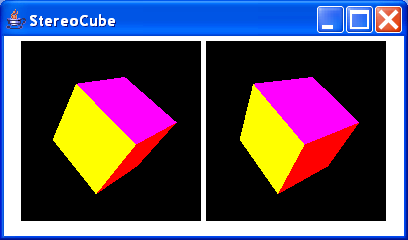
//Copyright 1999 Resplendent Technology Ltd. greg@resplendent.com

import java.applet.Applet;
import java.awt.FlowLayout;
import java.awt.GraphicsConfiguration;

import javax.media.j3d.BoundingSphere;
import javax.media.j3d.BranchGroup;
import javax.media.j3d.Canvas3D;
import javax.media.j3d.PhysicalBody;
import javax.media.j3d.Transform3D;
import javax.media.j3d.TransformGroup;
import javax.media.j3d.View;
import javax.vecmath.Point3d;

import com.sun.j3d.utils.applet.MainFrame;
import com.sun.j3d.utils.behaviors.keyboard.KeyNavigatorBehavior;
import com.sun.j3d.utils.behaviors.mouse.MouseRotate;
import com.sun.j3d.utils.behaviors.mouse.MouseTranslate;
import com.sun.j3d.utils.geometry.ColorCube;
import com.sun.j3d.utils.universe.SimpleUniverse;

public class StereoCube extends Applet {
    Canvas3D c1 = new Canvas3D(SimpleUniverse.getPreferredConfiguration());
    Canvas3D c2 = new Canvas3D(SimpleUniverse.getPreferredConfiguration());
    static MainFrame mf;
    private SimpleUniverse u = null;
    private BranchGroup scene = null;
    public void init() {
        setLayout(new FlowLayout());
        GraphicsConfiguration config =
           SimpleUniverse.getPreferredConfiguration();


        c1.setSize(180, 180);
        c1.setMonoscopicViewPolicy(View.LEFT_EYE_VIEW);
        add(c1);


        c2.setSize(180, 180);
        c2.setMonoscopicViewPolicy(View.RIGHT_EYE_VIEW);
        add(c2);

        // Create a simple scene and attach it to the virtual universe
        scene = createSceneGraph(0);
        u = new SimpleUniverse(c1);

        View view0 = u.getViewer().getView();
        View view = new View();
        PhysicalBody myBod = view0.getPhysicalBody();
        myBod.setLeftEyePosition(new Point3d(-.006,0.0, 0.0)); // default is(-0.033, 0.0, 0.0)
        myBod.setRightEyePosition(new Point3d(+.006,0.0, 0.0));
        view.setPhysicalBody(myBod);
        view.setPhysicalEnvironment(view0.getPhysicalEnvironment());
        view.attachViewPlatform(u.getViewingPlatform().getViewPlatform());
        view.addCanvas3D(c2);


        // This will move the ViewPlatform back a bit so the
        // objects in the scene can be viewed.
        u.getViewingPlatform().setNominalViewingTransform();
        u.addBranchGraph(scene);

    }
    public BranchGroup createSceneGraph(int i) {
        // Create the root of the branch graph
        BranchGroup objRoot = new BranchGroup();
        TransformGroup objTrans = new TransformGroup();
        objTrans.setCapability(TransformGroup.ALLOW_TRANSFORM_WRITE);
        Transform3D t = new Transform3D();
      TransformGroup tg = new TransformGroup(t);
      tg.setCapability(TransformGroup.ALLOW_TRANSFORM_READ);
      tg.setCapability(TransformGroup.ALLOW_TRANSFORM_WRITE);
      objTrans.addChild(tg);
        tg.addChild(new ColorCube(0.4));
        MouseRotate behavior = new MouseRotate();
      BoundingSphere bounds =
          new BoundingSphere(new Point3d(0.0,0.0,0.0), 100.0);

      behavior.setTransformGroup(tg);
      objTrans.addChild(behavior);
        // Create the translate behavior node
      MouseTranslate behavior3 = new MouseTranslate();
      behavior3.setTransformGroup(tg);
      objTrans.addChild(behavior3);
      behavior3.setSchedulingBounds(bounds);

      KeyNavigatorBehavior keyNavBeh = new KeyNavigatorBehavior(tg);
    keyNavBeh.setSchedulingBounds(new BoundingSphere(
      new Point3d(),1000.0));
    objTrans.addChild(keyNavBeh);

      behavior.setSchedulingBounds(bounds);
        objRoot.addChild(objTrans);
        return objRoot;
    }
    public StereoCube() {
    }
    public void destroy() {
        u.removeAllLocales();
    }
    public void setSize(int width, int height) {
        System.out.println("setsize " + width +"," +height);
        super.setSize(width, height);
        int minDimension = Math.min(width/2, height);
        c1.setSize((minDimension - 20),(minDimension - 20));
        c2.setSize((minDimension - 20),(minDimension - 20));
        if (mf != null) {
            mf.appletResize(width, height);
        }
        validate();
    }
    public static void main(String[] args) {
        mf = new MainFrame(new StereoCube(), 400, 200);
    }
}
Related examples in the same category