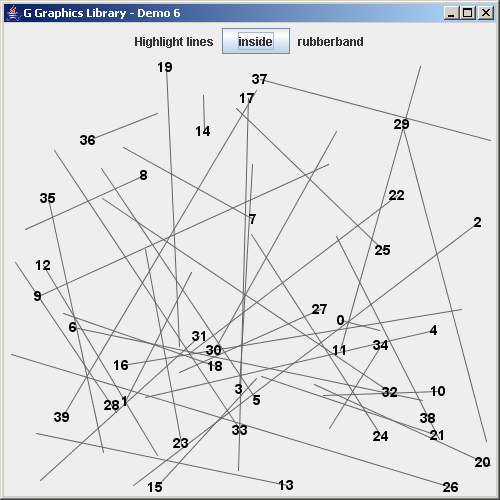
Lines Intersection
import java.util.Collection;
import java.util.Iterator;
import java.awt.*;
import java.awt.event.*;

import javax.swing.*;

import no.geosoft.cc.graphics.*;


/**
 * G demo program. Demonstrates:
 *
 * <ul>
 * <li>Custom selection interaction
 * <li>Object detection features
 * <li>Style inheritance and manipulation
 * <li>Dynamic style setting
 * </ul>
 *
 * @author <a href="mailto:jacob.dreyer@geosoft.no">Jacob Dreyer</a>
 */
public class Demo6 extends JFrame
  implements GInteraction, ActionListener
{
  private JButton     typeButton_;
  private GStyle      selectionStyle_;
  private GStyle      textStyle_;
  private GStyle      selectedTextStyle_;
  private GScene      scene_;
  private GObject     rubberBand_;
  private Collection  selection_;
  private int         x0_, y0_;


  /**
   * Class for creating the demo canvas and hande Swing events.
   */
  public Demo6()
  {
    super ("G Graphics Library - Demo 6");
    setDefaultCloseOperation (JFrame.EXIT_ON_CLOSE);

    selectionStyle_ = new GStyle();
    selectionStyle_.setForegroundColor (new Color (255, 255, 150));
    selectionStyle_.setLineWidth (2);

    selectedTextStyle_ = new GStyle();
    selectedTextStyle_.setForegroundColor (new Color (255, 255, 255));
    selectedTextStyle_.setFont (new Font ("Dialog", Font.BOLD, 14));

    selection_ = null;

    // Create the GUI
    JPanel topLevel = new JPanel();
    topLevel.setLayout (new BorderLayout());
    getContentPane().add (topLevel);

    JPanel buttonPanel = new JPanel();
    buttonPanel.add (new JLabel ("Highlight lines "));

    typeButton_ = new JButton ("inside");
    typeButton_.addActionListener (this);
    buttonPanel.add (typeButton_);

    buttonPanel.add (new JLabel (" rubberband"));
    topLevel.add (buttonPanel,   BorderLayout.NORTH);

    // Create the graphic canvas
    GWindow window = new GWindow();
    topLevel.add (window.getCanvas(), BorderLayout.CENTER);

    // Create scene with default viewport and world extent settings
    scene_ = new GScene (window, "Scene");

    // Create som graphic objects
    GObject testObject = new TestObject (scene_, 40);
    scene_.add (testObject);

    rubberBand_ = new GObject ("Interaction");
    GStyle rubberBandStyle = new GStyle();
    rubberBandStyle.setBackgroundColor (new Color (1.0f, 0.0f, 0.0f, 0.2f));
    rubberBand_.setStyle (rubberBandStyle);
    scene_.add (rubberBand_);

    pack();
    setSize (new Dimension (500, 500));
    setVisible (true);

    window.startInteraction (this);
  }


  public void actionPerformed (ActionEvent event)
  {
    String text = typeButton_.getText();
    if (text.equals ("inside")) typeButton_.setText ("intersecting");
    else                        typeButton_.setText ("inside");
  }


  public void event (GScene scene, int event, int x, int y)
  {
    switch (event) {
      case GWindow.BUTTON1_DOWN :
        x0_ = x;
        y0_ = y;
        rubberBand_.addSegment (new GSegment());
        break;

      case GWindow.BUTTON1_UP :
        rubberBand_.removeSegments();

        // Undo visual selection of current selection
        if (selection_ != null) {
          for (Iterator i = selection_.iterator(); i.hasNext(); ) {
            GSegment line = (GSegment) i.next();
            GText text = line.getText();
            text.setStyle (textStyle_);
            line.setStyle (null);
          }
        }

        scene_.refresh();
        break;

      case GWindow.BUTTON1_DRAG :
        int[] xRubber = new int[] {x0_, x, x, x0_, x0_};
        int[] yRubber = new int[] {y0_, y0_, y, y, y0_};

        GSegment rubberBand = rubberBand_.getSegment();
        rubberBand.setGeometry (xRubber, yRubber);

        // Undo visual selection of current selection
        if (selection_ != null) {
          for (Iterator i = selection_.iterator(); i.hasNext(); ) {
            GSegment line = (GSegment) i.next();
            GText text = line.getText();
            text.setStyle (textStyle_);
            line.setStyle (null);
          }
        }

        if (typeButton_.getText().equals ("inside"))
          selection_ = scene_.findSegmentsInside (Math.min (x0_, x),
                                                  Math.min (y0_, y),
                                                  Math.max (x0_, x),
                                                  Math.max (y0_, y));
        else
          selection_ = scene_.findSegments (Math.min (x0_, x),
                                            Math.min (y0_, y),
                                            Math.max (x0_, x),
                                            Math.max (y0_, y));

        // Remove rubber band from selection
        selection_.remove (rubberBand);

        // Set visual appaerance of new selection
        for (Iterator i = selection_.iterator(); i.hasNext(); ) {
          GSegment line = (GSegment) i.next();
          line.setStyle (selectionStyle_);
          GText text = line.getText();
          text.setStyle (selectedTextStyle_);
        }

        scene_.refresh();
        break;
    }
  }


  /**
   * Defines the geometry and presentation for a sample
   * graphic object.
   */
  private class TestObject extends GObject
  {
    private GSegment[] lines_;

    TestObject (GScene scene, int nLines)
    {
      lines_ = new GSegment[nLines];

      // Add style to object itself so it is inherited by segments
      GStyle lineStyle = new GStyle();
      lineStyle.setForegroundColor (new Color (100, 100, 100));
      setStyle (lineStyle);

      // Text style is set on each text element
      textStyle_ = new GStyle();
      textStyle_.setForegroundColor (new Color (0, 0, 0));
      textStyle_.setFont (new Font ("Dialog", Font.BOLD, 14));

      for (int i = 0; i < nLines; i++) {
        lines_[i] = new GSegment();
        addSegment (lines_[i]);

        GText text = new GText (Integer.toString (i));
        text.setStyle (textStyle_);
        lines_[i].setText (text);
      }
    }


    public void draw()
    {
      // Viewport dimensions
      int width  = (int) Math.round (getScene().getViewport().getWidth());
      int height = (int) Math.round (getScene().getViewport().getHeight());

      for (int i = 0; i < lines_.length; i++) {
        int x0 = (int) Math.round (width  * Math.random());
        int y0 = (int) Math.round (height * Math.random());
        int x1 = (int) Math.round (width  * Math.random());
        int y1 = (int) Math.round (height * Math.random());

        lines_[i].setGeometry (x0, y0, x1, y1);
      }
    }
  }


  public static void main (String[] args)
  {
    new Demo6();
  }
}
 G-LinesIntersection.zip( 210 k)
Related examples in the same category