EventTest Pane
/*
 * Copyright (c) 2000 David Flanagan.  All rights reserved.
 * This code is from the book Java Examples in a Nutshell, 2nd Edition.
 * It is provided AS-IS, WITHOUT ANY WARRANTY either expressed or implied.
 * You may study, use, and modify it for any non-commercial purpose.
 * You may distribute it non-commercially as long as you retain this notice.
 * For a commercial use license, or to purchase the book (recommended),
 * visit http://www.davidflanagan.com/javaexamples2.
 */

import java.awt.AWTEvent;
import java.awt.BorderLayout;
import java.awt.Dimension;
import java.awt.Graphics;
import java.awt.event.ComponentEvent;
import java.awt.event.FocusEvent;
import java.awt.event.InputEvent;
import java.awt.event.KeyEvent;
import java.awt.event.MouseEvent;
import java.awt.event.WindowAdapter;
import java.awt.event.WindowEvent;
import java.util.Vector;

import javax.swing.JFrame;
import javax.swing.JPanel;

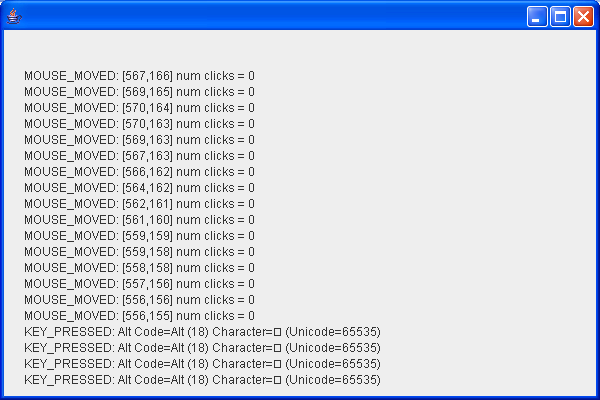
/** A program that displays all the event that occur in its window */
public class EventTestPane extends JPanel {
  /** The constructor: register the event types we are interested in */
  public EventTestPane() {
    // We're interested in all types of events
    this.enableEvents(AWTEvent.MOUSE_EVENT_MASK
        | AWTEvent.MOUSE_MOTION_EVENT_MASK | AWTEvent.KEY_EVENT_MASK
        | AWTEvent.FOCUS_EVENT_MASK | AWTEvent.COMPONENT_EVENT_MASK
        | AWTEvent.WINDOW_EVENT_MASK);
    this.setPreferredSize(new Dimension(500, 400));
  }

  /**
   * Display mouse events that don't involve mouse motion. The mousemods()
   * method prints modifiers, and is defined below. The other methods return
   * additional information about the mouse event. showLine() displays a line
   * of text in the window. It is defined at the end of this class, along with
   * the paintComponent() method.
   */
  public void processMouseEvent(MouseEvent e) {
    String type = null;
    switch (e.getID()) {
    case MouseEvent.MOUSE_PRESSED:
      type = "MOUSE_PRESSED";
      break;
    case MouseEvent.MOUSE_RELEASED:
      type = "MOUSE_RELEASED";
      break;
    case MouseEvent.MOUSE_CLICKED:
      type = "MOUSE_CLICKED";
      break;
    case MouseEvent.MOUSE_ENTERED:
      type = "MOUSE_ENTERED";
      break;
    case MouseEvent.MOUSE_EXITED:
      type = "MOUSE_EXITED";
      break;
    }
    showLine(mousemods(e) + type + ": [" + e.getX() + "," + e.getY() + "] "
        + "num clicks = " + e.getClickCount()
        + (e.isPopupTrigger() ? "; is popup trigger" : ""));

    // When the mouse enters the component, request keyboard focus so
    // we can receive and respond to keyboard events
    if (e.getID() == MouseEvent.MOUSE_ENTERED)
      requestFocus();
  }

  /**
   * Display mouse moved and dragged mouse event. Note that MouseEvent is the
   * only event type that has two methods, two EventListener interfaces and
   * two adapter classes to handle two distinct categories of events. Also, as
   * seen in init(), mouse motion events must be requested separately from
   * other mouse event types.
   */
  public void processMouseMotionEvent(MouseEvent e) {
    String type = null;
    switch (e.getID()) {
    case MouseEvent.MOUSE_MOVED:
      type = "MOUSE_MOVED";
      break;
    case MouseEvent.MOUSE_DRAGGED:
      type = "MOUSE_DRAGGED";
      break;
    }
    showLine(mousemods(e) + type + ": [" + e.getX() + "," + e.getY() + "] "
        + "num clicks = " + e.getClickCount()
        + (e.isPopupTrigger() ? "; is popup trigger" : ""));
  }

  /**
   * Return a string representation of the modifiers for a MouseEvent. Note
   * that the methods called here are inherited from InputEvent.
   */
  protected String mousemods(MouseEvent e) {
    int mods = e.getModifiers();
    String s = "";
    if (e.isShiftDown())
      s += "Shift ";
    if (e.isControlDown())
      s += "Ctrl ";
    if ((mods & InputEvent.BUTTON1_MASK) != 0)
      s += "Button 1 ";
    if ((mods & InputEvent.BUTTON2_MASK) != 0)
      s += "Button 2 ";
    if ((mods & InputEvent.BUTTON3_MASK) != 0)
      s += "Button 3 ";
    return s;
  }

  /**
   * Display keyboard events.
   *
   * Note that there are three distinct types of key events, and that key
   * events are reported by key code and/or Unicode character. KEY_PRESSED and
   * KEY_RELEASED events are generated for all key strokes. KEY_TYPED events
   * are only generated when a key stroke produces a Unicode character; these
   * events do not report a key code. If isActionKey() returns true, then the
   * key event reports only a key code, because the key that was pressed or
   * released (such as a function key) has no corresponding Unicode character.
   * Key codes can be interpreted by using the many VK_ constants defined by
   * the KeyEvent class, or they can be converted to strings using the static
   * getKeyText() method as we do here.
   */
  public void processKeyEvent(KeyEvent e) {
    String eventtype, modifiers, code, character;
    switch (e.getID()) {
    case KeyEvent.KEY_PRESSED:
      eventtype = "KEY_PRESSED";
      break;
    case KeyEvent.KEY_RELEASED:
      eventtype = "KEY_RELEASED";
      break;
    case KeyEvent.KEY_TYPED:
      eventtype = "KEY_TYPED";
      break;
    default:
      eventtype = "UNKNOWN";
    }

    // Convert the list of modifier keys to a string
    modifiers = KeyEvent.getKeyModifiersText(e.getModifiers());

    // Get string and numeric versions of the key code, if any.
    if (e.getID() == KeyEvent.KEY_TYPED)
      code = "";
    else
      code = "Code=" + KeyEvent.getKeyText(e.getKeyCode()) + " ("
          + e.getKeyCode() + ")";

    // Get string and numeric versions of the Unicode character, if any.
    if (e.isActionKey())
      character = "";
    else
      character = "Character=" + e.getKeyChar() + " (Unicode="
          + ((int) e.getKeyChar()) + ")";

    // Display it all.
    showLine(eventtype + ": " + modifiers + " " + code + " " + character);
  }

  /**
   * Display keyboard focus events. Focus can be permanently gained or lost,
   * or temporarily transferred to or from a component.
   */
  public void processFocusEvent(FocusEvent e) {
    if (e.getID() == FocusEvent.FOCUS_GAINED)
      showLine("FOCUS_GAINED" + (e.isTemporary() ? " (temporary)" : ""));
    else
      showLine("FOCUS_LOST" + (e.isTemporary() ? " (temporary)" : ""));
  }

  /** Display Component events. */
  public void processComponentEvent(ComponentEvent e) {
    switch (e.getID()) {
    case ComponentEvent.COMPONENT_MOVED:
      showLine("COMPONENT_MOVED");
      break;
    case ComponentEvent.COMPONENT_RESIZED:
      showLine("COMPONENT_RESIZED");
      break;
    case ComponentEvent.COMPONENT_HIDDEN:
      showLine("COMPONENT_HIDDEN");
      break;
    case ComponentEvent.COMPONENT_SHOWN:
      showLine("COMPONENT_SHOWN");
      break;
    }
  }

  /** Display Window events. Note the special handling of WINDOW_CLOSING */
  public void processWindowEvent(WindowEvent e) {
    switch (e.getID()) {
    case WindowEvent.WINDOW_OPENED:
      showLine("WINDOW_OPENED");
      break;
    case WindowEvent.WINDOW_CLOSED:
      showLine("WINDOW_CLOSED");
      break;
    case WindowEvent.WINDOW_CLOSING:
      showLine("WINDOW_CLOSING");
      break;
    case WindowEvent.WINDOW_ICONIFIED:
      showLine("WINDOW_ICONIFIED");
      break;
    case WindowEvent.WINDOW_DEICONIFIED:
      showLine("WINDOW_DEICONIFIED");
      break;
    case WindowEvent.WINDOW_ACTIVATED:
      showLine("WINDOW_ACTIVATED");
      break;
    case WindowEvent.WINDOW_DEACTIVATED:
      showLine("WINDOW_DEACTIVATED");
      break;
    }

    // If the user requested a window close, quit the program.
    // But first display a message, force it to be visible, and make
    // sure the user has time to read it.
    if (e.getID() == WindowEvent.WINDOW_CLOSING) {
      showLine("WINDOW_CLOSING event received.");
      showLine("Application will exit in 5 seconds");
      // Force the updates to appear now.
      update(this.getGraphics());
      // Wait five seconds
      try {
        Thread.sleep(5000);
      } catch (InterruptedException ie) {
        ;
      }
      // Exit now
      System.exit(0);
    }
  }

  /** The list of lines to display in the window */
  protected Vector lines = new Vector();

  /** Add a new line to the list of lines, and request redisplay */
  protected void showLine(String s) {
    if (lines.size() == 20)
      lines.removeElementAt(0);
    lines.addElement(s);
    repaint();
  }

  /** This method repaints the text in the window */
  public void paintComponent(Graphics g) {
    for (int i = 0; i < lines.size(); i++)
      g.drawString((String) lines.elementAt(i), 20, i * 16 + 50);
  }

  public boolean isOpaque() {
    return false;
  }

  public static void main(String[] args) {
    JFrame frame = new JFrame();
    frame.addWindowListener(new WindowAdapter() {
      public void windowClosing(WindowEvent e) {
        System.exit(0);
      }
    });

    frame.getContentPane().add(new EventTestPane(), BorderLayout.CENTER);
    // Finally, set the size of the main window, and pop it up.
    frame.setSize(600, 400);
    frame.setVisible(true);
  }
}
Related examples in the same category