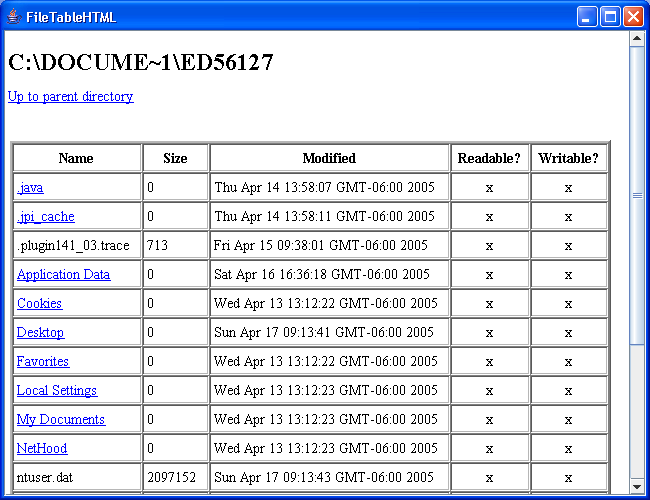
File Table HTML
/*
 * This example is from the book "Java Foundation Classes in a Nutshell".
 * Written by David Flanagan. Copyright (c) 1999 by O'Reilly & Associates.
 * You may distribute this source code for non-commercial purposes only.
 * You may study, modify, and use this example for any purpose, as long as
 * this notice is retained.  Note that this example is provided "as is",
 * WITHOUT WARRANTY of any kind either expressed or implied.
 */

import javax.swing.*;
import javax.swing.event.*;
import java.io.*;
import java.util.Date;

/**
 * This class implements a simple directory browser using the HTML
 * display capabilities of the JEditorPane component.
 **/
public class FileTableHTML {
  public static void main(String[] args) throws IOException {
    // Get the name of the directory to display
    String dirname = (args.length>0)?args[0]:System.getProperty("user.home");

    // Create something to display it in.
    final JEditorPane editor = new JEditorPane();
    editor.setEditable(false);               // we're browsing not editing
    editor.setContentType("text/html");      // must specify HTML text
    editor.setText(makeHTMLTable(dirname));  // specify the text to display

    // Set up the JEditorPane to handle clicks on hyperlinks
    editor.addHyperlinkListener(new HyperlinkListener() {
      public void hyperlinkUpdate(HyperlinkEvent e) {
  // Handle clicks; ignore mouseovers and other link-related events
  if (e.getEventType() == HyperlinkEvent.EventType.ACTIVATED) {
    // Get the HREF of the link and display it.
    editor.setText(makeHTMLTable(e.getDescription()));
  }
      }
    });

    // Put the JEditorPane in a scrolling window and display it.
    JFrame frame = new JFrame("FileTableHTML");
    frame.getContentPane().add(new JScrollPane(editor));
    frame.setSize(650, 500);
    frame.setVisible(true);
  }

  // This method returns an HTML table representing the specified directory
  public static String makeHTMLTable(String dirname) {
    // Look up the contents of the directory
    File dir = new File(dirname);
    String[] entries = dir.list();

    // Set up an output stream we can print the table to.
    // This is easier than concatenating strings all the time.
    StringWriter sout = new StringWriter();
    PrintWriter out = new PrintWriter(sout);

    // Print the directory name as the page title
    out.println("<H1>" + dirname + "</H1>");

    // Print an "up" link, unless we're already at the root
    String parent = dir.getParent();
    if ((parent != null) && (parent.length() > 0))
      out.println("<A HREF=\"" + parent + "\">Up to parent directory</A><P>");

    // Print out the table
    out.print("<TABLE BORDER=2 WIDTH=600><TR>");
    out.print("<TH>Name</TH><TH>Size</TH><TH>Modified</TH>");
    out.println("<TH>Readable?</TH><TH>Writable?</TH></TR>");
    for(int i=0; i < entries.length; i++) {
      File f = new File(dir, entries[i]);
      out.println("<TR><TD>" +
      (f.isDirectory() ?
         "<a href=\""+f+"\">" + entries[i] + "</a>" :
         entries[i]) +
      "</TD><TD>" + f.length() +
      "</TD><TD>" + new Date(f.lastModified()) +
      "</TD><TD align=center>" + (f.canRead()?"x":" ") +
      "</TD><TD align=center>" + (f.canWrite()?"x":" ") +
      "</TD></TR>");
    }
    out.println("</TABLE>");
    out.close();

    // Get the string of HTML from the StringWriter and return it.
    return sout.toString();
  }
}
Related examples in the same category