Shared Ticker
/*--------------------------------------------------
* SharedTicker.java
*
* Example from the book:     Core J2ME Technology
* Copyright John W. Muchow   http://www.CoreJ2ME.com
* You may use/modify for any non-commercial purpose
*-------------------------------------------------*/
import javax.microedition.midlet.*;
import javax.microedition.lcdui.*;

public class SharedTicker extends MIDlet implements CommandListener
{
  private Display display;    // Reference to Display object
  private List lsProducts;   // Main productlist
  private Alert alHelp;      // Alert to show text and image
  private Ticker tkSale;     // Ticker of what's on sale
  private Command cmExit;    // Command to exit the MIDlet

  public SharedTicker()
  {
    display = Display.getDisplay(this);

    cmExit = new Command("Exit", Command.SCREEN, 1);

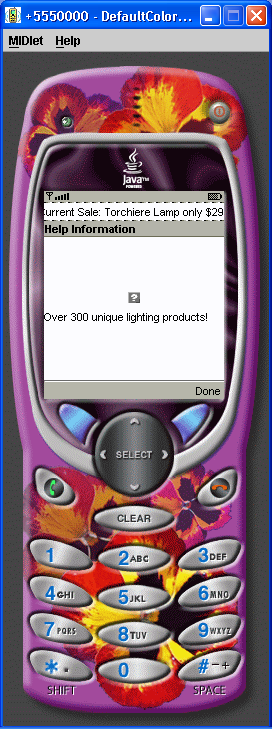
    tkSale = new Ticker("Current Sale: Torchiere Lamp only $29.00");

    lsProducts = new List("Products", Choice.IMPLICIT);
    lsProducts.append("Floor Lamp", null);
    lsProducts.append("Chandelier", null);
    lsProducts.append("Help", null);
    lsProducts.addCommand(cmExit);
    lsProducts.setCommandListener(this);
    lsProducts.setTicker(tkSale);
  }

  public void startApp()
  {
    display.setCurrent(lsProducts);
  }

  public void pauseApp()
  {
  }

  public void destroyApp(boolean unconditional)
  {
  }

  public void showAlert()
  {
    try
    {
      // Create an image
      Image im = Image.createImage("/help.png");

      // Create Alert, add text and image, no sound
      alHelp = new Alert("Help Information",
                          "Over 300 unique lighting products!",
                          im, null);
      alHelp.setTimeout(Alert.FOREVER);
      alHelp.setTicker(tkSale);
    }
    catch(Exception e)
    {
      System.out.println("Unable to read png image.");
    }

    // Display the Alert. Once dismissed, return to product list
    display.setCurrent(alHelp, lsProducts);

  }

  public void commandAction(Command c, Displayable s)
  {

    if (c == List.SELECT_COMMAND)
    {
      switch (lsProducts.getSelectedIndex())
      {
        case 0:
          System.out.println("Floor Lamp selected");
          break;

        case 1:
          System.out.println("Chandelier selected");
          break;

        case 2:
          showAlert();
          break;
      }
    }
    else if (c == cmExit)
    {
      destroyApp(true);
      notifyDestroyed();
    }
  }
}
Related examples in the same category