Simple ClipBoard
/*--------------------------------------------------
* SimpleClipBoard.java
*
* Example from the book:     Core J2ME Technology
* Copyright John W. Muchow   http://www.CoreJ2ME.com
* You may use/modify for any non-commercial purpose
*-------------------------------------------------*/
import javax.microedition.midlet.*;
import javax.microedition.lcdui.*;

public class SimpleClipBoard extends MIDlet implements CommandListener
{
  private Display display;      // Reference to Display object
  private TextBox tbClip;      // Main textbox
  private Command cmExit;      // Command to exit
  private Command cmStartMark; // Command to start marking a block
  private Command cmCopy;      // Command to copy to clipboard
  private Command cmPaste;     // Command to paste into textbox
  private int beginOffset = 0;  // The start index of copy
  private char[] clipBoard = null; // The clipboard
  private int clipBoardChars = 0;  // Number of chars in clipboard

  public SimpleClipBoard()
  {
    display = Display.getDisplay(this);

    // Create the Commands. Notice the priorities assigned
    cmExit = new Command("Exit", Command.EXIT, 1);
    cmStartMark = new Command("Mark", Command.SCREEN, 2);
    cmCopy = new Command("Copy", Command.SCREEN, 3);
    cmPaste = new Command("Paste", Command.SCREEN, 4);

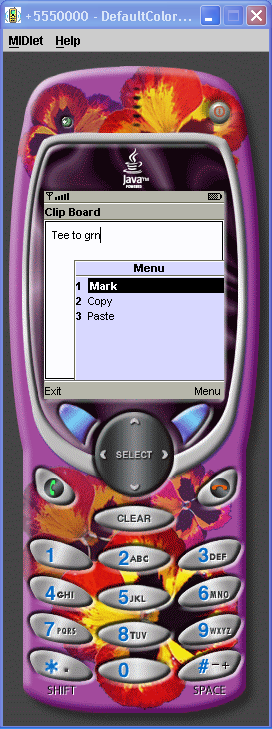
    tbClip = new TextBox("Clip Board", "Tee to grn", 15, TextField.ANY);
    tbClip.addCommand(cmExit);
    tbClip.addCommand(cmStartMark);
    tbClip.addCommand(cmCopy);
    tbClip.addCommand(cmPaste);
    tbClip.setCommandListener(this);

    // Allocate a clipboard big enough to hold the entire textbox
    clipBoard = new char[tbClip.getMaxSize()];
  }

  public void startApp()
  {
    display.setCurrent(tbClip);
  }

  public void pauseApp()
  {
  }

  public void destroyApp(boolean unconditional)
  {
  }

  public void commandAction(Command c, Displayable s)
  {
    if (c == cmStartMark)
    {
      beginOffset = tbClip.getCaretPosition();
    }
    else if (c == cmCopy && (tbClip.getCaretPosition() > beginOffset))
    {
      // Allocate an array to hold the current textbox contents
      char[] chr = new char[tbClip.size()];

      // Get the current textbox contents
      tbClip.getChars(chr);

      // The count of characters in the clipboard
      clipBoardChars = tbClip.getCaretPosition() - beginOffset;

      // Copy the text into the clipboard
      // arraycopy(source, sourceindex, dest, destindex, count)
      System.arraycopy(chr, beginOffset, clipBoard, 0, clipBoardChars);
    }
    else if (c == cmPaste)
    {
      // Make sure the paste will not overrun the textbox length.
      if ((tbClip.size() + clipBoardChars) <= tbClip.getMaxSize())
        tbClip.insert(clipBoard, 0, clipBoardChars, tbClip.getCaretPosition());
    }
    else if (c == cmExit)
    {
      destroyApp(false);
      notifyDestroyed();
    }
  }
}
Related examples in the same category