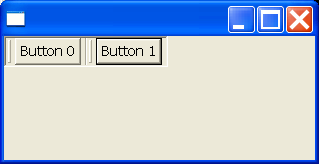
CoolBar Examples
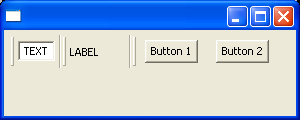
/*******************************************************************************
 * All Right Reserved. Copyright (c) 1998, 2004 Jackwind Li Guojie
 *
 * Created on Feb 27, 2004 12:17:28 AM by JACK $Id$
 *
 ******************************************************************************/


import java.io.DataInputStream;
import java.io.DataOutputStream;
import java.io.File;
import java.io.FileInputStream;
import java.io.FileOutputStream;
import java.io.IOException;

import org.eclipse.swt.SWT;
import org.eclipse.swt.graphics.Point;
import org.eclipse.swt.layout.GridData;
import org.eclipse.swt.layout.GridLayout;
import org.eclipse.swt.widgets.Button;
import org.eclipse.swt.widgets.Composite;
import org.eclipse.swt.widgets.Control;
import org.eclipse.swt.widgets.CoolBar;
import org.eclipse.swt.widgets.CoolItem;
import org.eclipse.swt.widgets.Display;
import org.eclipse.swt.widgets.Event;
import org.eclipse.swt.widgets.Label;
import org.eclipse.swt.widgets.Listener;
import org.eclipse.swt.widgets.Shell;
import org.eclipse.swt.widgets.Text;

public class CoolBarExamples {
  Display display = new Display();
  Shell shell = new Shell(display);

  public CoolBarExamples() {
    shell.setLayout(new GridLayout());

    final CoolBar coolBar = new CoolBar(shell, SWT.NONE);

    coolBar.setLayoutData(new GridData(GridData.FILL_HORIZONTAL));

    // cool item with a text field.
    CoolItem textItem = new CoolItem(coolBar, SWT.NONE);

    Text text = new Text(coolBar, SWT.BORDER | SWT.DROP_DOWN);
    text.setText("TEXT");
    text.pack();

    Point size = text.getSize();
    textItem.setControl(text);
    textItem.setSize(textItem.computeSize(size.x, size.y));

    // cool item with a label.
    CoolItem labelItem = new CoolItem(coolBar, SWT.NONE);

    Label label = new Label(coolBar, SWT.NONE);
    label.setText("LABEL");
    label.pack();

    size = label.getSize();
    labelItem.setControl(label);
    labelItem.setSize(textItem.computeSize(size.x, size.y));

    // cool item with a button.
    CoolItem buttonItem = new CoolItem(coolBar, SWT.NONE | SWT.DROP_DOWN);

    Composite composite = new Composite(coolBar, SWT.NONE);
    composite.setLayout(new GridLayout(2, true));

    Button button1 = new Button(composite, SWT.PUSH);
    button1.setText("Button 1");
    button1.pack();

    Button button2 = new Button(composite, SWT.PUSH);
    button2.setText("Button 2");
    button2.pack();

    composite.pack();

    size = composite.getSize();
    buttonItem.setControl(composite);
    buttonItem.setSize(buttonItem.computeSize(size.x, size.y));

//    // Test cool item adding method.
//    Label label2 = new Label(coolBar, SWT.NONE);
//    label2.setText("label2");
//    addControlToCoolBar(label2, SWT.DROP_DOWN, coolBar);

    try {
      setState(coolBar, new File("coolbar.state"));
    } catch (IOException e1) {
      e1.printStackTrace();
    }

    shell.addListener(SWT.Close, new Listener() {
      public void handleEvent(Event event) {
        try {
          saveState(coolBar, new File("coolbar.state") );
        } catch (IOException e) {
          e.printStackTrace();
        }
      }
    });

    shell.setSize(300, 120);
    // shell.pack();
    shell.open();

    // Set up the event loop.
    while (!shell.isDisposed()) {
      if (!display.readAndDispatch()) {
        // If no more entries in event queue
        display.sleep();
      }
    }

    display.dispose();
  }

  /**
   * Creates a cool item with the given control and add the cool item to the
   * specified cool bar.
   *
   * @param control
   * @param coolItemStyle -
   *            should be SWT.NONE or SWT.DROP_DOWN.
   * @param coolBar
   * @return the cool item created.
   */
  public static CoolItem addControlToCoolBar(
    Control control,
    int coolItemStyle,
    CoolBar coolBar) {
    CoolItem coolItem = new CoolItem(coolBar, coolItemStyle);
    Point size = control.getSize();
    if (size.x == 0 && size.y == 0) {
      // The control size has not been set yet.
      // Pack the control and recalculate its size.
      control.pack();
      size = control.getSize();
    }

    coolItem.setControl(control);
    coolItem.setSize(coolItem.computeSize(size.x, size.y));

    return coolItem;
  }

  // Save the display state of the given cool bar in the specified file.
  private void saveState(CoolBar coolBar, File file) throws IOException {
    DataOutputStream out = new DataOutputStream(new FileOutputStream(file));

    try {
      // Orders of items.
      System.out.println("Item order: " + intArrayToString(coolBar.getItemOrder()));
      int[] order = coolBar.getItemOrder();
      out.writeInt(order.length);
      for(int i=0; i<order.length; i++)
        out.writeInt(order[i]);

      // Wrap indices.
      System.out.println("Wrap indices: " + intArrayToString(coolBar.getWrapIndices()));
      int[] wrapIndices = coolBar.getWrapIndices();
      out.writeInt(wrapIndices.length);
      for(int i=0; i<wrapIndices.length; i++)
        out.writeInt(wrapIndices[i]);

      // Sizes.
      Point[] sizes = coolBar.getItemSizes();
      out.writeInt(sizes.length);
      for(int i=0; i<sizes.length; i++) {
        out.writeInt(sizes[i].x);
        out.writeInt(sizes[i].y);
      }
    } finally {
      out.close();
    }

  }

  // Sets the display state for a cool bar, using the saved information in the given file.
  private void setState(CoolBar coolBar, File file) throws IOException {
    if(! file.exists())
      throw new IOException("File does not exist: " + file);

    DataInputStream in = new DataInputStream(new FileInputStream(file));

    try {
      // Order
      int size = in.readInt();
      int[] order = new int[size];
      for(int i=0; i<order.length; i++)
        order[i] = in.readInt();

      // Wrap indices.
      size = in.readInt();
      int[] wrapIndices = new int[size];
      for(int i=0; i<wrapIndices.length; i++)
        wrapIndices[i] = in.readInt();

      // Sizes.
      size = in.readInt();
      Point[] sizes = new Point[size];
      for(int i=0; i<sizes.length; i++)
        sizes[i] = new Point(in.readInt(), in.readInt());

      coolBar.setItemLayout(order, wrapIndices, sizes);
    } finally {
      in.close();
    }

  }

  public static String intArrayToString(int values[]) {
    StringBuffer sb = new StringBuffer();
    sb.append("{");
    for (int i = 0; values != null && i < values.length; i++) {
      sb.append(values[i]);
      if (i != values.length - 1)
        sb.append(", ");
    }
    sb.append("}");
    return sb.toString();
  }

  public static void main(String[] args) {
    new CoolBarExamples();
  }
}
Related examples in the same category