Custom Components
/*******************************************************************************
 * All Right Reserved. Copyright (c) 1998, 2004 Jackwind Li Guojie
 *
 * Created on 2004-6-14 10:55:42 by JACK $Id$
 *
 ******************************************************************************/
import org.eclipse.jface.window.ApplicationWindow;
import org.eclipse.swt.SWT;
import org.eclipse.swt.graphics.Image;
import org.eclipse.swt.layout.FillLayout;
import org.eclipse.swt.layout.GridData;
import org.eclipse.swt.layout.GridLayout;
import org.eclipse.swt.widgets.Composite;
import org.eclipse.swt.widgets.Control;
import org.eclipse.swt.widgets.Shell;
import org.eclipse.ui.forms.HyperlinkGroup;
import org.eclipse.ui.forms.events.ExpansionAdapter;
import org.eclipse.ui.forms.events.ExpansionEvent;
import org.eclipse.ui.forms.events.HyperlinkAdapter;
import org.eclipse.ui.forms.events.HyperlinkEvent;
import org.eclipse.ui.forms.events.IHyperlinkListener;
import org.eclipse.ui.forms.widgets.ExpandableComposite;
import org.eclipse.ui.forms.widgets.Form;
import org.eclipse.ui.forms.widgets.FormText;
import org.eclipse.ui.forms.widgets.FormToolkit;
import org.eclipse.ui.forms.widgets.Hyperlink;
import org.eclipse.ui.forms.widgets.ImageHyperlink;
import org.eclipse.ui.forms.widgets.Section;
import org.eclipse.ui.forms.widgets.TableWrapLayout;

public class CustomWidgets extends ApplicationWindow {
  FormToolkit toolkit;
  Form form;

  /**
   * @param parentShell
   */
  public CustomWidgets(Shell parentShell) {
    super(parentShell);
  }

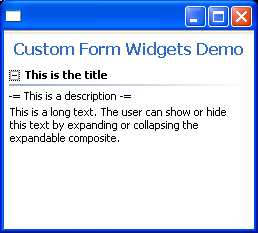
  private void demoSections() {
    form.getBody().setLayout(new TableWrapLayout());

    Section section = toolkit.createSection(form.getBody(), Section.DESCRIPTION |
        Section.TREE_NODE | Section.EXPANDED);

    section.setText("This is the title");
    toolkit.createCompositeSeparator(section);
    section.setDescription("-= This is a description -=");

    FormText text = toolkit.createFormText(section, false);
    text.setText(
      "This is a long text. The user can show or hide this text "
        + "by expanding or collapsing the expandable composite.",
      false,
      false);
    section.setClient(text);
  }

  private void demoExpandableComposite() {
    form.getBody().setLayout(new TableWrapLayout());

    ExpandableComposite ec1 =
      toolkit.createExpandableComposite(
        form.getBody(),
        ExpandableComposite.TREE_NODE | ExpandableComposite.EXPANDED);
    ec1.setText("This is the title");

    FormText text = toolkit.createFormText(ec1, false);
    text.setText(
      "This is a long text. The user can show or hide this text "
        + "by expanding or collapsing the expandable composite.",
      false,
      false);
    ec1.setClient(text);

    ec1.addExpansionListener(new ExpansionAdapter() {
      public void expansionStateChanged(ExpansionEvent e) {
        // resizes the application window.
        getShell().pack(true);
      }
    });
  }

  private void demoFormTextXML() {
    form.getBody().setLayout(new TableWrapLayout());
    FormText text = toolkit.createFormText(form.getBody(), true);

    Image image = new Image(form.getDisplay(), "icons/eclipse0.gif");
    text.setImage("eclipse", image);
    text.setText(
      "<form>"
        + "<p><img href=\"eclipse\"/> Eclipse Projects: </p>"
        + "<li><b>Platform</b> - Eclipse frameworks</li>"
        + "<li><b>JDT</b> - Java development tools</li>"
        + "<li><b>PDE</b> - Plug-in development environment</li>"
        + "</form>",
      true,
      false);

  }

  private void demoFormTextNormal() {
    form.getBody().setLayout(new TableWrapLayout());

    FormText text = toolkit.createFormText(form.getBody(), true);
    // text.setLayoutData(new TableWrapData(TableWrapData.FILL));

    text.setText(
      "Eclipse is a kind of universal tool platform - an open extensible "
        + "IDE for anything and nothing in particular. For more details, please "
        + "visit http://www.eclipse.org for more details.",
      false,
      false);

  }

  private void demoFormTextURL() {
    form.getBody().setLayout(new TableWrapLayout());

    FormText text = toolkit.createFormText(form.getBody(), true);

    HyperlinkGroup group = new HyperlinkGroup(form.getDisplay());
    group.setForeground(form.getDisplay().getSystemColor(SWT.COLOR_BLUE));
    group.setActiveForeground(
      form.getDisplay().getSystemColor(SWT.COLOR_BLUE));

    text.setHyperlinkSettings(group);

    text.setText(
      "Eclipse is a kind of universal tool platform - an open extensible "
        + "IDE for anything and nothing in particular. For more details, please "
        + "visit http://www.eclipse.org web site.",
      false,
      true);

    text.addHyperlinkListener(new HyperlinkAdapter() {
      public void linkActivated(HyperlinkEvent e) {
        System.out.println("Link activated: " + e.getHref());
      }
    });

  }

  private void demoHyperlinks() {
    form.getBody().setLayout(new GridLayout());

    Hyperlink hyperlink =
      toolkit.createHyperlink(
        form.getBody(),
        "This is a hyperlink to Eclipse.org",
        SWT.NULL);
    hyperlink.setHref("http://www.eclipse.org");
    hyperlink.setForeground(
      getShell().getDisplay().getSystemColor(SWT.COLOR_BLUE));
    hyperlink.addHyperlinkListener(new IHyperlinkListener() {
      public void linkEntered(HyperlinkEvent e) {
        System.out.println("Mouse entered.");
      }

      public void linkExited(HyperlinkEvent e) {
        System.out.println("Mouse left.");
      }

      public void linkActivated(HyperlinkEvent e) {
        System.out.println("Hyperlink activated.");
        System.out.println("HREF = " + e.getHref());
      }
    });

    ImageHyperlink imageHyperlink =
      toolkit.createImageHyperlink(form.getBody(), SWT.NULL);
    imageHyperlink.setText("This is an image hyperlink.");
    imageHyperlink.setForeground(
      getShell().getDisplay().getSystemColor(SWT.COLOR_BLUE));
    imageHyperlink.setImage(
      new Image(getShell().getDisplay(), "icons/eclipse0.gif"));
    imageHyperlink.addHyperlinkListener(new HyperlinkAdapter() {
      public void linkActivated(HyperlinkEvent e) {
        System.out.println("Image hyperlink activated.");
      }
    });

    HyperlinkGroup group = new HyperlinkGroup(getShell().getDisplay());
    group.add(hyperlink);
    group.add(imageHyperlink);

    group.setActiveBackground(
      getShell().getDisplay().getSystemColor(SWT.COLOR_YELLOW));
    group.setActiveForeground(
      getShell().getDisplay().getSystemColor(SWT.COLOR_RED));
    group.setForeground(
      getShell().getDisplay().getSystemColor(SWT.COLOR_BLUE));
  }

  /*
   * (non-Javadoc)
   *
   * @see org.eclipse.jface.window.Window#createContents(org.eclipse.swt.widgets.Composite)
   */
  protected Control createContents(Composite parent) {
    Composite composite = new Composite(parent, SWT.NULL);
    composite.setLayout(new FillLayout());

    // Sets up the toolkit.
    toolkit = new FormToolkit(getShell().getDisplay());

    // Creates a form instance.
    form = toolkit.createForm(composite);
    form.setLayoutData(new GridData(GridData.FILL_BOTH));

    // Sets title.
    form.setText("Custom Form Widgets Demo");

    // demoHyperlinks();

    // demoFormTextNormal();
    // demoFormTextURL();
    // demoFormTextXML();

    // demoExpandableComposite();
    demoSections();

    return composite;
  }

  public static void main(String[] args) {
    CustomWidgets win = new CustomWidgets(null);
    win.setBlockOnOpen(true);

    win.open();
  }

}
Related examples in the same category