Dialog Shell
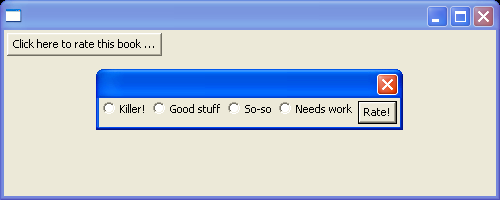
/******************************************************************************
 * Copyright (c) 1998, 2004 Jackwind Li Guojie
 * All right reserved.
 *
 * Created on Jan 25, 2004 6:16:43 PM by JACK
 * $Id$
 *
 * visit: http://www.asprise.com/swt
 *****************************************************************************/


import org.eclipse.swt.SWT;
import org.eclipse.swt.events.SelectionEvent;
import org.eclipse.swt.events.SelectionListener;
import org.eclipse.swt.graphics.Point;
import org.eclipse.swt.graphics.Rectangle;
import org.eclipse.swt.layout.RowLayout;
import org.eclipse.swt.widgets.Button;
import org.eclipse.swt.widgets.Display;
import org.eclipse.swt.widgets.Shell;

public class DialogShell {

  public DialogShell() {
    Display display = new Display();
    final Shell shell = new Shell(display);

    shell.setLayout(new RowLayout());
    shell.setSize(500, 200);

    final Button openDialog = new Button(shell, SWT.PUSH);
    openDialog.setText("Click here to rate this book ...");

    openDialog.addSelectionListener(new SelectionListener() {
      public void widgetSelected(SelectionEvent e) {
        final Shell dialog =
          new Shell(shell, SWT.DIALOG_TRIM | SWT.APPLICATION_MODAL);
        dialog.setLayout(new RowLayout());

        final String[] ratings =
          new String[] {
            "Killer!",
            "Good stuff",
            "So-so",
            "Needs work" };
        final Button[] radios = new Button[ratings.length];
        for (int i = 0; i < ratings.length; i++) {
          radios[i] = new Button(dialog, SWT.RADIO);
          radios[i].setText(ratings[i]);
        }

        Button rateButton = new Button(dialog, SWT.PUSH);
        rateButton.setText("Rate!");
        rateButton.addSelectionListener(new SelectionListener() {
          public void widgetSelected(SelectionEvent e) {
            for (int i = 0; i < radios.length; i++)
              if (radios[i].getSelection())
                openDialog.setText("Rating: " + ratings[i]);
            dialog.close();
          }

          public void widgetDefaultSelected(SelectionEvent e) {
          }
        });

        dialog.pack();
        dialog.open();

        // Move the dialog to the center of the top level shell.
        Rectangle shellBounds = shell.getBounds();
        Point dialogSize = dialog.getSize();

        dialog.setLocation(
          shellBounds.x + (shellBounds.width - dialogSize.x) / 2,
          shellBounds.y + (shellBounds.height - dialogSize.y) / 2);

      }

      public void widgetDefaultSelected(SelectionEvent e) {
      }
    });

    shell.open();

    // Set up the event loop.
    while (!shell.isDisposed()) {
      if (!display.readAndDispatch()) {
        // If no more entries in event queue
        display.sleep();
      }
    }

    display.dispose();
  }

  private void init() {

  }

  public static void main(String[] args) {
    new DialogShell();
  }
}
Related examples in the same category