JFace's ErrorDialog class
import org.eclipse.core.runtime.*;
import org.eclipse.jface.dialogs.ErrorDialog;
import org.eclipse.jface.window.ApplicationWindow;
import org.eclipse.swt.SWT;
import org.eclipse.swt.events.*;
import org.eclipse.swt.layout.*;
import org.eclipse.swt.widgets.*;

/**
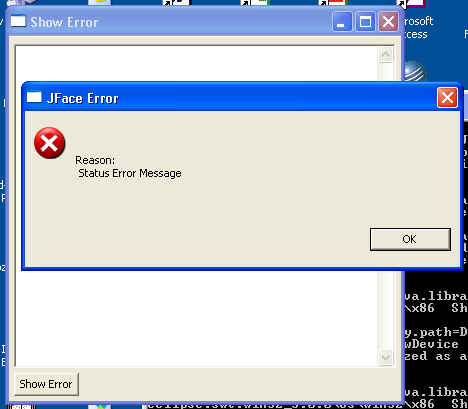
 * This class demonstrates JFace's ErrorDialog class
 */
public class ShowError extends ApplicationWindow {
  /**
   * ShowError constructor
   */
  public ShowError() {
    super(null);
  }

  /**
   * Runs the application
   */
  public void run() {
    // Don't return from open() until window closes
    setBlockOnOpen(true);

    // Open the main window
    open();

    // Dispose the display
    Display.getCurrent().dispose();
  }

  /**
   * Configures the shell
   *
   * @param shell the shell
   */
  protected void configureShell(Shell shell) {
    super.configureShell(shell);

    // Set the title bar text and the size
    shell.setText("Show Error");
    shell.setSize(400, 400);
  }

  /**
   * Creates the main window's contents
   *
   * @param parent the main window
   * @return Control
   */
  protected Control createContents(Composite parent) {
    Composite composite = new Composite(parent, SWT.NONE);
    composite.setLayout(new GridLayout(1, false));

    // Create a big text box to accept error text
    final Text text = new Text(composite, SWT.MULTI | SWT.BORDER | SWT.V_SCROLL);
    text.setLayoutData(new GridData(GridData.FILL_BOTH));

    // Create the button to launch the error dialog
    Button show = new Button(composite, SWT.PUSH);
    show.setText("Show Error");
    show.addSelectionListener(new SelectionAdapter() {
      public void widgetSelected(SelectionEvent event) {
        // Create the required Status object
        Status status = new Status(IStatus.ERROR, "My Plug-in ID", 0,
            "Status Error Message", null);

        // Display the dialog
        ErrorDialog.openError(Display.getCurrent().getActiveShell(),
            "JFace Error", text.getText(), status);
      }
    });

    return composite;
  }

  /**
   * The application entry point
   *
   * @param args the command line arguments
   */
  public static void main(String[] args) {
    new ShowError().run();
  }
}
Related examples in the same category