SWT Calendar
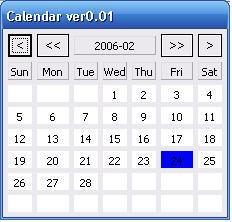
/**
* this is a example for Kalendar dialog for swt dialog.
*
* author: yin_zhiguo
*
* email: yin_zhiguo@hotmail.com
*
*/
import java.text.SimpleDateFormat;
import java.util.Calendar;
import java.util.Date;

import org.eclipse.swt.SWT;
import org.eclipse.swt.custom.CLabel;
import org.eclipse.swt.events.SelectionAdapter;
import org.eclipse.swt.events.SelectionEvent;
import org.eclipse.swt.layout.FillLayout;
import org.eclipse.swt.layout.GridData;
import org.eclipse.swt.layout.GridLayout;
import org.eclipse.swt.widgets.Button;
import org.eclipse.swt.widgets.Dialog;
import org.eclipse.swt.widgets.Display;
import org.eclipse.swt.widgets.Shell;
import org.eclipse.swt.graphics.Color;
import org.eclipse.swt.events.MouseListener;
import org.eclipse.swt.events.MouseEvent;

public class KalendarDialog extends Dialog implements MouseListener {

    private Display display = null;
    private Date nowDate = null; //current date

    private String selectedDate = null; //selected date
    private Shell shell = null;
    private GridLayout gridLayout = null;
    private GridData gridData = null;

    private CLabel sunday = null;
    private CLabel monday = null;
    private CLabel tuesday = null;
    private CLabel wednesday = null;
    private CLabel thursday = null;
    private CLabel friday = null;
    private CLabel saturday = null;

    private Button yearUp = null;
    private Button yearNext = null;
    private Button monthUp = null;
    private Button monthNext = null;
    private CLabel nowLabel = null;

    private CLabel[] days = new CLabel[42];

    public KalendarDialog(Shell parent, int style) {
        super(parent, style);
    }

    public KalendarDialog(Shell parent) {
        this(parent, 0);
    }

    private int getLastDayOfMonth(int year, int month) {
        if (month == 1 ||
            month == 3 ||
            month == 5 ||
            month == 7 ||
            month == 8 ||
            month == 10 ||
            month == 12) {
            return 31;
        }
        if (month == 4 ||
            month == 6 ||
            month == 9 ||
            month == 11) {
            return 30;
        }
        if (month == 2) {
            if (isLeapYear(year)) {
                return 29;
            } else {
                return 28;
            }
        }
        return 0;
    }

    public boolean isLeapYear(int year) {
        return (year % 4 == 0 && year % 100 != 0) || (year % 400 == 0);
    }

    private void moveTo(int type, int value) {
        Calendar now = Calendar.getInstance(); //get current Calendar object
        now.setTime(nowDate); //set current date
        now.add(type, value); //add to spec time.
        nowDate = new Date(now.getTimeInMillis()); //result
        SimpleDateFormat formatter = new
SimpleDateFormat("yyyy-MM");//format date
        nowLabel.setText(formatter.format(nowDate)); //set to label
        setDayForDisplay(now);
    }

    private void setDayForDisplay(Calendar now) {
        int currentDay = now.get(Calendar.DATE);
        now.add(Calendar.DAY_OF_MONTH, -(now.get(Calendar.DATE) - 1)); //
        int startIndex = now.get(Calendar.DAY_OF_WEEK) - 1; //
        int year = now.get(Calendar.YEAR); //
        int month = now.get(Calendar.MONTH) + 1; //
        int lastDay = this.getLastDayOfMonth(year, month); //
        int endIndex = startIndex + lastDay - 1; //
        int startday = 1;
        for (int i = 0; i < 42; i++) {
            Color temp = days[i].getBackground();
            if (temp.equals(display.getSystemColor(SWT.COLOR_BLUE))) {

days[i].setBackground(display.getSystemColor(SWT.COLOR_WHITE));
            }
        }
        for (int i = 0; i < 42; i++) {
            if (i >= startIndex && i <= endIndex) {
                days[i].setText("" + startday);
                if (startday == currentDay) {

days[i].setBackground(display.getSystemColor(SWT.COLOR_BLUE)); //
                }
                startday++;
            } else {
                days[i].setText("");
            }
        }

    }

    public void previousYear() {
        moveTo(Calendar.YEAR, -1);
    }

    public void nextYear() {
        moveTo(Calendar.YEAR, 1);
    }

    public void nextMonth() {
        moveTo(Calendar.MONTH, 1);
    }

    public void previousMonth() {
        moveTo(Calendar.MONTH, -1);
    }

    public void mouseDoubleClick(MouseEvent e) {
        CLabel day = (CLabel) e.getSource();
        if(!day.getText().equals(""))
        {
            this.selectedDate = nowLabel.getText() + "-" + day.getText();
            this.shell.close();
        }
    }

    public void mouseDown(MouseEvent e) {}

    public void mouseUp(MouseEvent e) {}


    public Object open() {
        Shell parent = getParent();
        display = Display.getDefault();
        shell = new Shell(parent,  SWT.TITLE |SWT.PRIMARY_MODAL);
        shell.setText("Calendar ver0.02");
        shell.setSize(230, 220);

        gridLayout = new GridLayout();
        gridLayout.numColumns = 7;
        shell.setLayout(gridLayout);

        gridData = new GridData(GridData.FILL_HORIZONTAL);
        yearUp = new Button(shell, SWT.PUSH | SWT.FLAT);
        yearUp.setText("<");
        yearUp.setLayoutData(gridData);
        yearUp.addSelectionListener(new SelectionAdapter() {
            public void widgetSelected(SelectionEvent e) {
                previousYear();
            }
        });

        gridData = new GridData(GridData.FILL_HORIZONTAL);
        monthUp = new Button(shell, SWT.PUSH | SWT.FLAT);
        monthUp.setText("<<");
        monthUp.setLayoutData(gridData);
        monthUp.addSelectionListener(new SelectionAdapter() {
            public void widgetSelected(SelectionEvent e) {
                previousMonth();
            }
        });

        nowLabel = new CLabel(shell, SWT.CENTER | SWT.SHADOW_OUT);
        gridData = new GridData(GridData.FILL_HORIZONTAL);
        gridData.horizontalSpan = 3;
        nowLabel.setLayoutData(gridData);
        SimpleDateFormat formatter = new SimpleDateFormat("yyyy-MM");
        nowLabel.setText(formatter.format(new Date()));

        gridData = new GridData(GridData.FILL_HORIZONTAL);
        monthNext = new Button(shell, SWT.PUSH | SWT.FLAT);
        monthNext.setText(">>");
        monthNext.setLayoutData(gridData);
        monthNext.addSelectionListener(new SelectionAdapter() {
            public void widgetSelected(SelectionEvent e) {
                nextMonth();
            }
        });

        gridData = new GridData(GridData.FILL_HORIZONTAL);
        yearNext = new Button(shell, SWT.PUSH | SWT.FLAT);
        yearNext.setText(">");
        yearNext.setLayoutData(gridData);
        yearNext.addSelectionListener(new SelectionAdapter() {
            public void widgetSelected(SelectionEvent e) {
                nextYear();
            }
        });

        sunday = new CLabel(shell, SWT.CENTER | SWT.SHADOW_OUT);
        gridData = new GridData(GridData.FILL_HORIZONTAL |
                                GridData.FILL_VERTICAL);
        gridData.widthHint = 20;
        gridData.heightHint = 20;
        sunday.setLayoutData(gridData);
        sunday.setText("Sun");

        monday = new CLabel(shell, SWT.CENTER | SWT.SHADOW_OUT);
        gridData = new GridData(GridData.FILL_HORIZONTAL |
                                GridData.FILL_VERTICAL);
        gridData.widthHint = 20;
        gridData.heightHint = 20;
        monday.setLayoutData(gridData);
        monday.setText("Mon");

        tuesday = new CLabel(shell, SWT.CENTER | SWT.SHADOW_OUT);
        gridData = new GridData(GridData.FILL_HORIZONTAL |
                                GridData.FILL_VERTICAL);
        gridData.widthHint = 20;
        gridData.heightHint = 20;
        tuesday.setLayoutData(gridData);
        tuesday.setText("Tue");

        wednesday = new CLabel(shell, SWT.CENTER | SWT.SHADOW_OUT);
        gridData = new GridData(GridData.FILL_HORIZONTAL |
                                GridData.FILL_VERTICAL);
        gridData.widthHint = 20;
        gridData.heightHint = 20;
        wednesday.setLayoutData(gridData);
        wednesday.setText("Wed");

        thursday = new CLabel(shell, SWT.CENTER | SWT.SHADOW_OUT);
        gridData = new GridData(GridData.FILL_HORIZONTAL |
                                GridData.FILL_VERTICAL);
        gridData.widthHint = 20;
        gridData.heightHint = 20;
        thursday.setLayoutData(gridData);
        thursday.setText("Thu");

        friday = new CLabel(shell, SWT.CENTER | SWT.SHADOW_OUT);
        gridData = new GridData(GridData.FILL_HORIZONTAL |
                                GridData.FILL_VERTICAL);
        gridData.widthHint = 20;
        gridData.heightHint = 20;
        friday.setLayoutData(gridData);
        friday.setText("Fri");

        saturday = new CLabel(shell, SWT.CENTER | SWT.SHADOW_OUT);
        gridData = new GridData(GridData.FILL_HORIZONTAL |
                                GridData.FILL_VERTICAL);
        gridData.widthHint = 20;
        gridData.heightHint = 20;
        saturday.setLayoutData(gridData);
        saturday.setText("Sat");

        for (int i = 0; i < 42; i++) {
            days[i] = new CLabel(shell, SWT.FLAT | SWT.CENTER);
            gridData = new GridData(GridData.FILL_HORIZONTAL |
                                    GridData.FILL_VERTICAL);
            days[i].setLayoutData(gridData);
            days[i].setBackground(display.getSystemColor(SWT.COLOR_WHITE));
            days[i].addMouseListener(this);
            days[i].setToolTipText("double click get current date.");
        }

        Calendar now = Calendar.getInstance(); //
        nowDate = new Date(now.getTimeInMillis());
        setDayForDisplay(now);

        shell.open();
        Display display = parent.getDisplay();
        while (!shell.isDisposed()) {
            if (!display.readAndDispatch()) {
                display.sleep();
            }
        }
        return selectedDate;
    }

    /**
     * @param args
     */
    public static void main(String[] args) {
        Display display = new Display();
        final Shell shell = new Shell(display);
        shell.setText("");

        FillLayout fl = new FillLayout();
        shell.setLayout(fl);
        Button open = new Button(shell, SWT.PUSH);
        open.setText("open");
        open.addSelectionListener(new SelectionAdapter() {
            public void widgetSelected(SelectionEvent e) {
              KalendarDialog cd = new KalendarDialog(shell);
                System.out.println(cd.open());
            }
        });
        shell.pack();
        shell.open();
        while (!shell.isDisposed()) {
            if (!display.readAndDispatch()) {
                display.sleep();
            }
        }
    }
}
Related examples in the same category