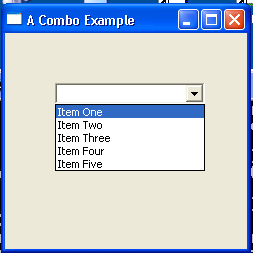
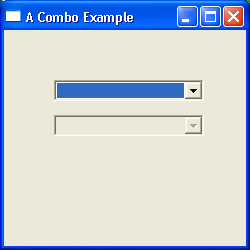
Sample Combo
/******************************************************************************
 * Copyright (c) 1998, 2004 Jackwind Li Guojie
 * All right reserved.
 *
 * Created on Feb 8, 2004 9:25:39 AM by JACK
 * $Id$
 *
 * visit: http://www.asprise.com/swt
 *****************************************************************************/


import java.util.Arrays;

import org.eclipse.swt.SWT;
import org.eclipse.swt.events.SelectionEvent;
import org.eclipse.swt.events.SelectionListener;
import org.eclipse.swt.layout.GridLayout;
import org.eclipse.swt.widgets.Combo;
import org.eclipse.swt.widgets.Display;
import org.eclipse.swt.widgets.Label;
import org.eclipse.swt.widgets.Shell;

public class SampleCombo {
  Display display = new Display();
  Shell shell = new Shell(display);

  public SampleCombo() {
    init();

    shell.setLayout(new GridLayout(2, false));

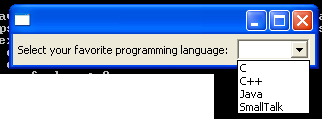
    (new Label(shell, SWT.NULL)).setText("Select your favorite programming language: ");

    //final CCombo combo = new CCombo(shell, SWT.FLAT);
    final Combo combo = new Combo(shell, SWT.NULL);

    String[] languages = new String[]{"Java", "C", "C++", "SmallTalk"};

    Arrays.sort(languages);

    for(int i=0; i<languages.length; i++)
      combo.add(languages[i]);

    //combo.add("Perl", 5);
    //combo.setItem(5, "Perl");

    combo.addSelectionListener(new SelectionListener() {
      public void widgetSelected(SelectionEvent e) {
        System.out.println("Selected index: " + combo.getSelectionIndex() + ", selected item: " + combo.getItem(combo.getSelectionIndex()) + ", text content in the text field: " + combo.getText());
      }

      public void widgetDefaultSelected(SelectionEvent e) {
        System.out.println("Default selected index: " + combo.getSelectionIndex() + ", selected item: " + (combo.getSelectionIndex() == -1 ? "<null>" : combo.getItem(combo.getSelectionIndex())) + ", text content in the text field: " + combo.getText());
        String text = combo.getText();
        if(combo.indexOf(text) < 0) { // Not in the list yet.
          combo.add(text);
          // Re-sort
          String[] items = combo.getItems();
          Arrays.sort(items);
          combo.setItems(items);
        }
      }
    });

    shell.pack();
    shell.open();
    //textUser.forceFocus();

    // Set up the event loop.
    while (!shell.isDisposed()) {
      if (!display.readAndDispatch()) {
        // If no more entries in event queue
        display.sleep();
      }
    }

    display.dispose();
  }


  private void init() {

  }

  public static void main(String[] args) {
    new SampleCombo();
  }
}
Related examples in the same category