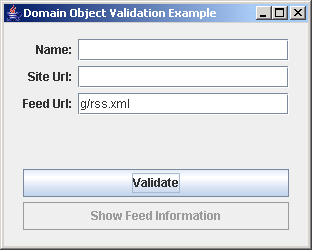
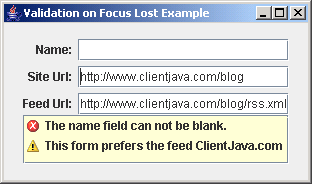
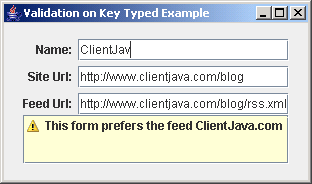
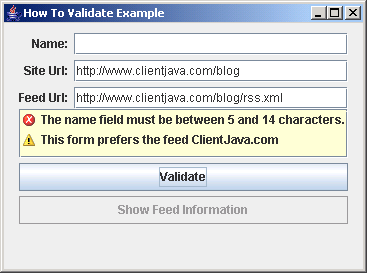
Validating Presentation Model Example
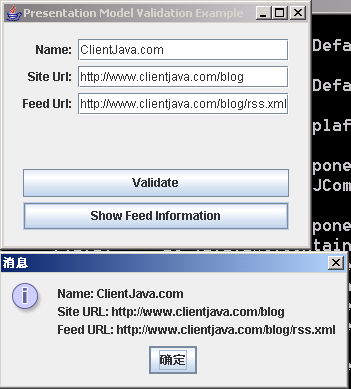
/*
Code revised from Desktop Java Live:
http://www.sourcebeat.com/downloads/
*/

import java.awt.event.ActionEvent;
import java.beans.PropertyChangeEvent;
import java.beans.PropertyChangeListener;

import javax.swing.AbstractAction;
import javax.swing.JButton;
import javax.swing.JComponent;
import javax.swing.JFrame;
import javax.swing.JOptionPane;
import javax.swing.JPanel;
import javax.swing.JTextField;

import com.jgoodies.binding.PresentationModel;
import com.jgoodies.binding.adapter.BasicComponentFactory;
import com.jgoodies.binding.value.ValueModel;
import com.jgoodies.forms.builder.DefaultFormBuilder;
import com.jgoodies.forms.layout.CellConstraints;
import com.jgoodies.forms.layout.FormLayout;
import com.jgoodies.validation.ValidationCapable;
import com.jgoodies.validation.ValidationResult;
import com.jgoodies.validation.util.DefaultValidationResultModel;
import com.jgoodies.validation.util.ValidationResultModel;
import com.jgoodies.validation.util.ValidationUtils;
import com.jgoodies.validation.view.ValidationResultViewFactory;

public class ValidatingPresentationModelExample extends JPanel {
    private Feed feed;
    private ShowFeedInformationAction showFeedInformationAction;
    private FeedPresentationModel feedPresentationModel;

    public ValidatingPresentationModelExample() {
        DefaultFormBuilder formBuilder = new DefaultFormBuilder(new FormLayout("right:pref, 3dlu, p:g"));
        formBuilder.setDefaultDialogBorder();

        createFeed();
        this.feedPresentationModel = new FeedPresentationModel(this.feed);
        ValueModel nameModel = this.feedPresentationModel.getModel("name");
        ValueModel feedModel = this.feedPresentationModel.getModel("feedUrl");
        ValueModel siteModel = this.feedPresentationModel.getModel("siteUrl");

        JTextField nameField = BasicComponentFactory.createTextField(nameModel);
        JTextField feedField = BasicComponentFactory.createTextField(feedModel);
        JTextField siteField = BasicComponentFactory.createTextField(siteModel);
        formBuilder.append("Name:", nameField);
        formBuilder.append("Site Url:", siteField);
        formBuilder.append("Feed Url:", feedField);


        this.feedPresentationModel.getValidationModel().addPropertyChangeListener(ValidationResultModel.PROPERTYNAME_RESULT, new ValidationListener());

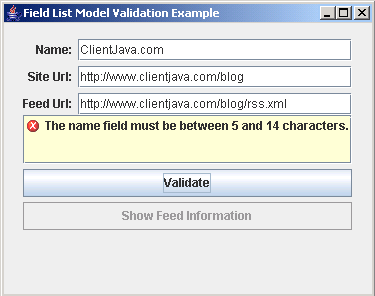
        JComponent validationResultsComponent = ValidationResultViewFactory.createReportList(this.feedPresentationModel.getValidationModel());
        formBuilder.appendRow("top:30dlu:g");

        CellConstraints cc = new CellConstraints();
        formBuilder.add(validationResultsComponent, cc.xywh(1, formBuilder.getRow() + 1, 3, 1, "fill, fill"));
        formBuilder.nextLine(2);
        formBuilder.append(new JButton(new ValidateAction()), 3);

        this.showFeedInformationAction = new ShowFeedInformationAction();
        formBuilder.append(new JButton(this.showFeedInformationAction), 3);

        add(formBuilder.getPanel());
    }

    private class ValidationListener implements PropertyChangeListener {
        public void propertyChange(PropertyChangeEvent evt) {
            if (evt.getPropertyName() == ValidationResultModel.PROPERTYNAME_RESULT) {
                showFeedInformationAction.setEnabled(!feedPresentationModel.getValidationModel().hasErrors());
            }
        }
    }

    private void createFeed() {
        this.feed = new Feed();
        this.feed.setName("ClientJava.com");
        this.feed.setSiteUrl("http://www.clientjava.com/blog");
        this.feed.setFeedUrl("http://www.clientjava.com/blog/rss.xml");
    }

    private class ValidateAction extends AbstractAction {
        public ValidateAction() {
            super("Validate");
        }

        public void actionPerformed(ActionEvent e) {
            feedPresentationModel.performValidation();
        }
    }

    private class ShowFeedInformationAction extends AbstractAction {
        public ShowFeedInformationAction() {
            super("Show Feed Information");
            setEnabled(false);
        }

        public void actionPerformed(ActionEvent event) {

            StringBuffer message = new StringBuffer();
            message.append("<html>");
            message.append("<b>Name:</b> ");
            message.append(feed.getName());
            message.append("<br>");
            message.append("<b>Site URL:</b> ");
            message.append(feed.getSiteUrl());
            message.append("<br>");
            message.append("<b>Feed URL:</b> ");
            message.append(feed.getFeedUrl());
            message.append("</html>");

            JOptionPane.showMessageDialog(null, message.toString());
        }
    }

    private class FeedPresentationModel extends PresentationModel implements ValidationCapable {
        private ValidationResultModel validationResultModel;

        public FeedPresentationModel(Object bean) {
            super(bean);
            this.validationResultModel = new DefaultValidationResultModel();
        }

        public ValidationResultModel getValidationModel() {
            return this.validationResultModel;
        }

        public ValidationResult validate() {
            ValidationResult validationResult = new ValidationResult();

            String name = (String) getModel("name").getValue();
            String feedUrl = (String) getModel("feedUrl").getValue();
            String siteUrl = (String) getModel("siteUrl").getValue();

            if (ValidationUtils.isEmpty(name)) {
                validationResult.addError("The name field can not be blank.");
            } else if (!ValidationUtils.hasBoundedLength(name, 5, 14)) {
                validationResult.addError("The name field must be between 5 and 14 characters.");
            }

            if (!"ClientJava.com".equals(name)) {
                validationResult.addWarning("This form prefers the feed ClientJava.com");
            }


            if (ValidationUtils.isEmpty(feedUrl)) {
                validationResult.addError("The feed field can not be blank.");
            }

            if (ValidationUtils.isEmpty(siteUrl)) {
                validationResult.addError("The site field can not be blank.");
            }

            return validationResult;
        }

        public void performValidation() {
            ValidationResult validationResult = validate();
            getValidationModel().setResult(validationResult);

        }
    }

    public static void main(String[] a){
      JFrame f = new JFrame("Presentation Model Validation Example");
      f.setDefaultCloseOperation(2);
      f.add(new ValidatingPresentationModelExample());
      f.pack();
      f.setVisible(true);
    }
}
 jgoodiesValidation.zip( 277 k)
Related examples in the same category