Applet clock demo
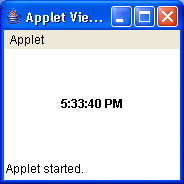
//File: applet.html
/*

<applet code="ClockDemo.class"
  codebase="."
  width=150 height=20>
</applet>

*/
///
/*
 * Copyright (c) 2000 David Flanagan.  All rights reserved.
 * This code is from the book Java Examples in a Nutshell, 2nd Edition.
 * It is provided AS-IS, WITHOUT ANY WARRANTY either expressed or implied.
 * You may study, use, and modify it for any non-commercial purpose.
 * You may distribute it non-commercially as long as you retain this notice.
 * For a commercial use license, or to purchase the book (recommended),
 * visit http://www.davidflanagan.com/javaexamples2.
 */

import java.applet.Applet;
import java.awt.BorderLayout;
import java.awt.Font;
import java.awt.Label;
import java.text.DateFormat;
import java.util.Date;

/**
 * This applet displays the time, and updates it every second
 */
public class ClockDemo extends Applet implements Runnable {
  Label time; // A component to display the time in

  DateFormat timeFormat; // This object converts the time to a string

  Thread timer; // The thread that updates the time

  volatile boolean running; // A flag used to stop the thread

  /**
   * The init method is called when the browser first starts the applet. It
   * sets up the Label component and obtains a DateFormat object
   */
  public void init() {
    time = new Label();
    time.setFont(new Font("helvetica", Font.BOLD, 12));
    time.setAlignment(Label.CENTER);
    setLayout(new BorderLayout());
    add(time, BorderLayout.CENTER);
    timeFormat = DateFormat.getTimeInstance(DateFormat.MEDIUM);
  }

  /**
   * This browser calls this method to tell the applet to start running. Here,
   * we create and start a thread that will update the time each second. Note
   * that we take care never to have more than one thread
   */
  public void start() {
    running = true; // Set the flag
    if (timer == null) { // If we don't already have a thread
      timer = new Thread(this); // Then create one
      timer.start(); // And start it running
    }
  }

  /**
   * This method implements Runnable. It is the body of the thread. Once a
   * second, it updates the text of the Label to display the current time
   */
  public void run() {
    while (running) { // Loop until we're stopped
      // Get current time, convert to a String, and display in the Label
      time.setText(timeFormat.format(new Date()));
      // Now wait 1000 milliseconds
      try {
        Thread.sleep(1000);
      } catch (InterruptedException e) {
      }
    }
    // If the thread exits, set it to null so we can create a new one
    // if start() is called again.
    timer = null;
  }

  /**
   * The browser calls this method to tell the applet that it is not visible
   * and should not run. It sets a flag that tells the run() method to exit
   */
  public void stop() {
    running = false;
  }

  /**
   * Returns information about the applet for display by the applet viewer
   */
  public String getAppletInfo() {
    return "Clock applet Copyright (c) 2000 by David Flanagan";
  }
}
Related examples in the same category