Build multiple document interface by yourself : MDI « Swing JFC « Java
Build multiple document interface by yourself
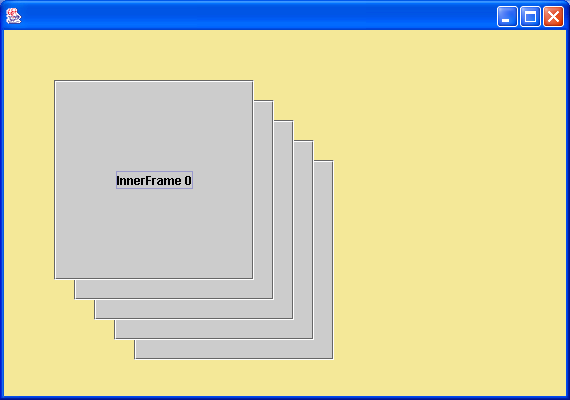
import java.awt.BorderLayout;
import java.awt.Color;
import java.awt.Dimension;
import java.awt.Font;
import java.awt.Graphics;
import java.awt.GridLayout;
import java.awt.event.MouseEvent;
import java.awt.event.WindowAdapter;
import java.awt.event.WindowEvent;
import java.awt.event.WindowListener;
import java.util.Hashtable;

import javax.swing.Icon;
import javax.swing.ImageIcon;
import javax.swing.JButton;
import javax.swing.JComponent;
import javax.swing.JFrame;
import javax.swing.JLabel;
import javax.swing.JLayeredPane;
import javax.swing.JPanel;
import javax.swing.LookAndFeel;
import javax.swing.UIDefaults;
import javax.swing.UIManager;
import javax.swing.border.Border;
import javax.swing.border.MatteBorder;
import javax.swing.event.MouseInputAdapter;
import javax.swing.plaf.BorderUIResource;
import javax.swing.plaf.ColorUIResource;
import javax.swing.plaf.ComponentUI;
import javax.swing.plaf.FontUIResource;

public class LayeredPaneDemo extends JFrame {
  public LayeredPaneDemo() {
    super("");
    setSize(570, 400);
    getContentPane().setBackground(new Color(244, 232, 152));

    getLayeredPane().setOpaque(true);

    InnerFrame[] frames = new InnerFrame[5];
    for (int i = 0; i < 5; i++) {
      frames[i] = new InnerFrame("InnerFrame " + i);
      frames[i].setBounds(50 + i * 20, 50 + i * 20, 200, 200);
      getLayeredPane().add(frames[i]);
    }

    WindowListener l = new WindowAdapter() {
      public void windowClosing(WindowEvent e) {
        System.exit(0);
      }
    };

    addWindowListener(l);
    setVisible(true);
  }

  public static void main(String[] args) {
    new LayeredPaneDemo();
  }
}

class InnerFrame extends JPanel {
  private static String IMAGE_DIR = "mdi" + java.io.File.separator;

  private static ImageIcon PRESS_RESTORE_BUTTON_ICON = new ImageIcon(
      IMAGE_DIR + "pressrestore.gif");

  private static ImageIcon PRESS_ICONIZE_BUTTON_ICON = new ImageIcon(
      IMAGE_DIR + "pressiconize.gif");

  private static final int WIDTH = 200;

  private static final int HEIGHT = 200;

  private static final int TITLE_BAR_HEIGHT = 25;

  private static Color TITLE_BAR_BG_COLOR = new Color(108, 190, 116);

  private String title;

  private JLabel titleLabel;

  private boolean isIconified;

  private JPanel titlePanel;

  private JPanel contentPanel;

  private JPanel buttonPanel;

  private JPanel buttonWrapperPanel;

  private InnerFrameButton iconizeButton;

  private InnerFrameButton closeButton;

  public InnerFrame(String t) {
    title = t;
    setLayout(new BorderLayout());
    createTitleBar();
    contentPanel = new JPanel();
    add(titlePanel, BorderLayout.NORTH);
    add(contentPanel, BorderLayout.CENTER);
  }

  public void toFront() {
    if (getParent() instanceof JLayeredPane)
      ((JLayeredPane) getParent()).moveToFront(this);
  }

  public void close() {
    if (getParent() instanceof JLayeredPane) {
      JLayeredPane jlp = (JLayeredPane) getParent();
      jlp.remove(InnerFrame.this);
      jlp.repaint();
    }
  }

  public void setIconified(boolean b) {
    isIconified = b;
    if (b) {
      setBounds(getX(), getY(), WIDTH, TITLE_BAR_HEIGHT);
    } else {
      setBounds(getX(), getY(), WIDTH, HEIGHT);
      revalidate();
    }
  }

  public boolean isIconified() {
    return isIconified;
  }

  // Title Bar
  public void createTitleBar() {
    titlePanel = new JPanel() {
      public Dimension getPreferredSize() {
        return new Dimension(InnerFrame.WIDTH,
            InnerFrame.TITLE_BAR_HEIGHT);
      }
    };
    titlePanel.setLayout(new BorderLayout());
    titlePanel.setOpaque(true);
    titlePanel.setBackground(TITLE_BAR_BG_COLOR);

    titleLabel = new JLabel(title);
    titleLabel.setForeground(Color.black);

    buttonWrapperPanel = new JPanel();
    buttonWrapperPanel.setOpaque(false);
    buttonPanel = new JPanel(new GridLayout(1, 2));
    buttonPanel.setOpaque(false);
    buttonPanel.setAlignmentX(0.5f);
    buttonPanel.setAlignmentY(0.5f);
    buttonWrapperPanel.add(buttonPanel);

    titlePanel.add(titleLabel, BorderLayout.CENTER);
    titlePanel.add(buttonWrapperPanel, BorderLayout.EAST);

    InnerFrameTitleBarMouseAdapter iftbma = new InnerFrameTitleBarMouseAdapter(
        this);
    titlePanel.addMouseListener(iftbma);
    titlePanel.addMouseMotionListener(iftbma);
  }

  // title bar mouse adapter for frame dragging
  class InnerFrameTitleBarMouseAdapter extends MouseInputAdapter {
    InnerFrame innerFrame;

    int xDifference, yDifference;

    boolean isDragging;

    public InnerFrameTitleBarMouseAdapter(InnerFrame inf) {
      innerFrame = inf;
    }

    public void mouseDragged(MouseEvent e) {
      if (isDragging)
        innerFrame.setLocation(e.getX() - xDifference + getX(), e.getY()
            - yDifference + getY());
    }

    public void mousePressed(MouseEvent e) {
      innerFrame.toFront();
      xDifference = e.getX();
      yDifference = e.getY();
      isDragging = true;
    }

    public void mouseReleased(MouseEvent e) {
      isDragging = false;
    }
  }

  // custom button class for title bar
  class InnerFrameButton extends JButton {
    Dimension size;

    public InnerFrameButton(ImageIcon ii) {
      super(ii);
      size = new Dimension(ii.getIconWidth(), ii.getIconHeight());
      setOpaque(false);
      setContentAreaFilled(false);
      setBorder(null);
    }

    public Dimension getPreferredSize() {
      return size;
    }

    public Dimension getMinimumSize() {
      return size;
    }

    public Dimension getMaximumSize() {
      return size;
    }
  }
}

class InnerFrameUI extends javax.swing.plaf.PanelUI {
  private static InnerFrameUI frameUI;

  protected static Color DEFAULT_TITLE_BAR_BG_COLOR;

  protected static Color DEFAULT_SELECTED_TITLE_BAR_BG_COLOR;

  protected static Color DEFAULT_TITLE_BAR_FG_COLOR;

  protected static Color DEFAULT_SELECTED_TITLE_BAR_FG_COLOR;

  protected static Font DEFAULT_TITLE_BAR_FONT;

  protected static Border DEFAULT_INNER_FRAME_BORDER;

  protected static Icon DEFAULT_FRAME_ICON;

  private static Hashtable myDefaults = new Hashtable();
  static {
    myDefaults.put("InternalFrame.inactiveTitleBackground",
        new ColorUIResource(108, 190, 116));
    myDefaults.put("InternalFrame.inactiveTitleForeground",
        new ColorUIResource(Color.black));
    myDefaults.put("InternalFrame.activeTitleBackground",
        new ColorUIResource(91, 182, 249));
    myDefaults.put("InternalFrame.activeTitleForeground",
        new ColorUIResource(Color.black));
    myDefaults.put("InternalFrame.titleFont", new FontUIResource(
        "Dialog", Font.BOLD, 12));
    myDefaults.put("InternalFrame.border", new BorderUIResource(
        new MatteBorder(4, 4, 4, 4, Color.blue)));
  }

  public static ComponentUI createUI(JComponent c) {
    LookAndFeel currentLF = UIManager.getLookAndFeel();
    if (frameUI == null)
      frameUI = new InnerFrameUI();
    try {
      frameUI.installDefaults();

      InnerFrame frame = (InnerFrame) c;
      frame.setBorder(DEFAULT_INNER_FRAME_BORDER);
      if (frame.isShowing())
        frame.repaint();
    } catch (Exception ex) {
      System.err.println(ex);
      ex.printStackTrace();
    }

    return frameUI;
  }

  public void installUI(JComponent c) {
    InnerFrame frame = (InnerFrame) c;
    super.installUI(frame);
  }

  public void uninstallUI(JComponent c) {
    super.uninstallUI(c);
  }

  protected void installDefaults() {
    DEFAULT_TITLE_BAR_BG_COLOR = (Color) findDefaultResource("InternalFrame.inactiveTitleBackground");
    DEFAULT_TITLE_BAR_FG_COLOR = (Color) findDefaultResource("InternalFrame.inactiveTitleForeground");
    DEFAULT_SELECTED_TITLE_BAR_BG_COLOR = (Color) findDefaultResource("InternalFrame.activeTitleBackground");
    DEFAULT_SELECTED_TITLE_BAR_FG_COLOR = (Color) findDefaultResource("InternalFrame.activeTitleForeground");
    DEFAULT_TITLE_BAR_FONT = (Font) findDefaultResource("InternalFrame.titleFont");
    DEFAULT_INNER_FRAME_BORDER = (Border) findDefaultResource("InternalFrame.border");
    DEFAULT_FRAME_ICON = (Icon) findDefaultResource("InternalFrame.icon");
  }

  protected Object findDefaultResource(String id) {
    Object obj = null;
    try {
      UIDefaults uiDef = UIManager.getDefaults();
      obj = uiDef.get(id);
    } catch (Exception ex) {
      System.err.println(ex);
    }
    if (obj == null)
      obj = myDefaults.get(id);
    return obj;
  }

  public void paint(Graphics g, JComponent c) {
    super.paint(g, c);
    if (c.getBorder() != null)
      c.getBorder().paintBorder(c, g, 0, 0, c.getWidth(), c.getHeight());
  }

  public Color getTitleBarBkColor() {
    return DEFAULT_TITLE_BAR_BG_COLOR;
  }

  public Color getSelectedTitleBarBkColor() {
    return DEFAULT_SELECTED_TITLE_BAR_BG_COLOR;
  }

  public Color getTitleBarFgColor() {
    return DEFAULT_TITLE_BAR_FG_COLOR;
  }

  public Color getSelectedTitleBarFgColor() {
    return DEFAULT_SELECTED_TITLE_BAR_FG_COLOR;
  }

  public Font getTitleBarFont() {
    return DEFAULT_TITLE_BAR_FONT;
  }

  public Border getInnerFrameBorder() {
    return DEFAULT_INNER_FRAME_BORDER;
  }

}
Related examples in the same category
| 1. | Dynamic menu item for MDI children window and scroll bar |  | |
| 2. | Getting All Frames in a JDesktopPane Container | ||
| 3. | Creating a JDesktopPane Container | ||
| 4. | Create a virtual desktop in your application |