Containers
/*
 * Copyright (c) 2000 David Flanagan.  All rights reserved.
 * This code is from the book Java Examples in a Nutshell, 2nd Edition.
 * It is provided AS-IS, WITHOUT ANY WARRANTY either expressed or implied.
 * You may study, use, and modify it for any non-commercial purpose.
 * You may distribute it non-commercially as long as you retain this notice.
 * For a commercial use license, or to purchase the book (recommended),
 * visit http://www.davidflanagan.com/javaexamples2.
 */

import java.awt.BorderLayout;
import java.awt.Color;
import java.awt.Font;
import java.awt.event.WindowAdapter;
import java.awt.event.WindowEvent;

import javax.swing.JButton;
import javax.swing.JFrame;
import javax.swing.JPanel;

/**
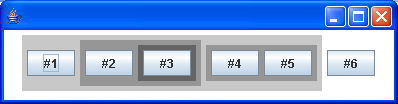
 * A component subclass that demonstrates nested containers and components. It
 * creates the hierarchy shown below, and uses different colors to distinguish
 * the different nesting levels of the containers
 *
 * Containers---panel1----button1 | |---panel2----button2 | |
 * |----panel3----button3 | |------panel4----button4 | |----button5 |---button6
 */
public class Containers extends JPanel {
  public Containers() {
    this.setBackground(Color.white); // This component is white
    this.setFont(new Font("Dialog", Font.BOLD, 24));

    JPanel p1 = new JPanel();
    p1.setBackground(new Color(200, 200, 200)); // Panel1 is darker
    this.add(p1); // p1 is contained by this component
    p1.add(new JButton("#1")); // Button 1 is contained in p1

    JPanel p2 = new JPanel();
    p2.setBackground(new Color(150, 150, 150)); // p2 is darker than p2
    p1.add(p2); // p2 is contained in p1
    p2.add(new JButton("#2")); // Button 2 is contained in p2

    JPanel p3 = new JPanel();
    p3.setBackground(new Color(100, 100, 100)); // p3 is darker than p2
    p2.add(p3); // p3 is contained in p2
    p3.add(new JButton("#3")); // Button 3 is contained in p3

    JPanel p4 = new JPanel();
    p4.setBackground(new Color(150, 150, 150)); // p4 is darker than p1
    p1.add(p4); // p4 is contained in p1
    p4.add(new JButton("#4")); // Button4 is contained in p4
    p4.add(new JButton("#5")); // Button5 is also contained in p4

    this.add(new JButton("#6")); // Button6 is contained in this component
  }

  public static void main(String[] args) {
    JFrame frame = new JFrame();
    frame.addWindowListener(new WindowAdapter() {
      public void windowClosing(WindowEvent e) {
        System.exit(0);
      }
    });

    frame.getContentPane().add(new Containers(), BorderLayout.CENTER);
    // Finally, set the size of the main window, and pop it up.
    frame.setSize(600, 400);
    frame.setVisible(true);
  }
}
Related examples in the same category