DocumentListener Demo : Document Event « Swing JFC « Java
- Java
- Swing JFC
- Document Event
DocumentListener Demo
import java.awt.BorderLayout;
import java.awt.Container;

import javax.swing.JFrame;
import javax.swing.JScrollPane;
import javax.swing.JTextArea;
import javax.swing.event.DocumentEvent;
import javax.swing.event.DocumentListener;
import javax.swing.text.Document;
import javax.swing.text.Element;

public class ListenerSample {
  public static void main(String args[]) {
    JFrame frame = new JFrame("Offset Example");
    Container content = frame.getContentPane();
    JTextArea textArea = new JTextArea();
    JScrollPane scrollPane = new JScrollPane(textArea);
    final Document document = textArea.getDocument();
    document.addDocumentListener(new MyListener());

    content.add(scrollPane, BorderLayout.CENTER);
    frame.setSize(250, 150);
    frame.setVisible(true);
  }
}

class MyListener implements DocumentListener {
  public void changedUpdate(DocumentEvent documentEvent) {
    printInfo(documentEvent);
  }

  public void insertUpdate(DocumentEvent documentEvent) {
    printInfo(documentEvent);
  }

  public void removeUpdate(DocumentEvent documentEvent) {
    printInfo(documentEvent);
  }

  public void printInfo(DocumentEvent documentEvent) {
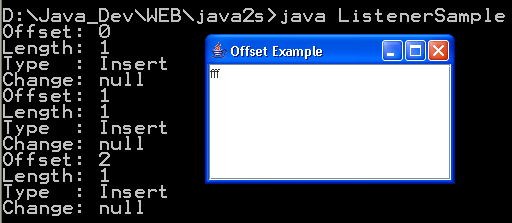
    System.out.println("Offset: " + documentEvent.getOffset());
    System.out.println("Length: " + documentEvent.getLength());
    DocumentEvent.EventType type = documentEvent.getType();
    String typeString = null;
    if (type.equals(DocumentEvent.EventType.CHANGE)) {
      typeString = "Change";
    } else if (type.equals(DocumentEvent.EventType.INSERT)) {
      typeString = "Insert";
    } else if (type.equals(DocumentEvent.EventType.REMOVE)) {
      typeString = "Remove";
    }
    System.out.println("Type  : " + typeString);
    Document documentSource = documentEvent.getDocument();
    Element rootElement = documentSource.getDefaultRootElement();
    DocumentEvent.ElementChange change = documentEvent
        .getChange(rootElement);
    System.out.println("Change: " + change);
  }
};
Related examples in the same category