Frame dialog data exchange
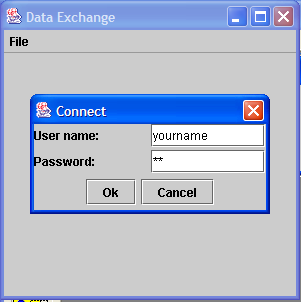
import java.awt.Container;
import java.awt.GridLayout;
import java.awt.Panel;
import java.awt.event.ActionEvent;
import java.awt.event.ActionListener;
import java.awt.event.WindowAdapter;
import java.awt.event.WindowEvent;

import javax.swing.JButton;
import javax.swing.JDialog;
import javax.swing.JFrame;
import javax.swing.JLabel;
import javax.swing.JMenu;
import javax.swing.JMenuBar;
import javax.swing.JMenuItem;
import javax.swing.JPanel;
import javax.swing.JPasswordField;
import javax.swing.JTextField;

public class DataExchangeTest extends JFrame implements ActionListener {
  private ConnectDialog dialog = null;

  private JMenuItem connectItem = new JMenuItem("Connect");

  public DataExchangeTest() {
    setTitle("Data Exchange");
    setSize(300, 300);
    addWindowListener(new WindowAdapter() {
      public void windowClosing(WindowEvent e) {
        System.exit(0);
      }
    });

    JMenuBar mbar = new JMenuBar();
    setJMenuBar(mbar);
    JMenu fileMenu = new JMenu("File");
    mbar.add(fileMenu);

    connectItem.addActionListener(this);
    fileMenu.add(connectItem);

  }

  public void actionPerformed(ActionEvent evt) {
    Object source = evt.getSource();
    if (source == connectItem) {
      UserInfo transfer = new UserInfo("yourname", "pw");
      dialog = new ConnectDialog(this);
      if (dialog.showDialog(transfer)) {
        String name = transfer.username;
        String pwd = transfer.password;
        Container contentPane = getContentPane();
        contentPane.removeAll();
        contentPane.add(new JLabel("username=" + name + ", password="  + pwd), "Center");
        validate();
      }
    }
  }

  public static void main(String[] args) {
    JFrame f = new DataExchangeTest();
    f.show();
  }

}

class UserInfo {
  public String username;

  public String password;

  public UserInfo(String u, String p) {
    username = u;
    password = p;
  }
}

class ConnectDialog extends JDialog implements ActionListener {

  private JTextField username = new JTextField("");

  private JPasswordField password= new JPasswordField("");

  private boolean okPressed;

  private JButton okButton;

  private JButton cancelButton;

  public ConnectDialog(JFrame parent) {
    super(parent, "Connect", true);
    Container contentPane = getContentPane();
    JPanel p1 = new JPanel(new GridLayout(2, 2,3,3));
    p1.add(new JLabel("User name:"));
    p1.add(username);
    p1.add(new JLabel("Password:"));
    p1.add(password );
    contentPane.add("Center", p1);

    Panel p2 = new Panel();
    okButton = addButton(p2, "Ok");
    cancelButton = addButton(p2, "Cancel");
    contentPane.add("South", p2);
    setSize(240, 120);
  }

  private JButton addButton(Container c, String name) {
    JButton button = new JButton(name);
    button.addActionListener(this);
    c.add(button);
    return button;
  }

  public void actionPerformed(ActionEvent evt) {
    Object source = evt.getSource();
    if (source == okButton) {
      okPressed = true;
      setVisible(false);
    } else if (source == cancelButton)
      setVisible(false);
  }

  public boolean showDialog(UserInfo transfer) {
    username.setText(transfer.username);
    password.setText(transfer.password);
    okPressed = false;
    show();
    if (okPressed) {
      transfer.username = username.getText();
      transfer.password = new String(password.getPassword());
    }
    return okPressed;
  }
}
Related examples in the same category