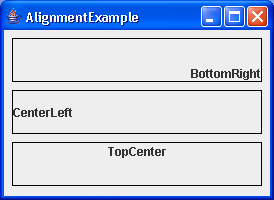
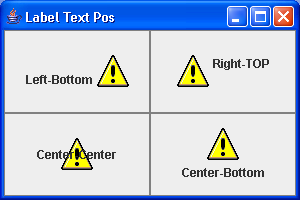
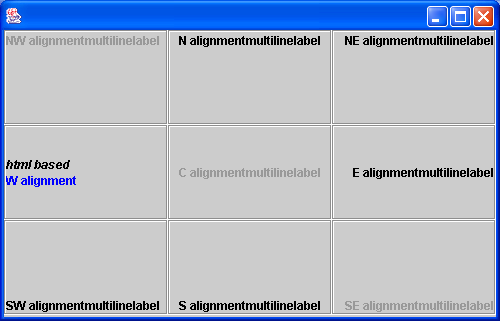
Label alignment
import java.awt.Color;
import java.awt.Component;
import java.awt.Dimension;
import java.awt.Graphics;
import java.awt.GridLayout;

import javax.swing.BorderFactory;
import javax.swing.Icon;
import javax.swing.JFrame;
import javax.swing.JLabel;
import javax.swing.JPanel;

public class AlignLabels extends JPanel {
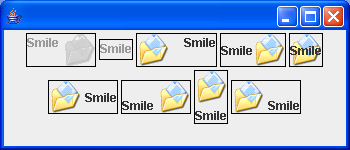
  JLabel[] labels = new JLabel[9];

  public AlignLabels() {
    JLabel label;

    setLayout(new GridLayout(3, 3));

    label = createLabel("NW alignment");
    setNWalignment(label);
    label.setEnabled(false);
    labels[0] = label;
    label = createLabel("N alignment");
    setNalignment(label);
    labels[1] = label;
    label = createLabel("NE alignment");
    setNEalignment(label);
    labels[2] = label;
    label = createLabel("W alignment");
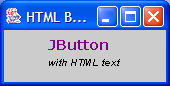
    label.setText("<html><i>html based<br></i><font color=blue>W alignment</font>");
    setWalignment(label);
    labels[3] = label;
    label = createLabel("C alignment");
    setCalignment(label);
    label.setEnabled(false);
    labels[4] = label;
    label = createLabel("E alignment");
    setEalignment(label);
    labels[5] = label;
    label = createLabel("SW alignment");
    setSWalignment(label);
    labels[6] = label;
    label = createLabel("S alignment");
    setSalignment(label);
    labels[7] = label;
    label = createLabel("SE alignment");
    setSEalignment(label);
    label.setEnabled(false);
    labels[8] = label;
  }

  public static void main(String[] a) {
    JFrame mainFrame = new JFrame();
    mainFrame.getContentPane().add(new AlignLabels());

    mainFrame.setSize(500,500);

    mainFrame.setVisible(true);

  }

  JLabel[] getLabels() {
    return labels;
  }

  JLabel createLabel(String text) {
    String separator = System.getProperty("line.separator");
    JLabel label = new JLabel(text + separator + "multiline" + separator
        + "label");
    label.setToolTipText(text + "\n\ndoubled space\n\ntooltip");
    label.setBorder(BorderFactory.createEtchedBorder());
    this.add(label);
    label.setPreferredSize(new Dimension(125, 125));
    return label;
  }

  void setNWalignment(JLabel b) {
    b.setHorizontalAlignment(JLabel.LEFT);
    b.setVerticalAlignment(JLabel.TOP);
  }

  void setNalignment(JLabel b) {
    b.setHorizontalAlignment(JLabel.CENTER);
    b.setVerticalAlignment(JLabel.TOP);
  }

  void setNEalignment(JLabel b) {
    b.setHorizontalAlignment(JLabel.RIGHT);
    b.setVerticalAlignment(JLabel.TOP);
  }

  void setWalignment(JLabel b) {
    b.setHorizontalAlignment(JLabel.LEFT);
    b.setVerticalAlignment(JLabel.CENTER);
  }

  void setCalignment(JLabel b) {
    b.setHorizontalAlignment(JLabel.CENTER);
    b.setVerticalAlignment(JLabel.CENTER);
  }

  void setEalignment(JLabel b) {
    b.setHorizontalAlignment(JLabel.RIGHT);
    b.setVerticalAlignment(JLabel.CENTER);
  }

  void setSWalignment(JLabel b) {
    b.setHorizontalAlignment(JLabel.LEFT);
    b.setVerticalAlignment(JLabel.BOTTOM);
  }

  void setSalignment(JLabel b) {
    b.setHorizontalAlignment(JLabel.CENTER);
    b.setVerticalAlignment(JLabel.BOTTOM);
  }

  void setSEalignment(JLabel b) {
    b.setHorizontalAlignment(JLabel.RIGHT);
    b.setVerticalAlignment(JLabel.BOTTOM);
  }
}

class ColoredSquare implements Icon {
  Color color;

  public ColoredSquare(Color color) {
    this.color = color;
  }

  public void paintIcon(Component c, Graphics g, int x, int y) {
    Color oldColor = g.getColor();
    g.setColor(color);
    g.fill3DRect(x, y, getIconWidth(), getIconHeight(), true);
    g.setColor(oldColor);
  }

  public int getIconWidth() {
    return 12;
  }

  public int getIconHeight() {
    return 12;
  }
}
Related examples in the same category