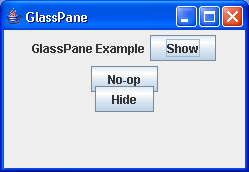
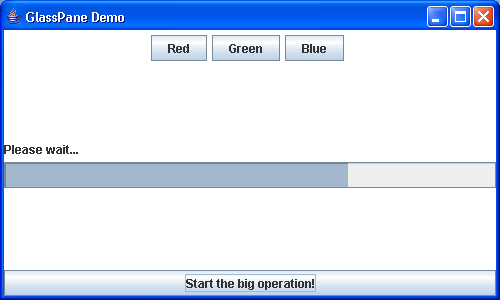
Show how a glass pane can be used to block mouse (and key!) events
/*
Java Swing, 2nd Edition
By Marc Loy, Robert Eckstein, Dave Wood, James Elliott, Brian Cole
ISBN: 0-596-00408-7
Publisher: O'Reilly
*/

/*
This directory contains a fixed GlassPane example.

This fixes two bugs:
  1) Key events were not supressed in the original example, they are now
  2) On 1.2 and 1.3 systems, firHtmlLabelst mouse click after removing glass pane
     would not be sent to the component under the mouse.  This was a bug
     in the way JRootPane handled the glass pane component that has been
     fixed in the 1.4 release.  FixedGlassPane.java (see below) provides
     a workaround for 1.2 and 1.3, but is still safe to use with 1.4.

The updated files are:

SwingGlassExample.java       Updated to use (and control) the new glass pane
FixedGlassPane.java    Extension of JPanel that allows for redispatching
                                      erroneous events to their rightful owners
*/

// SwingGlassExample.java
//Show how a glass pane can be used to block mouse (and key!) events.
//Updated in response to discussions with Mark Hansen at Unify.
//

import java.awt.BorderLayout;
import java.awt.Color;
import java.awt.Component;
import java.awt.Container;
import java.awt.GridLayout;
import java.awt.Point;
import java.awt.Toolkit;
import java.awt.event.ActionEvent;
import java.awt.event.ActionListener;
import java.awt.event.FocusEvent;
import java.awt.event.FocusListener;
import java.awt.event.MouseEvent;
import java.awt.event.MouseListener;
import java.awt.event.MouseMotionListener;

import javax.swing.ImageIcon;
import javax.swing.JButton;
import javax.swing.JFrame;
import javax.swing.JLabel;
import javax.swing.JMenuBar;
import javax.swing.JOptionPane;
import javax.swing.JPanel;
import javax.swing.JProgressBar;
import javax.swing.SwingUtilities;
import javax.swing.Timer;

public class SwingGlassExample extends JFrame {
  // We'll use a custom glass pane rather than a generic JPanel.
  FixedGlassPane glass;

  JProgressBar waiter = new JProgressBar(0, 100);

  Timer timer;

  public SwingGlassExample() {
    super("GlassPane Demo");
    setSize(500, 300);
    setDefaultCloseOperation(EXIT_ON_CLOSE);

    // Now set up a few buttons & images for the main application
    JPanel mainPane = new JPanel();
    mainPane.setBackground(Color.white);
    JButton redB = new JButton("Red");
    JButton blueB = new JButton("Blue");
    JButton greenB = new JButton("Green");
    mainPane.add(redB);
    mainPane.add(greenB);
    mainPane.add(blueB);
    mainPane.add(new JLabel(new ImageIcon("oreilly.gif")));

    // Attach the popup debugger to the main app buttons so you
    // see the effect of making a glass pane visible
    PopupDebugger pd = new PopupDebugger(this);
    redB.addActionListener(pd);
    greenB.addActionListener(pd);
    blueB.addActionListener(pd);

    // And last but not least, our button to launch the glass pane
    JButton startB = new JButton("Start the big operation!");
    startB.addActionListener(new ActionListener() {
      public void actionPerformed(java.awt.event.ActionEvent A) {
        // manually control the 1.2/1.3 bug work-around
        glass.setNeedToRedispatch(false);
        glass.setVisible(true);
        startTimer();
      }
    });

    Container contentPane = getContentPane();
    contentPane.add(mainPane, BorderLayout.CENTER);
    contentPane.add(startB, BorderLayout.SOUTH);

    // Set up the glass pane with a little message and a progress bar...
    JPanel controlPane = new JPanel(new GridLayout(2, 1));
    controlPane.setOpaque(false);
    controlPane.add(new JLabel("Please wait..."));
    controlPane.add(waiter);
    glass = new FixedGlassPane(getJMenuBar(), getContentPane());
    glass.setLayout(new GridLayout(0, 1));
    glass.setOpaque(false);
    glass.add(new JLabel()); // padding...
    glass.add(new JLabel());
    glass.add(controlPane);
    glass.add(new JLabel());
    glass.add(new JLabel());
    setGlassPane(glass);
  }

  // A quick method to start up a 10 second timer and update the
  // progress bar
  public void startTimer() {
    if (timer == null) {
      timer = new Timer(1000, new ActionListener() {
        int progress = 0;

        public void actionPerformed(ActionEvent A) {
          progress += 10;
          waiter.setValue(progress);

          // Once we hit 100%, remove the glass pane and reset the
          // progress bar stuff
          if (progress >= 100) {
            progress = 0;
            timer.stop();
            glass.setVisible(false);
            // Again, manually control our 1.2/1.3 bug workaround
            glass.setNeedToRedispatch(true);
            waiter.setValue(0);
          }
        }
      });
    }
    if (timer.isRunning()) {
      timer.stop();
    }
    timer.start();
  }

  // A graphical debugger that pops up anytime a button is pressed
  public class PopupDebugger implements ActionListener {
    private JFrame parent;

    public PopupDebugger(JFrame f) {
      parent = f;
    }

    public void actionPerformed(ActionEvent ae) {
      JOptionPane.showMessageDialog(parent, ae.getActionCommand());
    }
  }

  public static void main(String[] args) {
    SwingGlassExample ge = new SwingGlassExample();
    ge.setVisible(true);
  }
}

// Based in part on code from the Java Tutorial for glass panes (java.sun.com).
// This version handles both mouse events and focus events.  The focus is
// held on the panel so that key events are also effectively ignored.  (But
// a KeyListener could still be attached by the program activating this pane.)
//


class FixedGlassPane extends JPanel implements MouseListener,
    MouseMotionListener, FocusListener {
  // helpers for redispatch logic
  Toolkit toolkit;

  JMenuBar menuBar;

  Container contentPane;

  boolean inDrag = false;

  // trigger for redispatching (allows external control)
  boolean needToRedispatch = false;

  public FixedGlassPane(JMenuBar mb, Container cp) {
    toolkit = Toolkit.getDefaultToolkit();
    menuBar = mb;
    contentPane = cp;
    addMouseListener(this);
    addMouseMotionListener(this);
    addFocusListener(this);
  }

  public void setVisible(boolean v) {
    // Make sure we grab the focus so that key events don't go astray.
    if (v)
      requestFocus();
    super.setVisible(v);
  }

  // Once we have focus, keep it if we're visible
  public void focusLost(FocusEvent fe) {
    if (isVisible())
      requestFocus();
  }

  public void focusGained(FocusEvent fe) {
  }

  // We only need to redispatch if we're not visible, but having full control
  // over this might prove handy.
  public void setNeedToRedispatch(boolean need) {
    needToRedispatch = need;
  }

  /*
   * (Based on code from the Java Tutorial) We must forward at least the mouse
   * drags that started with mouse presses over the check box. Otherwise, when
   * the user presses the check box then drags off, the check box isn't
   * disarmed -- it keeps its dark gray background or whatever its L&F uses to
   * indicate that the button is currently being pressed.
   */
  public void mouseDragged(MouseEvent e) {
    if (needToRedispatch)
      redispatchMouseEvent(e);
  }

  public void mouseMoved(MouseEvent e) {
    if (needToRedispatch)
      redispatchMouseEvent(e);
  }

  public void mouseClicked(MouseEvent e) {
    if (needToRedispatch)
      redispatchMouseEvent(e);
  }

  public void mouseEntered(MouseEvent e) {
    if (needToRedispatch)
      redispatchMouseEvent(e);
  }

  public void mouseExited(MouseEvent e) {
    if (needToRedispatch)
      redispatchMouseEvent(e);
  }

  public void mousePressed(MouseEvent e) {
    if (needToRedispatch)
      redispatchMouseEvent(e);
  }

  public void mouseReleased(MouseEvent e) {
    if (needToRedispatch) {
      redispatchMouseEvent(e);
      inDrag = false;
    }
  }

  private void redispatchMouseEvent(MouseEvent e) {
    boolean inButton = false;
    boolean inMenuBar = false;
    Point glassPanePoint = e.getPoint();
    Component component = null;
    Container container = contentPane;
    Point containerPoint = SwingUtilities.convertPoint(this,
        glassPanePoint, contentPane);
    int eventID = e.getID();

    if (containerPoint.y < 0) {
      inMenuBar = true;
      container = menuBar;
      containerPoint = SwingUtilities.convertPoint(this, glassPanePoint,
          menuBar);
      testForDrag(eventID);
    }

    //XXX: If the event is from a component in a popped-up menu,
    //XXX: then the container should probably be the menu's
    //XXX: JPopupMenu, and containerPoint should be adjusted
    //XXX: accordingly.
    component = SwingUtilities.getDeepestComponentAt(container,
        containerPoint.x, containerPoint.y);

    if (component == null) {
      return;
    } else {
      inButton = true;
      testForDrag(eventID);
    }

    if (inMenuBar || inButton || inDrag) {
      Point componentPoint = SwingUtilities.convertPoint(this,
          glassPanePoint, component);
      component.dispatchEvent(new MouseEvent(component, eventID, e
          .getWhen(), e.getModifiers(), componentPoint.x,
          componentPoint.y, e.getClickCount(), e.isPopupTrigger()));
    }
  }

  private void testForDrag(int eventID) {
    if (eventID == MouseEvent.MOUSE_PRESSED) {
      inDrag = true;
    }
  }
}
Related examples in the same category