Key and mouse Action infomation : Mouse Action « Event « Python

Python
1. 2D
2. Application
3. Buildin Function
4. Class
5. Data Structure
6. Data Type
7. Development
8. Dictionary
9. Event
10. Exception
11. File
12. Function
13. GUI Pmw
14. GUI Tk
15. Language Basics
16. List
17. Math
18. Network
19. String
20. System
21. Thread
22. Tuple
23. Utility
24. XML
Microsoft Office Word 2007 Tutorial
Java
Java Tutorial
Java Source Code / Java Documentation
Java Open Source
Jar File Download
Java Articles
Java Products
Java by API
C# / C Sharp
C# / CSharp Tutorial
ASP.Net
JavaScript DHTML
JavaScript Tutorial
JavaScript Reference
HTML / CSS
HTML CSS Reference
C / ANSI-C
C Tutorial
C++
C++ Tutorial
PHP
SQL Server / T-SQL
Oracle PL / SQL
Oracle PL/SQL Tutorial
PostgreSQL
SQL / MySQL
MySQL Tutorial
VB.Net
VB.Net Tutorial
Python » Event » Mouse ActionScreenshots 
Key and mouse Action infomation
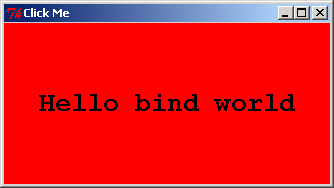


from Tkinter import *

def showAllEvent(event):
    print event
    for attr in dir(event)
        print attr, '=>', getattr(event, attr


def showPosEvent(event):
    print 'Widget=%s X=%s Y=%s' % (event.widget, event.x, event.y)


def onMiddleClick(event):
    print 'Got middle mouse button click:', 
    showPosEvent(event)
    showAllEvent(event)


tkroot = Tk()
labelfont = ('courier', 20'bold')               
widget = Label(tkroot, text='Hello bind world')
widget.config(bg='red', font=labelfont)        
widget.config(height=5, width=20)              
widget.pack(expand=YES, fill=BOTH)

widget.bind('<Button-2>',  onMiddleClick)       


widget.focus()                                
tkroot.title('Click Me')
tkroot.mainloop()


Related examples in the same category
1. Mouse action: single click, double clickMouse action: single click, double click
2. Button mouse action: mouse in, out and rolloverButton mouse action: mouse in, out and rollover
3. Image button mouse action: mouse in, out and rollover
4. Mouse events on a frame: Mouse clicked, positionMouse events on a frame: Mouse clicked, position
5. Mouse events on a frame: Mouse released, positionMouse events on a frame: Mouse released, position
6. Mouse events on a frame: Mouse entered
7. Mouse events on a frame: Mouse leftMouse events on a frame: Mouse left
8. Mouse events on a frame: MouseMouse events on a frame: Mouse
9. Mouse button differentiation: Mouse clickMouse button differentiation: Mouse click
10. Mouse button differentiation: center button clicMouse button differentiation: center button clic
11. Mouse button differentiation: Right Button clickMouse button differentiation: Right Button click
12. Mouse Action: mouse cursor enterMouse Action: mouse cursor enter
13. Button single click and double clickButton single click and double click
14. Capturing clicks in a windowCapturing clicks in a window
15. Menu item mouse on (active) foreground colorMenu item mouse on (active) foreground color
16. Mouse Double click
17. Mouse action: left click
18. Mouse action: Right click
19. Mouse action: Middle Mouse key
20. Mouse action: double click
21. Mouse action: drag
22. Bind mouse click action to the object on a canvasBind mouse click action to the object on a canvas
w_w__w.___j___a__v_a___2_s.__c__om_ | Contact Us
Copyright 2003 - 08 Demo Source and Support. All rights reserved.
All other trademarks are property of their respective owners.