Using Tk option database to configure Tk widgets
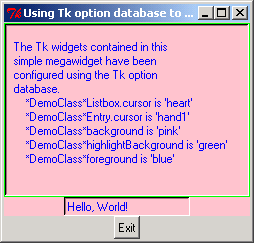
title = 'Using Tk option database to configure Tk widgets'

# Import Pmw from this directory tree.
import sys
sys.path[:0] = ['../../..']

import string
import Tkinter
import Pmw

info = """
  The Tk widgets contained in this
  simple megawidget have been
  configured using the Tk option
  database.
      *DemoClass*Listbox.cursor is 'heart'
      *DemoClass*Entry.cursor is 'hand1'
      *DemoClass*background is 'pink'
      *DemoClass*highlightBackground is 'green'
      *DemoClass*foreground is 'blue'
"""

class DemoClass(Pmw.MegaWidget):

    # Demo Pmw megawidget.

    def __init__(self, parent = None, **kw):

  # Define the megawidget options.
  optiondefs = ()
  self.defineoptions(kw, optiondefs)

  # Initialise the base class (after defining the options).
  Pmw.MegaWidget.__init__(self, parent)

  interior = self.interior()
  listbox = Tkinter.Listbox(interior, height = 12, width = 40)
  listbox.pack(fill='both', expand='yes')
  for line in string.split(info, '\n'):
      listbox.insert('end', line)

  entry = Tkinter.Entry(interior)
  entry.pack(fill='y')
  entry.insert(0, 'Hello, World!')

  # Check keywords and initialise options.
  self.initialiseoptions()

class Demo:
    def __init__(self, parent):

  # Test Tk option database settings.
  parent.option_add('*DemoClass*Listbox.cursor', 'heart')
  parent.option_add('*DemoClass*Entry.cursor', 'hand1')
  parent.option_add('*DemoClass*background', 'pink')
  parent.option_add('*DemoClass*highlightBackground', 'green')
  parent.option_add('*DemoClass*foreground', 'blue')

  # Create and pack the megawidget.
  demo = DemoClass(parent)
  demo.pack(fill = 'both', expand = 1)

######################################################################

# Create demo in root window for testing.
if __name__ == '__main__':
    root = Tkinter.Tk()
    Pmw.initialise(root)
    root.title(title)

    exitButton = Tkinter.Button(root, text = 'Exit', command = root.destroy)
    exitButton.pack(side = 'bottom')
    widget = Demo(root)
    root.mainloop()
Related examples in the same category