Paint Lines
Imports System
Imports System.Drawing
Imports System.Drawing.Printing
Imports System.Collections
Imports System.ComponentModel
Imports System.Windows.Forms
Imports System.Drawing.Drawing2D

Class MyFirstForm
    Inherits Form


    Public Sub Draw(ByVal g As Graphics)
        g.SmoothingMode = SmoothingMode.AntiAlias

        Dim rect As Rectangle = Me.ClientRectangle
        Dim cx As Integer = rect.Width
        Dim cy As Integer = rect.Height
        Dim scale As Single = CSng(cy) / CSng(cx)

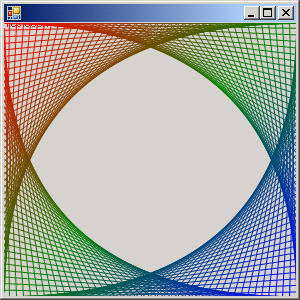
        Dim _brush As LinearGradientBrush = New LinearGradientBrush(Me.ClientRectangle, Color.Empty, Color.Empty, 45)

        Dim blend As ColorBlend = New ColorBlend()
        blend.Colors = New Color() {Color.Red, Color.Green, Color.Blue}
        blend.Positions = New Single() {0.0, 0.5, 1.0}
        _brush.InterpolationColors = blend
        Dim _pen As Pen = New Pen(_brush)
        Dim x As Integer
        For x = 0 To cx Step 7
            g.DrawLine(_pen, 0, x * scale, cx - x, 0)
            g.DrawLine(_pen, 0, (cx - x) * scale, cx - x, cx * scale)
            g.DrawLine(_pen, cx - x, 0 * scale, cx, (cx - x) * scale)
            g.DrawLine(_pen, cx - x, cx * scale, cx, x * scale)
        Next

        Dim format As StringFormat = New StringFormat()
        format.Alignment = StringAlignment.Center
        format.LineAlignment = StringAlignment.Center

        Dim s As String = "Ain't graphics cool?"
        g.DrawString(s, Me.Font, _brush, rect.X, rect.Y, format)
    End Sub

    Private Sub MyPaint(ByVal sender As Object, ByVal e As System.Windows.Forms.PaintEventArgs) Handles MyBase.Paint
        Dim g As Graphics = e.Graphics
        Draw(g)
    End Sub

    Shared Sub Main()
        Dim myform As Form = New MyFirstForm()
        Application.Run(myform)
    End Sub
End Class
Related examples in the same category