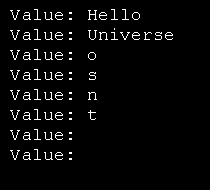
IEnumerable: array like access
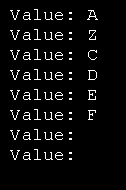
Imports System
Imports System.Collections

Public Class MainClass

    Shared Sub Main(ByVal args As String())
             ' create a new list box and initialize
             Dim currentListBox As New EnumerableClass("A", "B")

             ' add a few strings
             currentListBox.Add("C")
             currentListBox.Add("D")
             currentListBox.Add("E")
             currentListBox.Add("F")

             ' test the access
             Dim subst As String = "Z"
             currentListBox(1) = subst

             ' access all the strings
             Dim s As String
             For Each s In currentListBox
                 Console.WriteLine("Value: {0}", s)
             Next
    End Sub

End Class

     Public Class EnumerableClass : Implements IEnumerable
         Private strings( ) As String
         Private ctr As Integer = 0

         Private Class MyEnumerator
             Implements IEnumerator
             Private currentListBox As EnumerableClass
             Private index As Integer

             Public Sub New(ByVal currentListBox As EnumerableClass)
                 Me.currentListBox = currentListBox
                 index = -1
             End Sub

             Public Function MoveNext( ) As Boolean _
               Implements IEnumerator.MoveNext
                 index += 1
                 If index >= currentListBox.strings.Length Then
                     Return False
                 Else
                     Return True
                 End If
             End Function

             Public Sub Reset( ) _
               Implements IEnumerator.Reset
                 index = -1
             End Sub

             Public ReadOnly Property Current( ) As Object _
             Implements IEnumerator.Current
                 Get
                     Return currentListBox(index)
                 End Get
             End Property
         End Class  ' end nested class

         Public Function GetEnumerator( ) As IEnumerator _
         Implements IEnumerable.GetEnumerator
             Return New MyEnumerator(Me)
         End Function

         Public Sub New( _
           ByVal ParamArray initialStrings( ) As String)
             ReDim strings(7)

             Dim s As String
             For Each s In initialStrings
                 strings(ctr) = s
                 ctr += 1
             Next
         End Sub

         Public Sub Add(ByVal theString As String)
             strings(ctr) = theString
             ctr += 1
         End Sub

         Default Public Property Item( _
           ByVal index As Integer) As String
             Get
                 If index < 0 Or index >= strings.Length Then
                     ' handle bad index
                     Exit Property
                 End If
                 Return strings(index)
             End Get
             Set(ByVal Value As String)
                 strings(index) = Value
             End Set
         End Property

         Public Function GetNumEntries( ) As Integer
             Return ctr
         End Function

     End Class
Related examples in the same category