Use DataColumnMapping to Map column
Imports System
Imports System.Xml
Imports System.Xml.Schema
Imports System.IO
Imports System.Data.OleDb
Imports System.Data.Common
Imports System.Data


Public Class MainClass

    Shared Sub DoDataMappings(ByVal da As OleDbDataAdapter)
        Try
            ' Define an array of column to map
            Dim dcmMappedColumns() As DataColumnMapping = { _
                      New DataColumnMapping("ID", "EmployeeID"), _
                      New DataColumnMapping("FirstName", "FirstName"), _
                      New DataColumnMapping("LastName", "LastName")}

            ' Define the table containing the mapped columns
            Dim dtmUsers As New DataTableMapping("Table", "Employee", _
            dcmMappedColumns)

            ' Activate the mapping mechanism
            da.TableMappings.Add(dtmUsers)
        Catch ex As Exception

            ' An error occurred. Show the error message
            Console.WriteLine(ex.Message)
        End Try
    End Sub

    Shared Sub Main()
        Try
            ' Define a connection object
            Dim dbConn As New OleDbConnection("Provider=Microsoft.Jet.OLEDB.4.0;Password=;User ID=Admin;Data Source=Employee.mdb")

            ' Create a data adapter to retrieve records from db
            Dim daUsers As New OleDbDataAdapter("SELECT ID, FirstName, LastName FROM Employee", dbConn)
            Dim dsUsers As New DataSet("Employee")

            DoDataMappings(daUsers)

            ' Fill the dataset
            daUsers.Fill(dsUsers)

            ' Go through the records and print them using the mapped names
            Dim r As DataRow
            For Each r In dsUsers.Tables("Employee").Rows
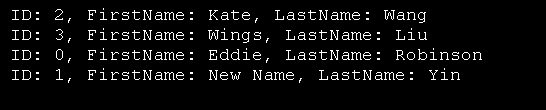
                Console.WriteLine("ID: {0}, FirstName: {1}, LastName: {2}", r("EmployeeID"), r("FirstName"), r("LastName"))
            Next
        Catch ex As Exception
            ' An error occurred. Show the error message
            Console.WriteLine(ex.Message)
        End Try
    End Sub
End Class
 Employee.zip( 7 k)
Related examples in the same category