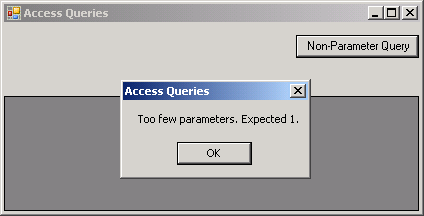
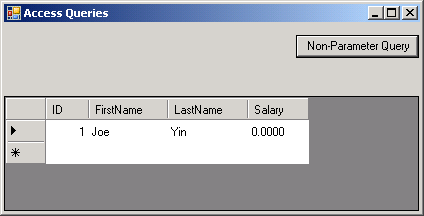
Pass Parameters into Store Procedure
Imports System
Imports System.Data
Imports System.Data.OleDb
Imports System.Data.SqlClient
Imports System.Collections
Imports System.Windows.Forms
Imports System.Resources

Public Class MainClass
    Shared Sub Main()
        Dim form1 As Form = New Form1()
        Application.Run(form1)

    End Sub
End Class


Public Class Form1
    'Form level variables
    Private strConnectionString As String = _
        "Provider=Microsoft.Jet.OLEDB.4.0;" & _
        "Data Source=Employee.mdb;"

    Private objConnection As OleDbConnection
    Private objCommand As OleDbCommand
    Private objDataAdapter As OleDbDataAdapter
    Private objDataSet As DataSet

    Private Sub PopulateGrid()
        'Initialize a new instance of the OleDbDataAdapter class
        objDataAdapter = New OleDbDataAdapter

        'Initialize a new instance of the DataSet class
        objDataSet = New DataSet

        'Set the SelectCommand for the OleDbDataAdapter
        objDataAdapter.SelectCommand = objCommand

        Try
            'Populate the DataSet
            objDataAdapter.Fill(objDataSet, "Employee")

            'Bind the DataSet to the DataGrid
            grdResults.DataSource = objDataSet
            grdResults.DataMember = "Employee"

            'Set the CellBorderStyle property
            grdResults.CellBorderStyle = DataGridViewCellBorderStyle.None

            'Set the SelectionMode property
            grdResults.SelectionMode = DataGridViewSelectionMode.FullRowSelect

            'Set the AutoSizeColumnsMode property
            grdResults.AutoSizeColumnsMode = _
                DataGridViewAutoSizeColumnsMode.AllCells

            'Right align SequenceNumber column
            grdResults.Columns("ID").DefaultCellStyle.Alignment = _
                DataGridViewContentAlignment.MiddleRight

        Catch OleDbException As OleDbException
            MessageBox.Show(OleDbException.Message, "Access Queries")
        End Try

        'Cleanup
        objCommand.Dispose()
        objCommand = Nothing
        objDataAdapter.Dispose()
        objDataAdapter = Nothing
        objDataSet.Dispose()
        objDataSet = Nothing
        objConnection.Dispose()
        objConnection = Nothing
    End Sub

    Private Sub btnNonParameterQuery_Click(ByVal sender As Object, _
        ByVal e As System.EventArgs) Handles btnNonParameterQuery.Click


        'Initialize a new instance of the OleDbConnection class
        objConnection = New OleDbConnection(strConnectionString)

        'Initialize a new instance of the OleDbCommand class
        objCommand = New OleDbCommand

        'Set the objCommand object properties
        objCommand.CommandText = "StoreProcedureForEmployee"
        objCommand.CommandType = CommandType.StoredProcedure
        objCommand.Connection = objConnection

        'Add the required parameter for the query
        objCommand.Parameters.Add("@ID", OleDbType.TinyInt, 8).Value = 1

        'Populate the DataGridView
        Call PopulateGrid()
    End Sub
End Class


<Global.Microsoft.VisualBasic.CompilerServices.DesignerGenerated()> _
Partial Public Class Form1
    Inherits System.Windows.Forms.Form

    'Form overrides dispose to clean up the component list.
    <System.Diagnostics.DebuggerNonUserCode()> _
    Protected Overloads Overrides Sub Dispose(ByVal disposing As Boolean)
        If disposing AndAlso components IsNot Nothing Then
            components.Dispose()
        End If
        MyBase.Dispose(disposing)
    End Sub

    'Required by the Windows Form Designer
    Private components As System.ComponentModel.IContainer

    'NOTE: The following procedure is required by the Windows Form Designer
    'It can be modified using the Windows Form Designer.
    'Do not modify it using the code editor.
    <System.Diagnostics.DebuggerStepThrough()> _
    Private Sub InitializeComponent()
        Me.grdResults = New System.Windows.Forms.DataGridView
        Me.btnNonParameterQuery = New System.Windows.Forms.Button
        CType(Me.grdResults, System.ComponentModel.ISupportInitialize).BeginInit()
        Me.SuspendLayout()
        '
        'grdResults
        '
        Me.grdResults.Anchor = CType((((System.Windows.Forms.AnchorStyles.Top Or System.Windows.Forms.AnchorStyles.Bottom) _
                    Or System.Windows.Forms.AnchorStyles.Left) _
                    Or System.Windows.Forms.AnchorStyles.Right), System.Windows.Forms.AnchorStyles)
        Me.grdResults.Location = New System.Drawing.Point(0, 73)
        Me.grdResults.Name = "grdResults"
        Me.grdResults.Size = New System.Drawing.Size(415, 115)
        Me.grdResults.TabIndex = 6
        '
        'btnNonParameterQuery
        '
        Me.btnNonParameterQuery.Anchor = CType((System.Windows.Forms.AnchorStyles.Top Or System.Windows.Forms.AnchorStyles.Right), System.Windows.Forms.AnchorStyles)
        Me.btnNonParameterQuery.Location = New System.Drawing.Point(292, 12)
        Me.btnNonParameterQuery.Name = "btnNonParameterQuery"
        Me.btnNonParameterQuery.Size = New System.Drawing.Size(123, 23)
        Me.btnNonParameterQuery.TabIndex = 5
        Me.btnNonParameterQuery.Text = "Non-Parameter Query"
        '
        'Form1
        '
        Me.AutoScaleDimensions = New System.Drawing.SizeF(6.0!, 13.0!)
        Me.AutoScaleMode = System.Windows.Forms.AutoScaleMode.Font
        Me.ClientSize = New System.Drawing.Size(416, 189)
        Me.Controls.Add(Me.grdResults)
        Me.Controls.Add(Me.btnNonParameterQuery)
        Me.Name = "Form1"
        Me.StartPosition = System.Windows.Forms.FormStartPosition.CenterScreen
        Me.Text = "Access Queries"
        CType(Me.grdResults, System.ComponentModel.ISupportInitialize).EndInit()
        Me.ResumeLayout(False)
        Me.PerformLayout()

    End Sub
    Friend WithEvents grdResults As System.Windows.Forms.DataGridView
    Friend WithEvents btnNonParameterQuery As System.Windows.Forms.Button

End Class
 Employee.zip( 7 k)
Related examples in the same category