Use Filter to filter Data Table
Imports System
Imports System.Data
Imports System.Data.SqlClient


public class MainClass
   Shared Sub Main()
      Dim thisConnection As New SqlConnection("server=(local)\SQLEXPRESS;" & _
          "integrated security=sspi;database=MyDatabase")

      ' Sql Query
      Dim sql As String = "SELECT ID, FirstName, LastName FROM Employee"

      Try
         ' Create Data Adapter
         Dim da As New SqlDataAdapter
         da.SelectCommand = New SqlCommand(sql, thisConnection)

         ' Create and fill Dataset
         Dim ds As New DataSet
         da.Fill(ds, "Employee")

         ' Get the Data Tables Collection
         Dim dtc As DataTableCollection = ds.Tables

         ' Get and Display First Data Table
         ' 1. Display header
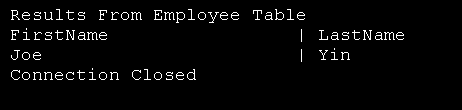
         Console.WriteLine("Results From Employee Table")
         Console.WriteLine("FirstName".PadRight(25) & " | LastName")

         ' 2. Set display filter
         Dim filter1 As String = "FirstName = 'Joe'"

         ' 3. Set sort
         Dim sort1 As String = "LastName asc"

         ' 4. Display filtered and sorted data
         For Each row As DataRow In dtc("Employee").Select(filter1, sort1)
            Console.WriteLine("{0} | {1}", _
               row("FirstName").ToString().PadRight(25), _
               row("LastName"))
         Next


      Catch ex As SqlException
         ' Display error
         Console.WriteLine("Error: " & ex.ToString())
      Finally
         ' Close Connection
         thisConnection.Close()
         Console.WriteLine("Connection Closed")
      End Try
   End Sub
End Class
Related examples in the same category