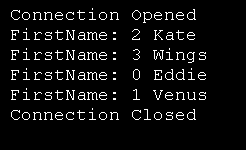
Use OleDbDataReader to read data
Imports System
Imports System.Data
Imports System.Data.OleDb
Imports System.Data.SqlClient
Imports System.Collections
Imports System.Windows.Forms
Imports System.Resources

Public Class MainClass
    Shared Sub Main()
        'Declare variables and objects
        Dim strConnectionString As String = _
            "Provider=Microsoft.Jet.OLEDB.4.0;" & _
            "Data Source=Employee.mdb;"
        Dim objConnection As New OleDbConnection(strConnectionString)
        Dim strSQL As String = "SELECT * FROM Employee"
        Dim objCommand As New OleDbCommand(strSQL, objConnection)
        Dim objDataAdapter As New OleDbDataAdapter(objCommand)
        Dim objDataTable As New Data.DataTable("Employee")
        Dim objDataRow As DataRow

        Try
            'Open the database connection
            objConnection.Open()
        Catch OleDbExceptionErr As OleDbException
            'Write the exception
            Console.WriteLine(OleDbExceptionErr.Message)
        Catch InvalidOperationExceptionErr As InvalidOperationException
            'Write the exception
            Console.WriteLine(InvalidOperationExceptionErr.Message)
        End Try


        'Declare an OleDbDataReader object
        Dim objDataReader As OleDbDataReader

        Try
            'Execute the SQL text
            objDataReader = objCommand.ExecuteReader()

            'Check to see if we have data
            If objDataReader.HasRows Then
                'Process all rows
                While objDataReader.Read()
                    'Get the data in each column
                    For intIndex As Integer = 0 To objDataReader.FieldCount - 1
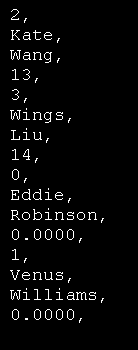
                        Console.WriteLine( objDataReader.Item(intIndex).ToString & ", ")
                    Next
                End While

            End If

            'Close the reader
            objDataReader.Close()

        Catch OleDbExceptionErr As OleDbException
            Console.WriteLine(OleDbExceptionErr.Message)
        End Try


        'Close the database connection
        objConnection.Close()

        'Clean up
        objDataRow = Nothing
        objDataTable.Dispose()
        objDataTable = Nothing
        objDataAdapter.Dispose()
        objDataAdapter = Nothing
        objCommand.Dispose()
        objCommand = Nothing
        objConnection.Dispose()
        objConnection = Nothing

    End Sub
End Class
 Employee.zip( 7 k)
Related examples in the same category