RichTextBox ReDo and UnDo
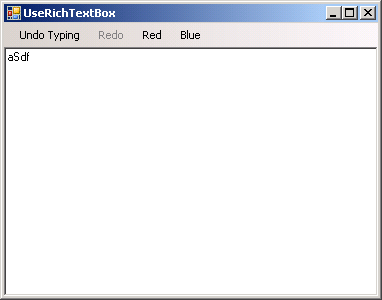
Imports System
Imports System.Data
Imports System.Windows.Forms
Imports System.Drawing
Imports System.Diagnostics
Imports System.Drawing.Printing
Imports System.ComponentModel


Public Class MainClass

    Shared Sub Main()

       Dim form1 As Form = New Form1
       Application.Run(form1)
    End Sub
End Class


Public Class Form1
    Private Sub rchNotes_TextChanged(ByVal sender As System.Object, ByVal e As System.EventArgs) Handles rchNotes.TextChanged
        btnUndo.Enabled = rchNotes.CanUndo
        btnRedo.Enabled = rchNotes.CanRedo

        If btnUndo.Enabled Then
            btnUndo.Text = "Undo " & rchNotes.UndoActionName
        Else
            btnUndo.Text = "Undo"
        End If

        If btnRedo.Enabled Then
            If btnRedo.Enabled Then btnRedo.Text = "Redo " & rchNotes.RedoActionName
        Else
            If btnRedo.Enabled Then btnRedo.Text = "Redo"
        End If
    End Sub

    Private Sub btnUndo_Click(ByVal sender As System.Object, ByVal e As System.EventArgs) Handles btnUndo.Click
        rchNotes.Undo()
    End Sub

    Private Sub btnRedo_Click(ByVal sender As System.Object, ByVal e As System.EventArgs) Handles btnRedo.Click
        rchNotes.Redo()
    End Sub

    Private Sub btnRed_Click(ByVal sender As System.Object, ByVal e As System.EventArgs) Handles btnRed.Click
        rchNotes.SelectionColor = Color.Red
    End Sub

    Private Sub btnBlue_Click(ByVal sender As System.Object, ByVal e As System.EventArgs) Handles btnBlue.Click
        rchNotes.SelectionColor = Color.Blue
    End Sub
End Class


<Global.Microsoft.VisualBasic.CompilerServices.DesignerGenerated()> _
Partial Public Class Form1
    Inherits System.Windows.Forms.Form

    'Form overrides dispose to clean up the component list.
    <System.Diagnostics.DebuggerNonUserCode()> _
    Protected Overloads Overrides Sub Dispose(ByVal disposing As Boolean)
        If disposing AndAlso components IsNot Nothing Then
            components.Dispose()
        End If
        MyBase.Dispose(disposing)
    End Sub

    'Required by the Windows Form Designer
    Private components As System.ComponentModel.IContainer

    'NOTE: The following procedure is required by the Windows Form Designer
    'It can be modified using the Windows Form Designer.
    'Do not modify it using the code editor.
    <System.Diagnostics.DebuggerStepThrough()> _
    Private Sub InitializeComponent()
        Me.MenuStrip1 = New System.Windows.Forms.MenuStrip
        Me.btnUndo = New System.Windows.Forms.ToolStripMenuItem
        Me.btnRedo = New System.Windows.Forms.ToolStripMenuItem
        Me.btnRed = New System.Windows.Forms.ToolStripMenuItem
        Me.btnBlue = New System.Windows.Forms.ToolStripMenuItem
        Me.rchNotes = New System.Windows.Forms.RichTextBox
        Me.MenuStrip1.SuspendLayout()
        Me.SuspendLayout()
        '
        'MenuStrip1
        '
        Me.MenuStrip1.Items.AddRange(New System.Windows.Forms.ToolStripItem() {Me.btnUndo, Me.btnRedo, Me.btnRed, Me.btnBlue})
        Me.MenuStrip1.Location = New System.Drawing.Point(0, 0)
        Me.MenuStrip1.Name = "MenuStrip1"
        Me.MenuStrip1.Size = New System.Drawing.Size(374, 24)
        Me.MenuStrip1.TabIndex = 5
        Me.MenuStrip1.Text = "MenuStrip1"
        '
        'btnUndo
        '
        Me.btnUndo.Enabled = False
        Me.btnUndo.Name = "btnUndo"
        Me.btnUndo.Text = "Undo"
        '
        'btnRedo
        '
        Me.btnRedo.Enabled = False
        Me.btnRedo.Name = "btnRedo"
        Me.btnRedo.Text = "Redo"
        '
        'btnRed
        '
        Me.btnRed.Name = "btnRed"
        Me.btnRed.Text = "Red"
        '
        'btnBlue
        '
        Me.btnBlue.Name = "btnBlue"
        Me.btnBlue.Text = "Blue"
        '
        'rchNotes
        '
        Me.rchNotes.Dock = System.Windows.Forms.DockStyle.Fill
        Me.rchNotes.Location = New System.Drawing.Point(0, 24)
        Me.rchNotes.Name = "rchNotes"
        Me.rchNotes.Size = New System.Drawing.Size(374, 249)
        Me.rchNotes.TabIndex = 6
        Me.rchNotes.Text = ""
        '
        'Form1
        '
        Me.AutoScaleDimensions = New System.Drawing.SizeF(6.0!, 13.0!)
        Me.AutoScaleMode = System.Windows.Forms.AutoScaleMode.Font
        Me.ClientSize = New System.Drawing.Size(374, 273)
        Me.Controls.Add(Me.rchNotes)
        Me.Controls.Add(Me.MenuStrip1)
        Me.Name = "Form1"
        Me.Text = "UseRichTextBox"
        Me.MenuStrip1.ResumeLayout(False)
        Me.ResumeLayout(False)
        Me.PerformLayout()

    End Sub
    Friend WithEvents MenuStrip1 As System.Windows.Forms.MenuStrip
    Friend WithEvents btnUndo As System.Windows.Forms.ToolStripMenuItem
    Friend WithEvents btnRedo As System.Windows.Forms.ToolStripMenuItem
    Friend WithEvents btnRed As System.Windows.Forms.ToolStripMenuItem
    Friend WithEvents btnBlue As System.Windows.Forms.ToolStripMenuItem
    Friend WithEvents rchNotes As System.Windows.Forms.RichTextBox

End Class
Related examples in the same category