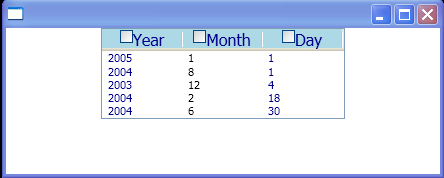
Enables sorting of data in ascending or descending order according to the contents of one column.
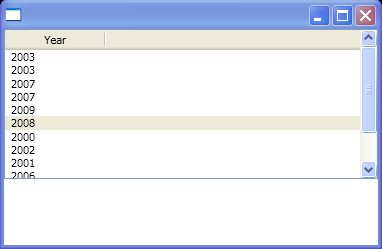
<Window xmlns="http://schemas.microsoft.com/winfx/2006/xaml/presentation"
    xmlns:x="http://schemas.microsoft.com/winfx/2006/xaml"
    x:Class="ListViewSort.Window1"
    xmlns:s="clr-namespace:System.Collections;assembly=mscorlib"
    xmlns:p="clr-namespace:System;assembly=mscorlib">
  <Window.Resources>
    <DataTemplate x:Key="HeaderTemplateArrowUp">
      <DockPanel>
        <TextBlock HorizontalAlignment="Center" Text="{Binding}"/>
        <Path x:Name="arrow"
           StrokeThickness = "1"
           Fill            = "gray"
           Data            = "M 5,10 L 15,10 L 10,5 L 5,10"/>
     </DockPanel>
    </DataTemplate>
    <DataTemplate x:Key="HeaderTemplateArrowDown">
      <DockPanel>
        <TextBlock HorizontalAlignment="Center" Text="{Binding }"/>
        <Path x:Name="arrow"
              StrokeThickness = "1"
              Fill            = "gray"
              Data            = "M 5,5 L 10,10 L 15,5 L 5,5"/>
      </DockPanel>
    </DataTemplate>
  </Window.Resources>

  <StackPanel>
    <ListView x:Name='lv' Height="150" GridViewColumnHeader.Click="GridViewColumnHeaderClickedHandler">
      <ListView.View>
        <GridView>
          <GridViewColumn DisplayMemberBinding="{Binding Path=Year}"
                          Header="Year"
                          Width="100"/>
        </GridView>
      </ListView.View>
      <ListView.ItemsSource>
        <s:ArrayList>
          <p:DateTime>2003/1/1 12:22:02</p:DateTime>
          <p:DateTime>2003/1/2 13:2:01</p:DateTime>
          <p:DateTime>2007/1/3 2:1:6</p:DateTime>
          <p:DateTime>2007/1/4 13:6:55</p:DateTime>
          <p:DateTime>2009/2/1 12:22:02</p:DateTime>
          <p:DateTime>2008/2/2 13:2:01</p:DateTime>
          <p:DateTime>2000/2/3 2:1:6</p:DateTime>
          <p:DateTime>2002/2/4 13:6:55</p:DateTime>
          <p:DateTime>2001/3/1 12:22:02</p:DateTime>
          <p:DateTime>2006/3/2 13:2:01</p:DateTime>
          <p:DateTime>2004/3/3 2:1:6</p:DateTime>
          <p:DateTime>2004/3/4 13:6:55</p:DateTime>
        </s:ArrayList>
      </ListView.ItemsSource>
    </ListView>
  </StackPanel>
</Window>

//File:Window.xaml.vb
Imports System
Imports System.Windows
Imports System.Windows.Controls
Imports System.Windows.Media
Imports System.Collections
Imports System.Windows.Controls.Primitives
Imports System.ComponentModel
Imports System.Windows.Data

Namespace ListViewSort
  Public Partial Class Window1
    Inherits Window
    Public Sub New()
      InitializeComponent()
    End Sub

    Private _lastHeaderClicked As GridViewColumnHeader = Nothing
    Private _lastDirection As ListSortDirection = ListSortDirection.Ascending

    Private Sub GridViewColumnHeaderClickedHandler(sender As Object, e As RoutedEventArgs)
      Dim headerClicked As GridViewColumnHeader = TryCast(e.OriginalSource, GridViewColumnHeader)
      Dim direction As ListSortDirection

      If headerClicked Is Nothing Then
        Return
      End If
      If headerClicked.Role <> GridViewColumnHeaderRole.Padding Then
        Return
      End If
      If headerClicked IsNot _lastHeaderClicked Then
        direction = ListSortDirection.Ascending
      Else
        If _lastDirection = ListSortDirection.Ascending Then
          direction = ListSortDirection.Descending
        Else
          direction = ListSortDirection.Ascending
        End If
      End If

      Dim header As String = TryCast(headerClicked.Column.Header, String)
      Sort(header, direction)

      If direction = ListSortDirection.Ascending Then
        headerClicked.Column.HeaderTemplate = TryCast(Resources("HeaderTemplateArrowUp"), DataTemplate)
      Else
        headerClicked.Column.HeaderTemplate = TryCast(Resources("HeaderTemplateArrowDown"), DataTemplate)
      End If
      If _lastHeaderClicked IsNot Nothing AndAlso _lastHeaderClicked IsNot headerClicked Then
        _lastHeaderClicked.Column.HeaderTemplate = Nothing
      End If
      _lastHeaderClicked = headerClicked
      _lastDirection = direction

    End Sub
    Private Sub Sort(sortBy As String, direction As ListSortDirection)
      Dim dataView As ICollectionView = CollectionViewSource.GetDefaultView(lv.ItemsSource)

      dataView.SortDescriptions.Clear()
      Dim sd As New SortDescription(sortBy, direction)
      dataView.SortDescriptions.Add(sd)
      dataView.Refresh()
    End Sub
  End Class
End Namespace
Related examples in the same category