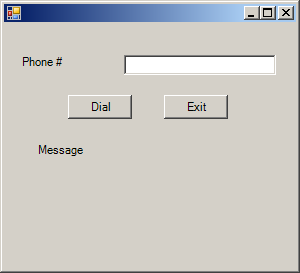
Imports System.Windows.Forms

public class PhoneTAPI
   public Shared Sub Main
        Application.Run(New Form1)
   End Sub
End class

Public Class Form1
    Inherits System.Windows.Forms.Form
    Public Sub New()
        MyBase.New()

        InitializeComponent()

    End Sub

    Protected Overloads Overrides Sub Dispose(ByVal disposing As Boolean)
        If disposing Then
            If Not (components Is Nothing) Then
                components.Dispose()
            End If
        End If
        MyBase.Dispose(disposing)
    End Sub

    Private components As System.ComponentModel.IContainer

    Friend WithEvents TextBox1 As System.Windows.Forms.TextBox
    Friend WithEvents Label1 As System.Windows.Forms.Label
    Friend WithEvents Button1 As System.Windows.Forms.Button
    Friend WithEvents Label2 As System.Windows.Forms.Label
    Friend WithEvents Button2 As System.Windows.Forms.Button
    <System.Diagnostics.DebuggerStepThrough()> Private Sub InitializeComponent()
        Me.TextBox1 = New System.Windows.Forms.TextBox
        Me.Label1 = New System.Windows.Forms.Label
        Me.Button1 = New System.Windows.Forms.Button
        Me.Label2 = New System.Windows.Forms.Label
        Me.Button2 = New System.Windows.Forms.Button
        Me.SuspendLayout()
        '
        'TextBox1
        '
        Me.TextBox1.Location = New System.Drawing.Point(120, 32)
        Me.TextBox1.Name = "TextBox1"
        Me.TextBox1.Size = New System.Drawing.Size(152, 20)
        Me.TextBox1.TabIndex = 0
        Me.TextBox1.Text = ""
        '
        'Label1
        '
        Me.Label1.Location = New System.Drawing.Point(16, 32)
        Me.Label1.Name = "Label1"
        Me.Label1.Size = New System.Drawing.Size(104, 32)
        Me.Label1.TabIndex = 1
        Me.Label1.Text = "Phone #"
        '
        'Button1
        '
        Me.Button1.Location = New System.Drawing.Point(64, 72)
        Me.Button1.Name = "Button1"
        Me.Button1.Size = New System.Drawing.Size(64, 24)
        Me.Button1.TabIndex = 2
        Me.Button1.Text = "Dial"
        '
        'Label2
        '
        Me.Label2.Location = New System.Drawing.Point(32, 120)
        Me.Label2.Name = "Label2"
        Me.Label2.Size = New System.Drawing.Size(240, 104)
        Me.Label2.TabIndex = 3
        Me.Label2.Text = "Message"
        '
        'Button2
        '
        Me.Button2.Location = New System.Drawing.Point(160, 72)
        Me.Button2.Name = "Button2"
        Me.Button2.Size = New System.Drawing.Size(64, 24)
        Me.Button2.TabIndex = 4
        Me.Button2.Text = "Exit"
        '
        'Form1
        '
        Me.AutoScaleBaseSize = New System.Drawing.Size(5, 13)
        Me.ClientSize = New System.Drawing.Size(292, 246)
        Me.Controls.Add(Me.Button2)
        Me.Controls.Add(Me.Label2)
        Me.Controls.Add(Me.Button1)
        Me.Controls.Add(Me.Label1)
        Me.Controls.Add(Me.TextBox1)
        Me.ResumeLayout(False)

    End Sub

    Declare Auto Function tapiRequestMakeCall Lib "TAPI32.dll" (ByVal DestAddress As String, ByVal AppName As String, ByVal CalledParty As String, ByVal Comment As String) As Integer
    Const TAPIERR_CONNECTED As Short = 0
    Const TAPIERR_NOREQUESTRECIPIENT As Short = -2
    Const TAPIERR_REQUESTQUEUEFULL As Short = -3
    Const TAPIERR_INVALDESTADDRESS As Short = -4
    Private Sub Button1_Click(ByVal sender As System.Object, ByVal e As System.EventArgs) Handles Button1.Click
        Dim Str As String
        Dim t As Short
        Dim buff As String
        Str = Trim(TextBox1.Text)
        Try
            t = tapiRequestMakeCall(Str, "Dial", Str, "")
        Catch ex As Exception
            Label2.Text = "Error"
        End Try
        If t <> 0 Then
            buff = "Error"
            Select Case t
                Case TAPIERR_NOREQUESTRECIPIENT
                    buff = buff & "No windows Telephony dialing application  is running and none could be started."
                Case TAPIERR_REQUESTQUEUEFULL
                    buff = buff & "The queue of pending Windows Telephony dialing requests is full."
                Case TAPIERR_INVALDESTADDRESS
                    buff = buff & "The phone number is not valid."
                Case Else
                    buff = buff & "Unkown error."
            End Select
        Else
            buff = "Dialing"
        End If
        Label2.Text = buff
    End Sub

    Private Sub Button2_Click(ByVal sender As System.Object, ByVal e As System.EventArgs) Handles Button2.Click
        End
    End Sub
End Class
| 24.10.TAPI |
| 24.10.1. | TAPI, Dial a phone number | |