Android UI Tutorial - Android UI Development
At the heart of the common controls in Android are two classes:
android.view.Viewandroid.view.ViewGroup
The View class represents a general-purpose View object.
The common controls in Android ultimately extend the View class.
ViewGroup is a view and it contains other views.
ViewGroup is the base class for a list of layout classes.
Layout
Android uses the concept of layouts to manage how controls are laid out within a container view.
You can choose from several approaches to build UIs in Android.
- You can construct UIs entirely in code.
- You can also define UIs in XML.
- You can even combine the two-define the UI in XML and then refer to it, and modify it, in code.
Common Layout attributes
Each View and ViewGroup has a set of common attributes.
- layout_width specifies the width of the View or ViewGroup
- layout_height specifies the height of the View or ViewGroup
- layout_marginTop specifies extra space on the top side of the View or ViewGroup
- layout_marginBottom specifies extra space on the bottom side of the View or ViewGroup
- layout_marginLeft specifies extra space on the left side of the View or ViewGroup
- layout_marginRight specifies extra space on the right side of the View or ViewGroup
- layout_gravity specifies how child Views are positioned
- layout_weight specifies how much of the extra space in the layout should be allocated to the View
- layout_x specifies the x-coordinate of the View or ViewGroup
- layout_y specifies the y-coordinate of the View or ViewGroup
Note
The layout_weight and layout_gravity attributes
are applicable only when a View is in either
a LinearLayout or a TableLayout.
        <?xml version="1.0" encoding="utf-8"?>
        <LinearLayout xmlns:android="http://schemas.android.com/apk/res/android"
            android:layout_width="fill_parent"
            android:layout_height="fill_parent"
            android:orientation="vertical" >
            <TextView
                android:layout_width="fill_parent"
                android:layout_height="wrap_content"
                android:text="@string/hello" />
        </LinearLayout>
For example, the width of the <TextView> element fills the
entire width of its parent using the fill_parent constant.
Its height is indicated by the wrap_content
constant, which means that its height is the height of its
content (in this case, the text contained within it).
If you don't want the <TextView> view to occupy the entire row, you can set its
layout_width attribute to wrap_content, like this:
<TextView
          android:layout_width="wrap_content"
          android:layout_height="wrap_content"
          android:text="@string/hello" />
The preceding code will set the width of the view to be equal to the width of the text contained within it.
Connect Layout xml to Java code
The code that connects the activity to the UI (main_layout_xml_file.xml)
is the setContentView() method:
package com.java2s.app;
import android.app.Activity;
import android.os.Bundle;
public class MainActivity extends Activity {
    @Override
    public void onCreate(Bundle savedInstanceState) {
        super.onCreate(savedInstanceState);
        setContentView(R.layout.activity_main);
    }
}
Add the following code in bold to the res/layout/
your main xml file for layout:
<?xml version="1.0" encoding="utf-8"?>
<LinearLayout xmlns:android="http://schemas.android.com/apk/res/android"
    android:layout_width="fill_parent"
  android:layout_height="fill_parent"
  android:orientation="vertical" >
  <TextView
      android:layout_width="fill_parent"
      android:layout_height="wrap_content"
      android:text="@string/hello" />
  <TextView
      android:layout_width="fill_parent"
      android:layout_height="wrap_content"
      android:text="This is my first Android Application!" />
  <Button
      android:layout_width="fill_parent"
      android:layout_height="wrap_content"
      android:text="And this is a clickable button!" />
</LinearLayout>
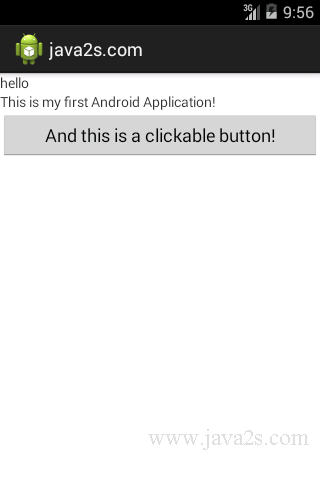
R.layout.main refers to the main.xml file located in the res/layout folder.
As you add additional XML files to the res/layout folder,
the filenames will automatically be generated in the R.java file.
The onCreate() method is one of many methods that are fired when an activity is
loaded.