Java Collection Tutorial - Java Map Operations
Map Iteration
To iterate over keys, values, or entries of a Map,
use keySet(), values() and entrySet() methods of a map
which returns a Set of keys, a Collection of values, and a Set of entries, respectively.
The following snippet of code shows how to print all keys of a map:
import java.util.HashMap;
import java.util.Map;
import java.util.Set;
//from w ww. ja  v a 2  s.c o  m
public class Main {
  public static void main(String[] args) {
    Map<String, String> map = new HashMap<>();
    map.put("CSS", "style");
    map.put("HTML", "mark up");
    map.put("Oracle", "database");
    map.put("XML", "data");
    // Get  the   set of  keys
    Set<String> keys  = map.keySet();
    // Print all keys  using the   forEach()  method.
    keys.forEach(System.out::println);
  }
}
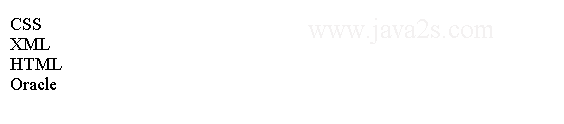
The code above generates the following result.
Map Entry
Each key-value pair in a map is called an entry.
An entry is represented by an instance of the Map.Entry<K,V> interface.
Map.Entry is an inner static interface of the Map interface.
Map.Entry has three methods called
getKey(), getValue(), and setValue(),
which return the key of the entry, the value
of the entry, and sets a new value in the entry, respectively.
A typical iteration over an entry set of a Map is written as follows:
import java.util.HashMap;
import java.util.Map;
import java.util.Set;
// w  w  w .j a  va 2  s .  c om
public class Main {
  public static void main(String[] args) {
    Map<String, String> map = new HashMap<>();
    map.put("CSS", "style");
    map.put("HTML", "mark up");
    map.put("Oracle", "database");
    map.put("XML", "data");
    // Get the entry Set
    Set<Map.Entry<String, String>> entries = map.entrySet();
    entries.forEach((Map.Entry<String, String> entry) -> {
      String key = entry.getKey();
      String value = entry.getValue();
      System.out.println("key=" + key + ",  value=" + value);
    });
  }
}
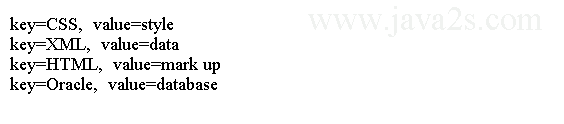
The code above generates the following result.
Map Entry Iteration
forEach(BiConsumer<? super K,? super V> action) method
from the Map interface
iterates over all entries in the map.
The method takes a BiConsumer instance whose
first argument is the key and second argument is the value
for the current entry in the map.
import java.util.HashMap;
import java.util.Map;
/*from w  ww .j  ava2  s  .c  o m*/
public class Main {
  public static void main(String[] args) {
    Map<String, String> map = new HashMap<>();
    map.put("CSS", "style");
    map.put("HTML", "mark up");
    map.put("Oracle", "database");
    map.put("XML", "data");
    map.forEach((String key, String value) -> {
      System.out.println("key=" + key + ",  value=" + value);
    });
  }
}
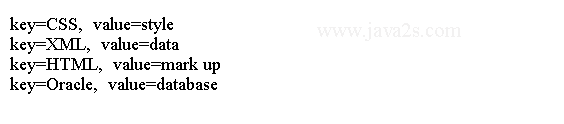
The code above generates the following result.
Map Views
The following code demonstrates how to get three different views of a Map and iterate over the elements in those views.
import java.util.Collection;
import java.util.HashMap;
import java.util.Map;
import java.util.Set;
/* w ww  . j  av a  2s.  c o m*/
public class Main {
  public static void main(String[] args) {
    Map<String, String> map = new HashMap<>();
    map.put("CSS", "style");
    map.put("HTML", "mark up");
    map.put("Oracle", "database");
    map.put("XML", "data");
    System.out.println("Map: " + map.toString());
    listValues(map);
    listEntries(map);
  }
  public static void listKeys(Map<String, String> map) {
    System.out.println("Key Set:");
    Set<String> keys = map.keySet();
    keys.forEach(System.out::println);
    System.out.println();
  }
  public static void listValues(Map<String, String> map) {
    System.out.println("Values Collection:");
    Collection<String> values = map.values();
    values.forEach(System.out::println);
    System.out.println();
  }
  public static void listEntries(Map<String, String> map) {
    System.out.println("Entry Set:");
    // Get the entry Set
    Set<Map.Entry<String, String>> entries = map.entrySet();
    entries.forEach((Map.Entry<String, String> entry) -> {
      String key = entry.getKey();
      String value = entry.getValue();
      System.out.println("key=" + key + ",  value=" + value);
    });
  }
}
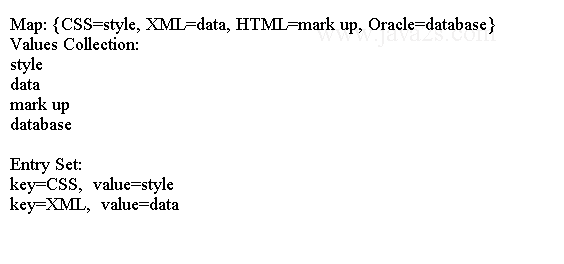
The code above generates the following result.