Clip Draw
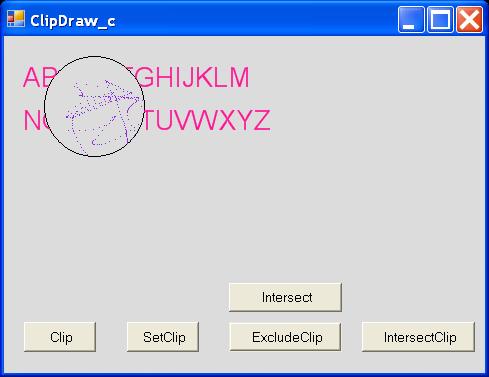
/*
GDI+ Programming in C# and VB .NET
by Nick Symmonds

Publisher: Apress
ISBN: 159059035X
*/

using System;
using System.Drawing;
using System.Drawing.Drawing2D;
using System.Collections;
using System.ComponentModel;
using System.Windows.Forms;
using System.Data;

namespace ClipDraw_c
{
    /// <summary>
    /// Summary description for ClipDraw_c.
    /// </summary>
    public class ClipDraw_c : System.Windows.Forms.Form
    {
        private System.Windows.Forms.Button B1;
        private System.Windows.Forms.Button B2;
        private System.Windows.Forms.Button B3;

        internal System.Windows.Forms.Button B4;
        internal System.Windows.Forms.Button B5;
        /// <summary>
        /// Required designer variable.
        /// </summary>
        private System.ComponentModel.Container components = null;

        public ClipDraw_c() {
            //
            // Required for Windows Form Designer support
            //
            InitializeComponent();

            //
            // TODO: Add any constructor code after InitializeComponent call
            //
            this.MouseMove += new MouseEventHandler(this.ClipDraw_cMouse);

        }

        /// <summary>
        /// Clean up any resources being used.
        /// </summary>
        protected override void Dispose( bool disposing )
        {
            if( disposing )
            {
                if (components != null)
                {
                    components.Dispose();
                }
            }
            base.Dispose( disposing );
        }

        #region Windows Form Designer generated code
        /// <summary>
        /// Required method for Designer support - do not modify
        /// the contents of this method with the code editor.
        /// </summary>
        private void InitializeComponent()
        {
            this.B1 = new System.Windows.Forms.Button();
            this.B2 = new System.Windows.Forms.Button();
            this.B3 = new System.Windows.Forms.Button();
            this.B4 = new System.Windows.Forms.Button();
            this.B5 = new System.Windows.Forms.Button();
            this.SuspendLayout();
              //
            // B1
            //
            this.B1.Location = new System.Drawing.Point(16, 232);
            this.B1.Name = "B1";
            this.B1.Size = new System.Drawing.Size(56, 24);
            this.B1.TabIndex = 0;
            this.B1.Text = "Clip";
            this.B1.Click += new System.EventHandler(this.B1_Click);
            //
            // B2
            //
            this.B2.Location = new System.Drawing.Point(96, 232);
            this.B2.Name = "B2";
            this.B2.Size = new System.Drawing.Size(56, 24);
            this.B2.TabIndex = 1;
            this.B2.Text = "SetClip";
            this.B2.Click += new System.EventHandler(this.B2_Click);
            //
            // B3
            //
            this.B3.Location = new System.Drawing.Point(176, 232);
            this.B3.Name = "B3";
            this.B3.Size = new System.Drawing.Size(88, 24);
            this.B3.TabIndex = 2;
            this.B3.Text = "ExcludeClip";
            this.B3.Click += new System.EventHandler(this.B3_Click);
            //
            // B4
            //
            this.B4.Location = new System.Drawing.Point(176, 200);
            this.B4.Name = "B4";
            this.B4.Size = new System.Drawing.Size(88, 24);
            this.B4.TabIndex = 4;
            this.B4.Text = "Intersect";
            this.B4.Click += new System.EventHandler(this.B4_Click);
            //
            // B5
            //
            this.B5.Location = new System.Drawing.Point(280, 232);
            this.B5.Name = "B5";
            this.B5.Size = new System.Drawing.Size(88, 24);
            this.B5.TabIndex = 5;
            this.B5.Text = "IntersectClip";
            this.B5.Click += new System.EventHandler(this.B5_Click);
            //
            // ClipDraw_c
            //
            this.AutoScaleBaseSize = new System.Drawing.Size(5, 13);
            this.ClientSize = new System.Drawing.Size(376, 273);
            this.Controls.AddRange(new System.Windows.Forms.Control[] {
                                                                  this.B5,
                                                                  this.B4,
                                                                  this.B3,
                                                                  this.B2,
                                                                  this.B1});
            this.Name = "ClipDraw_c";
            this.StartPosition = System.Windows.Forms.FormStartPosition.CenterScreen;
            this.Text = "ClipDraw_c";
            this.Load += new System.EventHandler(this.ClipDraw_c_Load);
            this.ResumeLayout(false);

        }
        #endregion

        /// <summary>
        /// The main entry point for the application.
        /// </summary>
        [STAThread]
        static void Main()
        {
            Application.Run(new ClipDraw_c());
        }

        private Graphics G_obj;

        private void ClipDraw_c_Load(object sender, System.EventArgs e)
        {

        }
        private void ClipDraw_cMouse(System.Object sender , MouseEventArgs e)
        {
            if (G_obj == null)
                return;
            if (G_obj.IsVisible(e.X, e.Y))
                G_obj.FillRectangle(Brushes.BlueViolet, e.X, e.Y, 1, 1);
        }

        private void B1_Click(object sender, System.EventArgs e)
        {
            Graphics G  = this.CreateGraphics();
            Rectangle R = new Rectangle(50, 50, 100, 100);

            G.Clear(Color.Gainsboro);

            //Outline the rectangle and create the clipping region
            G.DrawRectangle(Pens.Black, R);
            G.Clip = new Region(R);

            //Draw line the sidth of the form
            G.DrawLine(Pens.Blue, 0, 75, this.Width, 75);
            //Draw a circle 1/4 inside clipping region
            G.FillEllipse(Brushes.LawnGreen, new Rectangle(75, 75, 150, 150));

            G.Dispose();
        }

        private void B2_Click(object sender, System.EventArgs e)
        {
            Graphics G = this.CreateGraphics();
            Rectangle R = new Rectangle(20, 20, 100, 100);
            GraphicsPath path = new GraphicsPath();

            G.Clear(Color.Gainsboro);
            path.AddEllipse(R);
            G.DrawPath(Pens.Black, path);
            G.SetClip(path);

            // Draw some clipped strings.
            Font F = new Font("Arial", 16);
            G.DrawString("ABCDEFGHIJKLM", F, Brushes.DeepPink, 15, 25);
            G.DrawString("NOPQRSTUVWXYZ", F, Brushes.DeepPink, 15, 68);

            path.Dispose();

        }

        private void B3_Click(object sender, System.EventArgs e)
        {
            Graphics G = this.CreateGraphics();
            Rectangle R = new Rectangle(40, 20, 100, 100);
            GraphicsPath path = new GraphicsPath();

            G.Clear(Color.Gainsboro);
            path.AddEllipse(R);
            G.DrawPath(Pens.Black, path);
            G.ExcludeClip(new Region(path));

            // Draw some clipped strings.
            Font F = new Font("Arial", 16);
            G.DrawString("ABCDEFGHIJKLM", F, Brushes.DeepPink, 15, 25);
            G.DrawString("NOPQRSTUVWXYZ", F, Brushes.DeepPink, 15, 68);

            path.Dispose();
            F.Dispose();
        }

        private void B4_Click(object sender, System.EventArgs e)
        {
      Graphics G = this.CreateGraphics();
      Rectangle R = new Rectangle(40, 20, 100, 100);
      Rectangle R2 = new Rectangle(60, 20, 120, 120);
      GraphicsPath P1 = new GraphicsPath();
      GraphicsPath P2 = new GraphicsPath();

      G.Clear(Color.Gainsboro);
      P1.AddEllipse(R);
      G.DrawPath(Pens.Black, P1);

      P2.AddEllipse(R2);
      G.DrawPath(Pens.Black, P2);

      G.SetClip(P1);
      G.SetClip(P2, CombineMode.Intersect);

      // Draw some clipped strings.
      Font F = new Font("Arial", 16);
      G.DrawString("ABCDEFGHIJKLM", F, Brushes.DeepPink, 15, 25);
      G.DrawString("NOPQRSTUVWXYZ", F, Brushes.DeepPink, 15, 68);

      G_obj = G;
      F.Dispose();
      P1.Dispose();
      P2.Dispose();
    }

    private void B5_Click(object sender, System.EventArgs e)
    {
      //Bail out if not set
      if (G_obj == null )
        return;
      Rectangle R2 = new Rectangle(75, 75, 150, 150);

      G_obj.IntersectClip(R2);
      G_obj.FillRectangle(new SolidBrush(Color.Blue), 0, 0, 500, 500);
    }
    }
}
Related examples in the same category