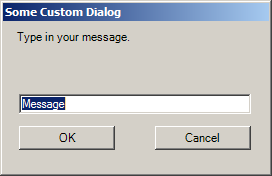
Italic User Message Dialog: your own dialog
using System;
using System.Collections.Generic;
using System.ComponentModel;
using System.Data;
using System.Drawing;
using System.Text;
using System.Windows.Forms;

public class ItalicUserMessageDialog : UserMessageDialog {
    public ItalicUserMessageDialog() {
        InitializeComponent();
    }

    public bool Italic {
        set { checkBoxItalic.Checked = value; }
        get { return checkBoxItalic.Checked; }
    }
    private void InitializeComponent() {
        this.checkBoxItalic = new System.Windows.Forms.CheckBox();
        this.SuspendLayout();

        this.checkBoxItalic.AutoSize = true;
        this.checkBoxItalic.Location = new System.Drawing.Point(12, 79);
        this.checkBoxItalic.Size = new System.Drawing.Size(50, 17);
        this.checkBoxItalic.Text = "Italic?";

        this.AutoScaleDimensions = new System.Drawing.SizeF(6F, 13F);
        this.AutoScaleMode = System.Windows.Forms.AutoScaleMode.Font;
        this.ClientSize = new System.Drawing.Size(352, 113);
        this.Controls.Add(this.checkBoxItalic);
        this.ResumeLayout(false);
        this.PerformLayout();

    }
    private System.Windows.Forms.CheckBox checkBoxItalic;
}
public class UserMessageDialog : Form {
    public UserMessageDialog() {
        InitializeComponent();
    }

    public string Message {
        set { txtUserInput.Text = value; }
        get { return txtUserInput.Text; }
    }
    private void InitializeComponent() {
        this.btnCancel = new System.Windows.Forms.Button();
        this.btnOK = new System.Windows.Forms.Button();
        this.label1 = new System.Windows.Forms.Label();
        this.txtUserInput = new System.Windows.Forms.TextBox();
        this.SuspendLayout();

        this.btnCancel.DialogResult = System.Windows.Forms.DialogResult.Cancel;
        this.btnCancel.Location = new System.Drawing.Point(263, 73);
        this.btnCancel.Size = new System.Drawing.Size(75, 23);
        this.btnCancel.Text = "Cancel";

        this.btnOK.DialogResult = System.Windows.Forms.DialogResult.OK;
        this.btnOK.Location = new System.Drawing.Point(182, 73);
        this.btnOK.Size = new System.Drawing.Size(75, 23);
        this.btnOK.Text = "OK";

        this.label1.AutoSize = true;
        this.label1.Location = new System.Drawing.Point(12, 9);
        this.label1.Size = new System.Drawing.Size(132, 13);
        this.label1.Text = "Please Enter your Message";

        this.txtUserInput.Location = new System.Drawing.Point(13, 35);
        this.txtUserInput.Size = new System.Drawing.Size(325, 20);

        this.AcceptButton = this.btnOK;
        this.AutoScaleDimensions = new System.Drawing.SizeF(6F, 13F);
        this.AutoScaleMode = System.Windows.Forms.AutoScaleMode.Font;
        this.CancelButton = this.btnCancel;
        this.ClientSize = new System.Drawing.Size(350, 113);
        this.Controls.Add(this.txtUserInput);
        this.Controls.Add(this.label1);
        this.Controls.Add(this.btnOK);
        this.Controls.Add(this.btnCancel);
        this.FormBorderStyle = System.Windows.Forms.FormBorderStyle.FixedDialog;
        this.MaximizeBox = false;
        this.MinimizeBox = false;
        this.ShowInTaskbar = false;
        this.StartPosition = System.Windows.Forms.FormStartPosition.CenterParent;
        this.ResumeLayout(false);
        this.PerformLayout();
    }
    private System.Windows.Forms.Button btnCancel;
    private System.Windows.Forms.Button btnOK;
    private System.Windows.Forms.Label label1;
    private System.Windows.Forms.TextBox txtUserInput;
}


public class MainWindow : Form {
    private string userMessage = "Default Message";
    private bool textIsItalic = false;

    public MainWindow() {
        InitializeComponent();
    }

    private void exitToolStripMenuItem_Click(object sender, EventArgs e) {
        Application.Exit();
    }

    private void configureToolStripMenuItem_Click(object sender, EventArgs e) {
        ItalicUserMessageDialog dlg = new ItalicUserMessageDialog();
        dlg.Message = userMessage;
        dlg.Italic = textIsItalic;

        if (DialogResult.OK == dlg.ShowDialog()) {
            userMessage = dlg.Message;
            textIsItalic = dlg.Italic;
            Invalidate();
        }
        dlg.Dispose();
    }

    private void MainWindow_Paint(object sender, PaintEventArgs e) {
        Graphics g = e.Graphics;
        Font f = null;
        if (textIsItalic)
            f = new Font("Times New Roman", 24, FontStyle.Italic);
        else
            f = new Font("Times New Roman", 24);
        g.DrawString(userMessage, f, Brushes.DarkBlue,50, 50);
    }
    private void InitializeComponent() {
        this.menuStrip1 = new System.Windows.Forms.MenuStrip();
        this.fileToolStripMenuItem = new System.Windows.Forms.ToolStripMenuItem();
        this.exitToolStripMenuItem = new System.Windows.Forms.ToolStripMenuItem();
        this.toolsToolStripMenuItem = new System.Windows.Forms.ToolStripMenuItem();
        this.configureToolStripMenuItem = new System.Windows.Forms.ToolStripMenuItem();
        this.menuStrip1.SuspendLayout();
        this.SuspendLayout();

        this.menuStrip1.Items.AddRange(new System.Windows.Forms.ToolStripItem[] {
            this.fileToolStripMenuItem,
            this.toolsToolStripMenuItem});
        this.menuStrip1.Location = new System.Drawing.Point(0, 0);
        this.menuStrip1.Size = new System.Drawing.Size(390, 24);
        this.menuStrip1.Text = "menuStrip1";

        this.fileToolStripMenuItem.DropDownItems.AddRange(new System.Windows.Forms.ToolStripItem[] {
            this.exitToolStripMenuItem});
        this.fileToolStripMenuItem.Text = "&File";
        this.exitToolStripMenuItem.Text = "E&xit";
        this.exitToolStripMenuItem.Click += new System.EventHandler(this.exitToolStripMenuItem_Click);

        this.toolsToolStripMenuItem.DropDownItems.AddRange(new System.Windows.Forms.ToolStripItem[] {
            this.configureToolStripMenuItem});
        this.toolsToolStripMenuItem.Text = "&Tools";
        this.configureToolStripMenuItem.Text = "&Configure";
        this.configureToolStripMenuItem.Click += new System.EventHandler(this.configureToolStripMenuItem_Click);

        this.AutoScaleDimensions = new System.Drawing.SizeF(6F, 13F);
        this.AutoScaleMode = System.Windows.Forms.AutoScaleMode.Font;
        this.ClientSize = new System.Drawing.Size(390, 182);
        this.Controls.Add(this.menuStrip1);
        this.MainMenuStrip = this.menuStrip1;
        this.Paint += new System.Windows.Forms.PaintEventHandler(this.MainWindow_Paint);
        this.menuStrip1.ResumeLayout(false);
        this.ResumeLayout(false);
        this.PerformLayout();
    }
    private System.Windows.Forms.MenuStrip menuStrip1;
    private System.Windows.Forms.ToolStripMenuItem fileToolStripMenuItem;
    private System.Windows.Forms.ToolStripMenuItem exitToolStripMenuItem;
    private System.Windows.Forms.ToolStripMenuItem toolsToolStripMenuItem;
    private System.Windows.Forms.ToolStripMenuItem configureToolStripMenuItem;

    [STAThread]
    static void Main() {
        Application.EnableVisualStyles();
        Application.Run(new MainWindow());
    }
}
Related examples in the same category